


Microsoft Office 2024 Download for Windows

Microsoft Office 2024 Download for Windows gives users access to Microsoft’s classic desktop productivity applications through a one-time-purchase license rather than a Microsoft 365 subscription.
Office 2024 is paid software. Downloading or installing Office does not provide a free license or activation key. A valid Office 2024 license purchased from Microsoft or an authorized seller is required for legitimate activation.
This guide covers Office 2024 editions, included applications, key features, installation, activation, common setup problems, and the differences between Office 2024, Microsoft 365, and Office 2021.
Microsoft Office 2024 Download – Overview
| Software | Microsoft Office 2024 |
| Developer | Microsoft |
| Platform | Windows / macOS depending on edition |
| Windows Support | Compatible supported Windows systems |
| License | Paid / One-time purchase |
| Core Apps | Word, Excel, PowerPoint, OneNote |
| Outlook | Included with Home & Business 2024 |
| Subscription Required | No |
| Activation | Valid Microsoft Office 2024 license required |
| Best For | Users who want classic Office desktop apps without a Microsoft 365 subscription |
Microsoft Office 2024 Interface & Key Features
Office 2024 keeps the familiar desktop interface used across Word, Excel, PowerPoint, OneNote, and Outlook. The Ribbon provides access to editing, formatting, review, layout, and document-management tools, while each application retains its own specialized workspace.
Microsoft highlights improvements across the Office 2024 applications, including new Excel functions and charts, improved document recovery in Word, enhancements in PowerPoint, and support for OpenDocument Format 1.4.
Important: Office 2024 provides a fixed set of classic desktop applications. It does not include all of the continuously updated cloud services and subscription benefits available with Microsoft 365.
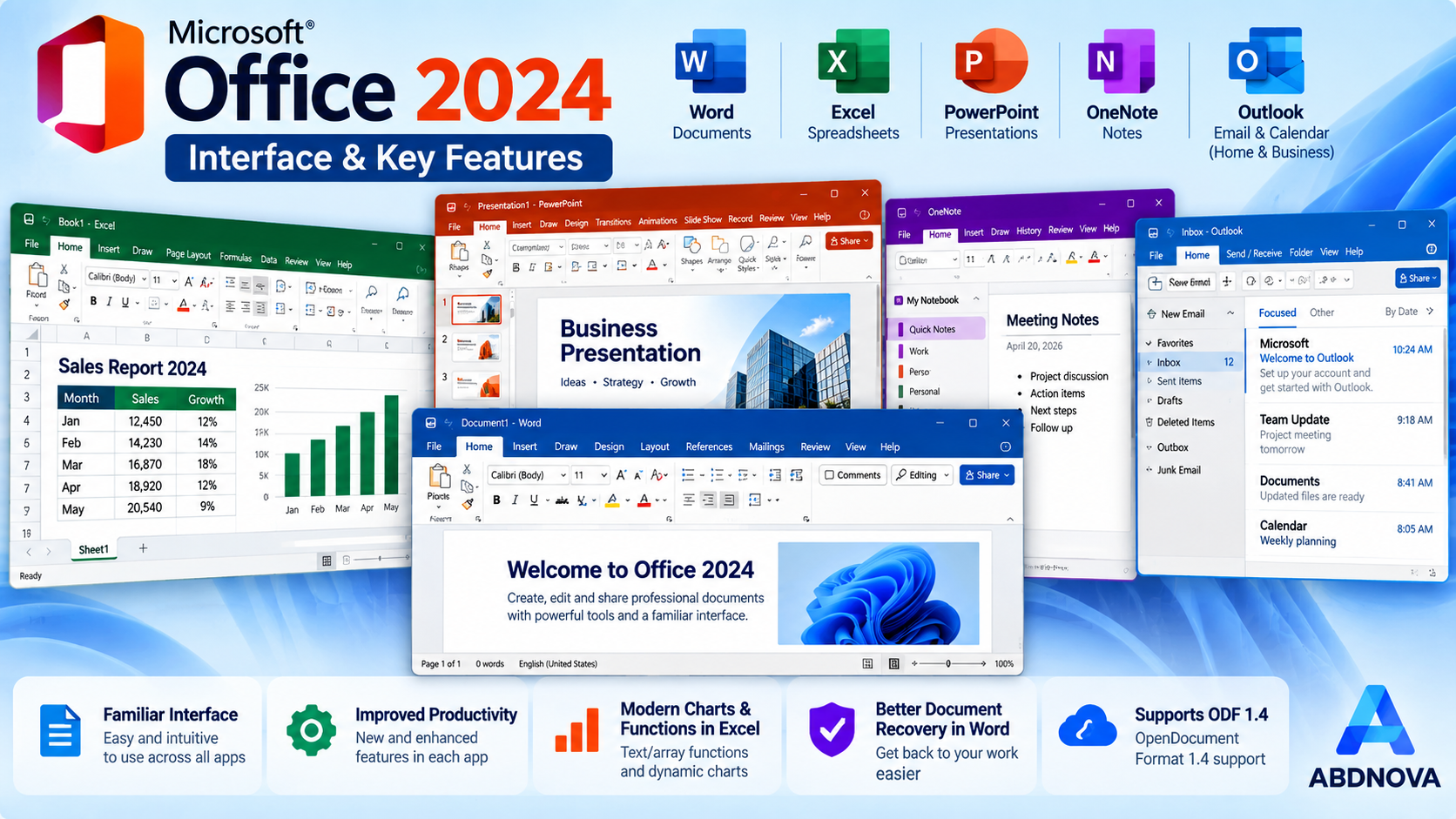
Word, Excel, PowerPoint and Outlook interface overview.
Microsoft Office 2024 Editions
Choosing the correct edition is important because the included applications and permitted use differ between products.
| Edition | Best For | Included Apps |
|---|---|---|
| Office Home 2024 | Home and school use | Word, Excel, PowerPoint, OneNote |
| Office Home & Business 2024 | Home users and small businesses | Word, Excel, PowerPoint, OneNote, Outlook |
| Office LTSC 2024 | Commercial and government organizations | Word, Excel, PowerPoint, Outlook, OneNote and Access on Windows |
Publisher is not included in Office 2024 or Office LTSC 2024. Office LTSC is intended for organizations using appropriate volume-licensing and deployment methods; it should not be confused with the consumer Office Home editions.
Before You Download or Install Office 2024
Before starting the installation, check the following:
- Confirm which Office 2024 edition you purchased.
- Make sure you can access the Microsoft account associated with the purchase or redeemed product key.
- Check Microsoft’s current system requirements before installing.
- Back up important Word, Excel, PowerPoint, and Outlook data before replacing an older Office installation.
- Check whether business-critical Office add-ins are compatible with your new installation.
- Use Microsoft’s official setup and account pages rather than modified third-party installers.
Office 2024 vs Microsoft 365 vs Office 2021
| Product | License | Best For |
|---|---|---|
| Office 2024 | One-time purchase | Users who want classic desktop Office apps without a subscription |
| Microsoft 365 | Subscription | Users who want ongoing feature updates, cloud services, and multi-device benefits |
| Office 2021 | Older one-time purchase release | Users who already own Office 2021 and do not need Office 2024 features |
Microsoft 365 receives ongoing feature updates and includes additional online services. Office 2024 instead provides a fixed major release through a one-time purchase and does not include the full Microsoft 365 subscription service package.
If you already use the previous perpetual release, see our Microsoft Office 2021 Download guide before deciding whether you need to upgrade.
How to Download & Install Microsoft Office 2024 on Windows
The following steps apply primarily to retail Office Home 2024 and Office Home & Business 2024. Organizational LTSC installations may use different deployment methods controlled by an IT administrator.
- If your purchase includes a new product key, redeem it using Microsoft’s official setup process and associate it with the Microsoft account you want to use for Office.
- Sign in to Microsoft’s Office apps page with the account associated with your Office 2024 purchase.
- Select Install apps and choose the available Office installation option.
- If Microsoft provides language or 32-bit/64-bit choices, select the version appropriate for your system and existing Office applications.
- Download and run the Microsoft setup file.
- Approve the Windows User Account Control prompt if it appears.
- Allow the installer to download and install the required Office applications.
- When installation finishes, open Word or Excel and complete activation using the Microsoft account associated with your license.
Microsoft normally installs the 64-bit version unless it detects an existing 32-bit Office installation or another compatibility reason. If you specifically need to switch between 32-bit and 64-bit Office, Microsoft may require the existing Office installation to be removed first.
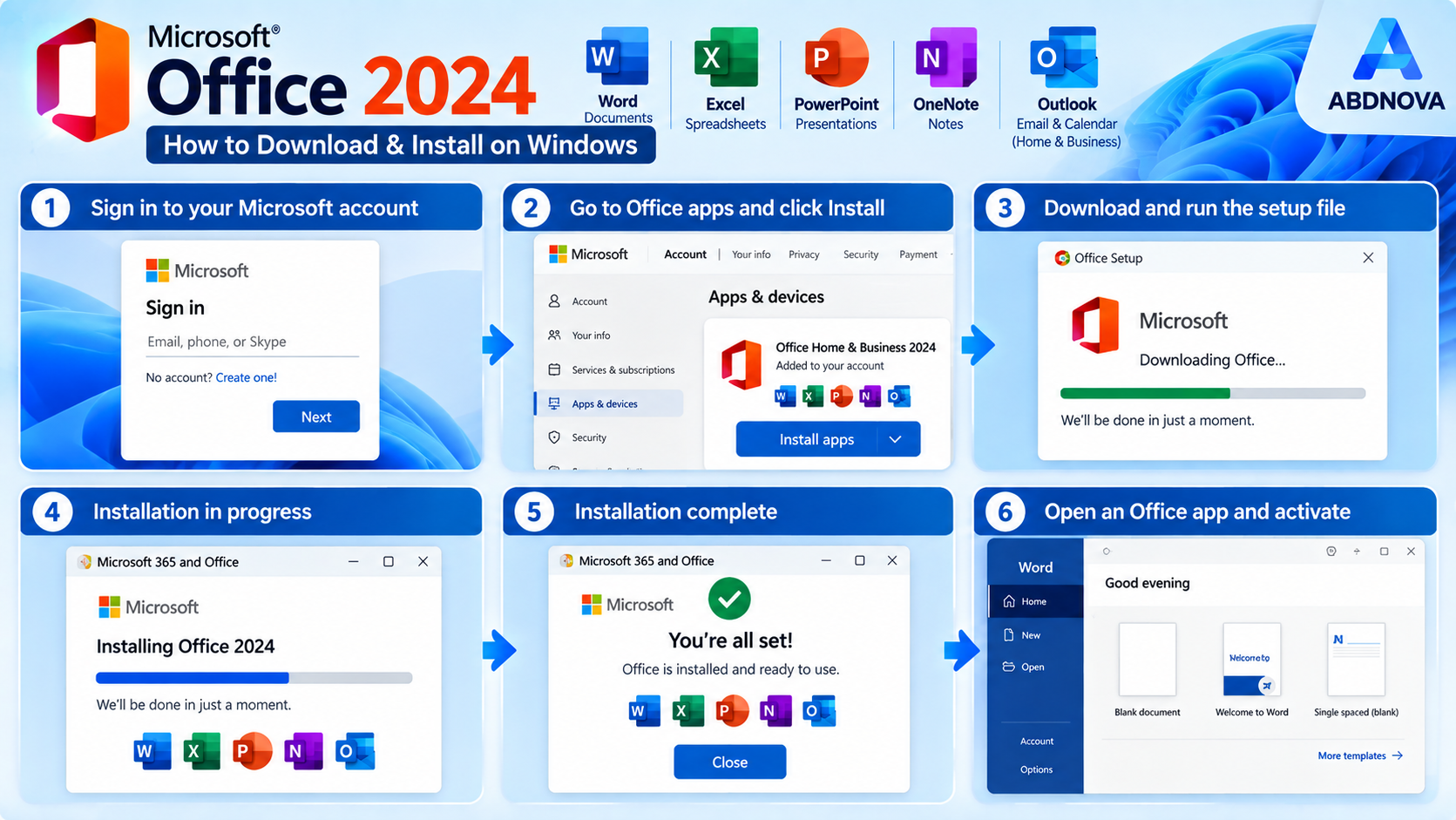
Microsoft account → Install apps → Setup → Office 2024 installation complete.
Microsoft Office 2024 Activation
After installation, open an Office application such as Word. Sign in with the Microsoft account associated with your Office 2024 license and follow any activation prompts displayed by the application.
A legitimate Office installer and a valid Office license are separate things. Installing Office does not automatically provide activation rights.
Office 2024 Installation & Activation Troubleshooting
Office 2024 Does Not Appear in Your Account
Verify that you signed in with the same Microsoft account used when Office was purchased or when the product key was redeemed. Using another installer will not solve an account-license mismatch.
Product Key Has Already Been Redeemed
A redeemed product key is normally associated with the account used during redemption. Sign in with that account when reinstalling Office instead of attempting to redeem the same key repeatedly.
Office Installation Takes Too Long
Check the internet connection and allow the installer to finish. If installation remains stuck or produces an error, record the exact error message or code and use Microsoft’s Office installation troubleshooter.
32-bit and 64-bit Office Conflict
Existing Office, Project, or Visio installations can affect which architecture can be installed. Microsoft may require the existing Office applications to be removed before changing between 32-bit and 64-bit versions.
Office Opens but Is Not Activated
Check the signed-in Microsoft account and confirm that it owns the Office 2024 license. If the Activation Wizard appears, follow the displayed steps rather than using unofficial activation utilities.
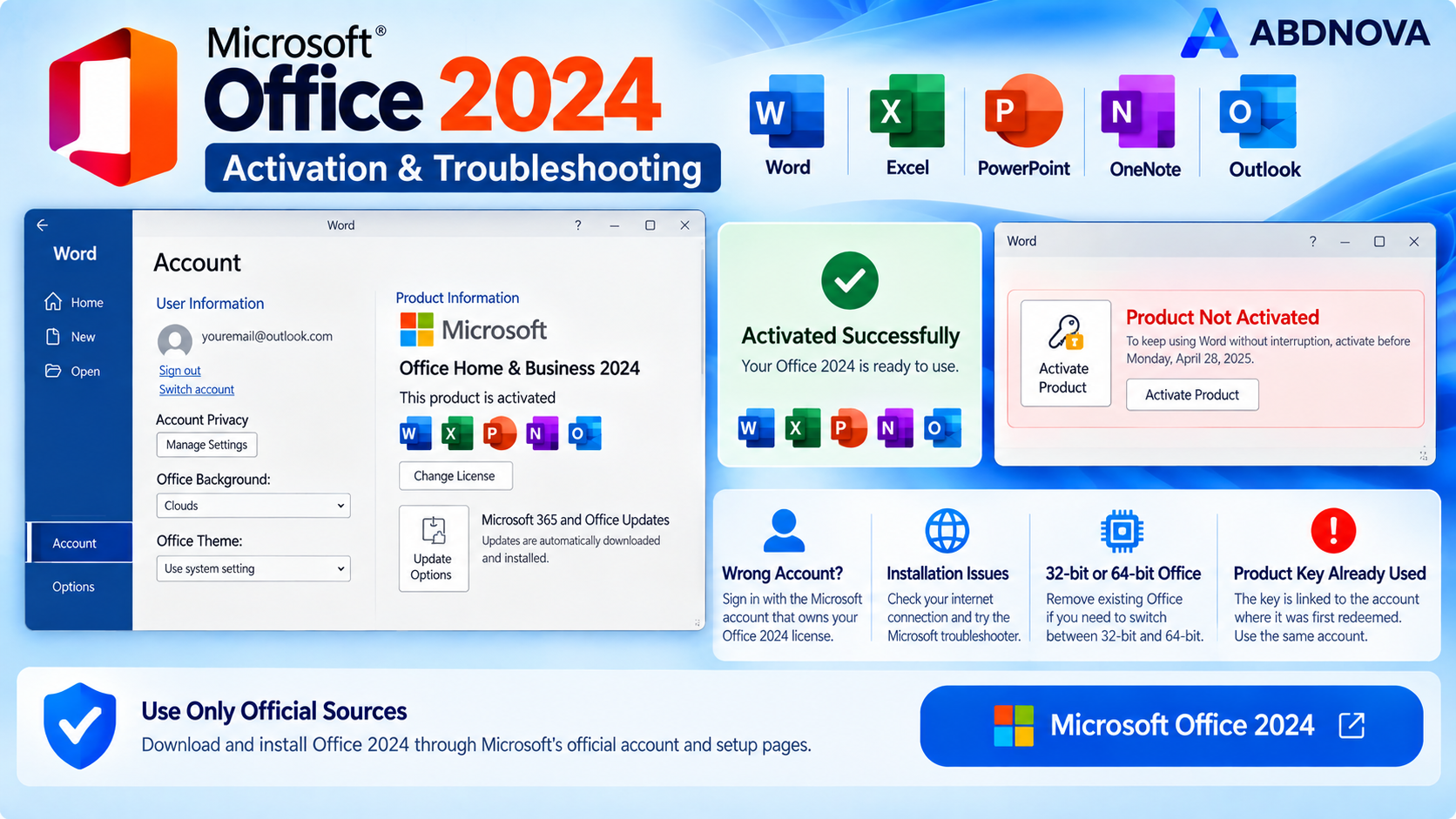
Office 2024 activation status, account, architecture and common setup problems.
Safe Download: Avoid Modified Office Installers
Download Office 2024 through Microsoft’s official account, setup, or installation pages whenever possible. Business and organizational users should follow the deployment method provided by their IT administrator.
Avoid cracked Office packages, modified ISO files, unofficial activation scripts, KMS tools from unknown websites, or installers that promise a free commercial Office 2024 license. These are not required for a legitimate licensed installation and can introduce security or licensing problems.
ABDNOVA does not provide Office 2024 product keys, cracks, activation scripts, or unauthorized licenses.
Microsoft Office 2024 FAQ
Is Microsoft Office 2024 free?
No. Office 2024 is commercial software. It is sold as a one-time purchase and requires a valid license.
What applications are included with Office Home 2024?
Office Home 2024 includes Word, Excel, PowerPoint, and OneNote for one PC or Mac.
Does Office Home & Business 2024 include Outlook?
Yes. Office Home & Business 2024 includes Word, Excel, PowerPoint, OneNote, and Outlook.
Does Office 2024 include Microsoft Publisher?
No. Publisher is not included with Office 2024 or Office LTSC 2024.
Is Office 2024 the same as Microsoft 365?
No. Office 2024 is a one-time purchase with classic desktop applications. Microsoft 365 is a subscription that includes ongoing feature updates and additional cloud-based services and benefits.
Can I reinstall Office 2024 later?
Yes, provided you still have access to the account or licensing method associated with your legitimate Office 2024 purchase. Sign in through Microsoft’s official Office installation process to reinstall it.
Should I install 32-bit or 64-bit Office 2024?
Microsoft normally installs 64-bit Office by default unless an existing 32-bit Office application or another compatibility condition requires 32-bit. Users with older add-ins or specialized software should check compatibility before changing architecture.
Can Office 2024 open older Word, Excel, and PowerPoint files?
Office 2024 works with common Microsoft Office document formats such as DOCX, XLSX, and PPTX and can open many documents created with earlier Office releases. Compatibility can vary with older features, macros, add-ins, or legacy file formats.
Is Office 2024 safe to download?
Yes, when obtained through Microsoft’s official download and account services or an approved organizational deployment. Avoid modified installers and unofficial activation packages.
Final Thoughts
Microsoft Office 2024 is a practical option for users who want classic desktop Office applications through a one-time purchase rather than a Microsoft 365 subscription. The most important step is choosing the correct edition before buying: Office Home 2024 provides the core Word, Excel, PowerPoint, and OneNote applications, while Home & Business 2024 adds Outlook and is designed for home or work use.
Keep the Microsoft account associated with your purchase accessible, use Microsoft’s official installation process, and keep important documents backed up before replacing an existing Office installation.
Ready to download Microsoft Office 2024?
Windows • One-Time Purchase • Microsoft Productivity Suite
ABDNOVA does not provide Office 2024 licenses, cracks, or activation tools. The button opens Microsoft’s official Office 2024 page.


