


Microsoft Office 2021 Download for Windows

Microsoft Office 2021 Download gives Windows users access to a traditional desktop productivity suite with familiar applications such as Word, Excel, PowerPoint, Outlook, and OneNote, with additional apps available in selected editions. Office 2021 is designed for users who prefer a one-time purchase instead of a Microsoft 365 subscription.
Microsoft Office 2021 Download – Overview
| Software | Microsoft Office 2021 |
| Developer | Microsoft |
| Category | Office & Productivity |
| License | Commercial |
| Platform | Windows |
| Supported Windows | Windows 10 / Windows 11 |
| Architecture | 32-bit / 64-bit |
| Main Apps | Word, Excel, PowerPoint, Outlook, OneNote |
| Selected Editions | Access and Publisher may also be included |
| Activation | Valid Microsoft license required |
| Support Status | End of support: October 13, 2026. No further security or quality updates from Microsoft. |
What Is Microsoft Office 2021?
Microsoft Office 2021 is Microsoft’s perpetual-license desktop productivity suite for users who want a standalone Office product rather than a subscription. Depending on the edition, it can include Microsoft Word, Excel, PowerPoint, Outlook, OneNote, Access, and Publisher.
Office 2021 is suitable for home users, students, professionals, and businesses that prefer a fixed desktop Office release with a traditional one-time purchase model.
Microsoft Office 2021 Features

Microsoft Word 2021
Word 2021 can be used for reports, resumes, letters, research papers, contracts, books, and other professional or personal documents. It includes improvements to navigation, accessibility, drawing, dark mode, and performance.
Microsoft Excel 2021
Excel 2021 includes spreadsheet and data-analysis tools for calculations, budgets, financial models, reports, charts, PivotTables, conditional formatting, dynamic arrays, XLOOKUP, and other modern formulas.
Microsoft PowerPoint 2021
PowerPoint 2021 provides presentation tools for business slides, education, training, sales, and project proposals. It includes drawing tools, animations, media support, presenter tools, recording features, and accessibility improvements.
Microsoft Outlook 2021
Outlook combines email, calendar, contacts, tasks, meeting scheduling, search, and organization tools in a desktop application.
Microsoft OneNote 2021
OneNote provides a digital notebook for meetings, school notes, projects, research, personal planning, and business documentation.
Microsoft Office 2021 Editions
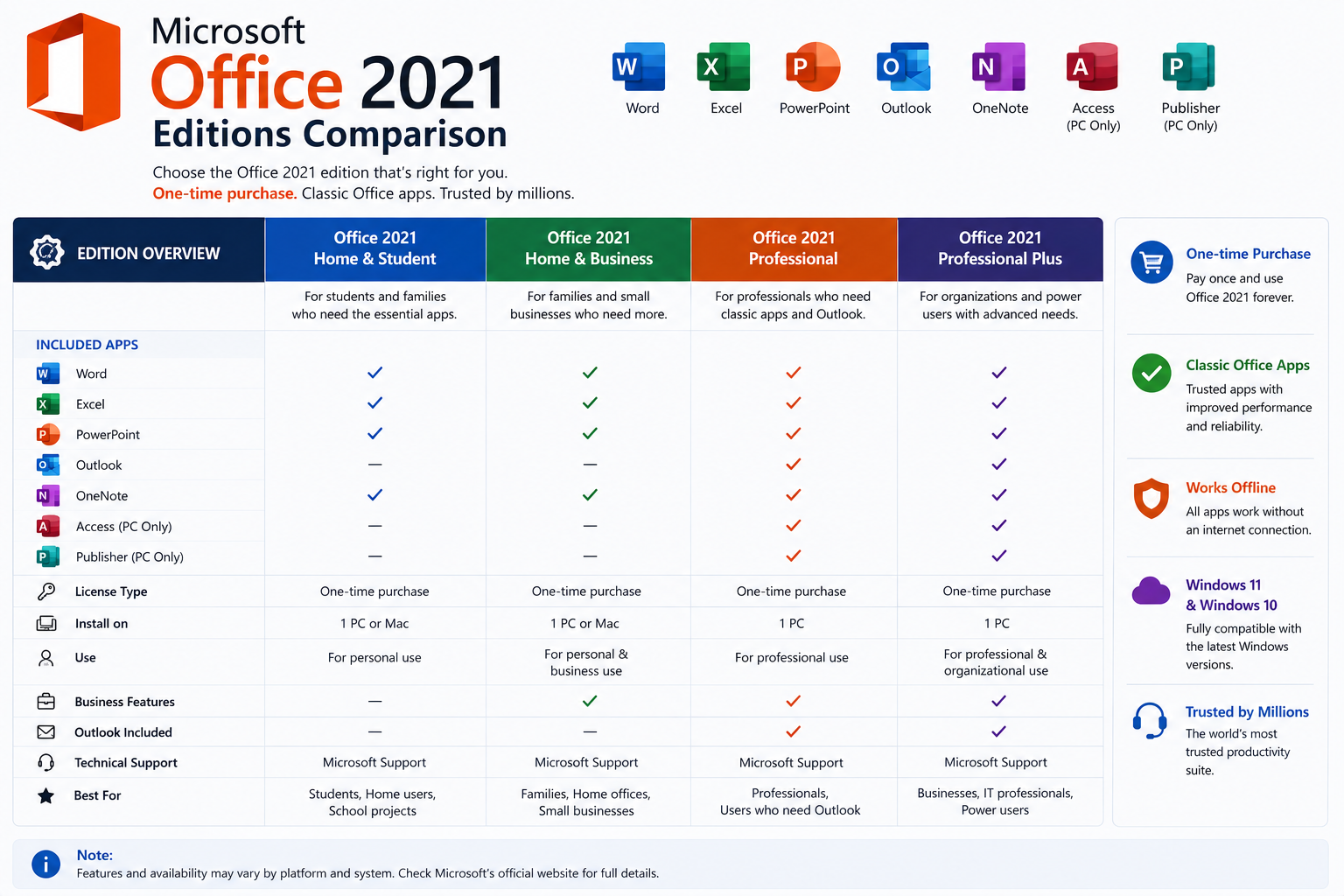
| Edition | Best For | Main Applications |
|---|---|---|
| Home & Student 2021 | Students and home users | Word, Excel, PowerPoint, OneNote |
| Home & Business 2021 | Home offices and small businesses | Word, Excel, PowerPoint, Outlook, OneNote |
| Professional 2021 | Advanced business users | Word, Excel, PowerPoint, Outlook, Access, Publisher, OneNote |
| Office LTSC 2021 | Organizations and specialized deployments | Depends on licensed LTSC package |
Application availability varies by edition, so always confirm the exact package and license before purchasing or installing Office 2021.
Microsoft Office 2021 System Requirements

- Operating System: Windows 10 or Windows 11
- Processor: Compatible 1.1 GHz or faster processor with two or more cores
- RAM: 4 GB for 64-bit or 2 GB for 32-bit installations
- Storage: Sufficient free space for installation and documents
- Display: Around 1280 × 768 or higher recommended
- Internet: May be required for activation, updates, downloads, and connected services
For smoother everyday productivity, an SSD and 8 GB RAM or more can improve performance, especially when working with large Excel files or several Office applications at the same time.
Microsoft Office 2021 32-bit vs 64-bit
The 64-bit version is generally appropriate for modern Windows computers and is especially useful for large Excel workbooks, complex calculations, large PowerPoint presentations, and heavier workloads.
The 32-bit version can still be useful where compatibility with older Office add-ins or applications is important. Choose the architecture that best matches your existing software and Windows environment.
Microsoft Office 2021 vs Microsoft 365

| Feature | Office 2021 | Microsoft 365 |
|---|---|---|
| License Model | Perpetual product | Subscription service |
| Payment | One-time purchase | Monthly / yearly |
| Feature Model | Fixed release | Continuously updated |
| Desktop Apps | Yes | Yes |
| Cloud Benefits | Depends on setup | Broader cloud services depending on plan |
| Best For | Stable desktop use without subscription | Latest features and broader cloud integration |
Microsoft Office 2021 vs Office 2019
Office 2021 is newer than Office 2019 and includes improvements such as XLOOKUP, dynamic arrays, LET, dark-mode enhancements, accessibility improvements, and newer collaboration features.
Microsoft Office 2021 vs Office 2024
Office 2024 is the newer perpetual Office release and remains a supported alternative. Because Office 2021 reached end of support on October 13, 2026, users should consider upgrading to a supported Office release, especially on devices that handle sensitive documents or email.
Related Guide: See our Microsoft Office 2024 Download guide.
How to Download Microsoft Office 2021 Safely
- Use the official Microsoft account or installation method associated with your Office 2021 license.
- Confirm that your Windows version is supported.
- Check whether you need 32-bit or 64-bit Office.
- Download the legitimate installer associated with your license.
- Avoid modified, cracked, or repackaged Office installers.
How to Install Microsoft Office 2021 on Windows

- Open Settings → System → About and confirm your Windows version and architecture.
- Check whether another Office installation may conflict with Office 2021.
- Download the installer through the legitimate Microsoft installation method linked to your license.
- Open the setup file.
- Allow Windows administrator permission if requested.
- Wait while Office installs the required applications and components.
- Open Word, Excel, or PowerPoint after installation.
- Sign in with the Microsoft account connected to your license or enter a valid product key when required.
Microsoft Office 2021 Activation and Licensing
Microsoft Office 2021 is commercial software and requires a valid license for legitimate use. Downloading an installer and owning a valid license are separate things.
Avoid cracks, unofficial KMS activators, pirated product keys, modified Office packages, and pre-activated installers. Use Microsoft’s official licensing and activation methods.
Common Microsoft Office 2021 Problems and Fixes
Office Installation Stuck
Check your internet connection if required by the installation method, close other Office applications, restart Windows, make sure enough storage is available, and retry using the official installation method.
Office Activation Error
Check the Microsoft account, product key, license status, internet connection, and whether another Office installation is causing a conflict.
Office Applications Won’t Open
Restart Windows, repair the Office installation, disable problematic add-ins, install available Office updates, or reinstall Office if necessary.
Safe Microsoft Office 2021 Download

Office 2021 is not free commercial software. Avoid websites offering cracked, pre-activated, or pirated copies. Modified installers can contain malware, spyware, password stealers, unwanted programs, or unauthorized activation tools.
ABDNOVA recommends legitimate Microsoft installation and licensing methods only.
Related Office and Windows Guides
For the newer perpetual Office release, see our Microsoft Office 2024 Download guide.
If you need Windows installation media, see our Windows 11 ISO Download guide.
For Windows 10 users, see our Windows 10 ISO Download guide.
Microsoft Office 2021 FAQ
Is Microsoft Office 2021 free?
No. Office 2021 is commercial software and requires a valid license for legitimate use.
Can I use Office 2021 without internet?
Many core Office tasks can work offline after installation and activation. Internet access may still be required for activation, updates, cloud services, and certain connected features.
Does Office 2021 work on Windows 11?
Yes. Office 2021 supports compatible Windows 11 systems.
Does Office 2021 include Word and Excel?
Yes. Word and Excel are included in the main Office 2021 editions, although the exact application lineup depends on the edition.
Should I install 32-bit or 64-bit Office 2021?
For most modern Windows computers, 64-bit Office is generally appropriate. However, compatibility with older add-ins and applications should be considered before choosing.
Does Office 2021 receive updates?
No. Microsoft ended support for Office 2021 on October 13, 2026. It no longer receives Microsoft security updates, bug fixes, or technical support, although already-installed applications may continue to function.
Can I still use Office 2021 after end of support?
Yes. An existing licensed installation may continue to work, but using unsupported software carries increased security and compatibility risks. Consider upgrading to Office 2024 or a supported Microsoft 365 plan.
Final Thoughts
Microsoft Office 2021 remains a capable desktop productivity suite for documents, spreadsheets, presentations, and email, but it reached end of support on October 13, 2026. Existing installations may still function; however, Microsoft no longer provides security updates, bug fixes, or technical support.
If you are looking for Microsoft Office 2021 Download, use legitimate Microsoft installation and activation methods. For a new purchase or long-term use, consider a supported alternative such as Office 2024 or Microsoft 365 rather than an unsupported Office 2021 installation.
Get Microsoft Office 2021 for Windows
Windows 10 & 11 • Commercial License Required • Official Microsoft Source
ABDNOVA does not host Microsoft Office 2021 installers, product keys, cracks, or activation tools. Use the Microsoft account and installation method associated with your legitimate Office license.


