


Calibre Download for Windows 11 & 10

Download Calibre for Windows 11 and 10 to manage, read, convert, edit, organize and transfer e-books from one free desktop application.
Calibre Download for Windows gives you a free and open-source e-book management application that combines a digital library manager, e-book reader, format converter, metadata editor, e-reader transfer tools and an integrated e-book editor.
For anyone with a growing collection of EPUB, Kindle-compatible books, PDFs or other digital publications, Calibre provides a practical way to organize and manage everything from one place.
Books can be sorted by author, title, series, tags, publisher, rating and other metadata, while advanced search tools make large libraries easier to navigate.
Calibre at a Glance
| Software | Calibre |
|---|---|
| Developer | Kovid Goyal / Calibre open-source project |
| Category | E-Book Management |
| Current Version | 9.14.0 |
| License | Free and Open Source |
| Windows Support | Windows 11 and Windows 10 version 1809+ |
| Current Windows Installer | 64-bit |
| Portable Version | Available |
| Main Uses | Manage, read, convert, edit and transfer e-books |
Download Calibre for Windows 11 & 10
The safest way to install Calibre is through the official Calibre website. The current Windows release is provided as a 64-bit installer and requires Windows 10 version 1809 or newer.
Windows 11 and fully updated Windows 10 PCs should normally use the current release.
Calibre Portable
Calibre is also available as an official portable edition. This is useful when you want to keep Calibre, your settings and your e-book library together on removable storage.
The portable version can be carried on a USB drive and used without relying on a normal installation on one Windows PC.
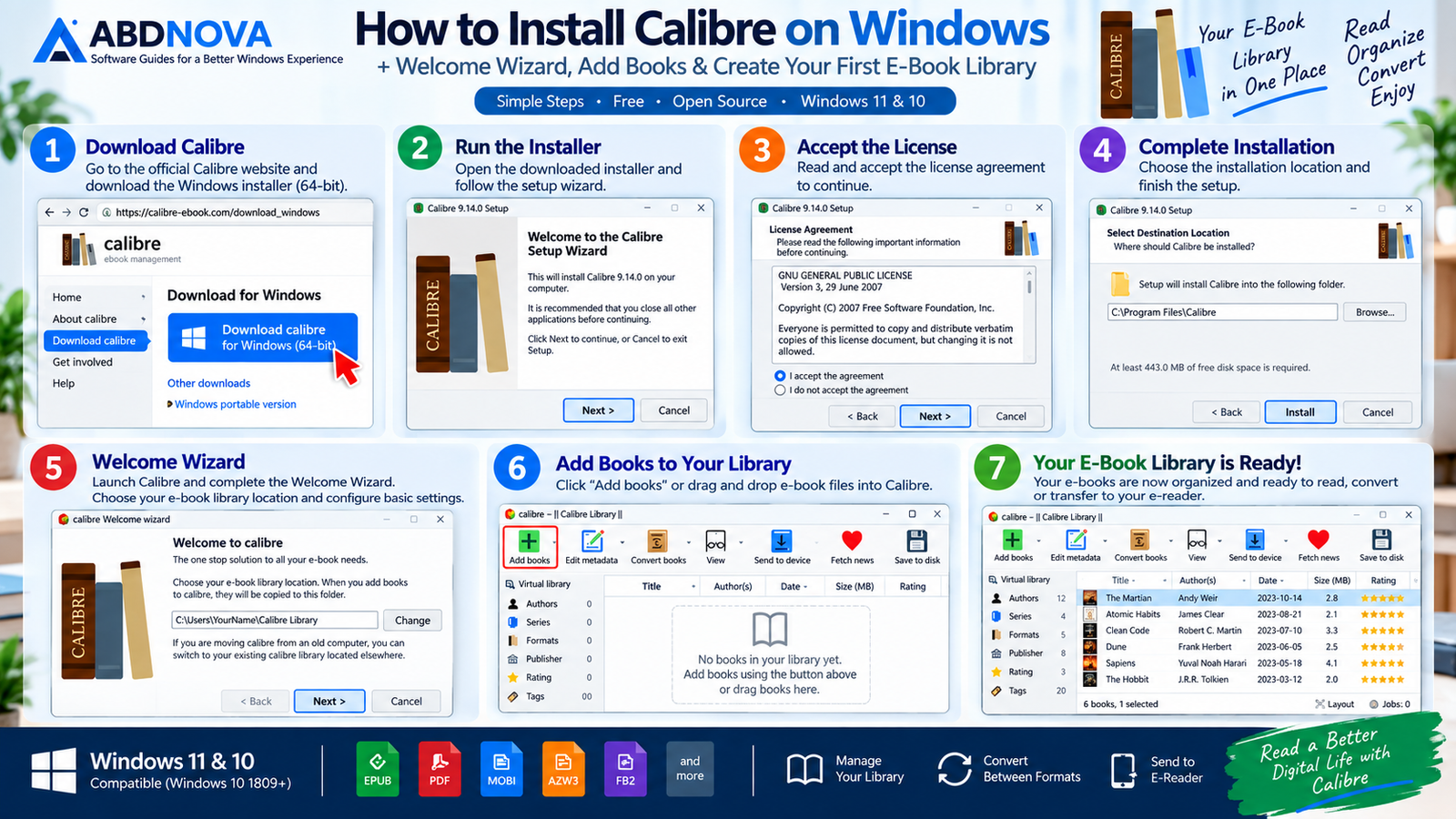
How to Install Calibre on Windows
- Open the official Calibre Windows download page.
- Download the current 64-bit Windows installer.
- Open the downloaded installer.
- Accept the license terms.
- Follow the installation prompts.
- Launch Calibre.
- Complete the initial Welcome Wizard.
During first-time setup, Calibre lets you choose where your e-book library will be stored. The Welcome Wizard can also help configure the program for your e-reader device.
After setup, click Add books or drag compatible e-book files directly into the Calibre window.
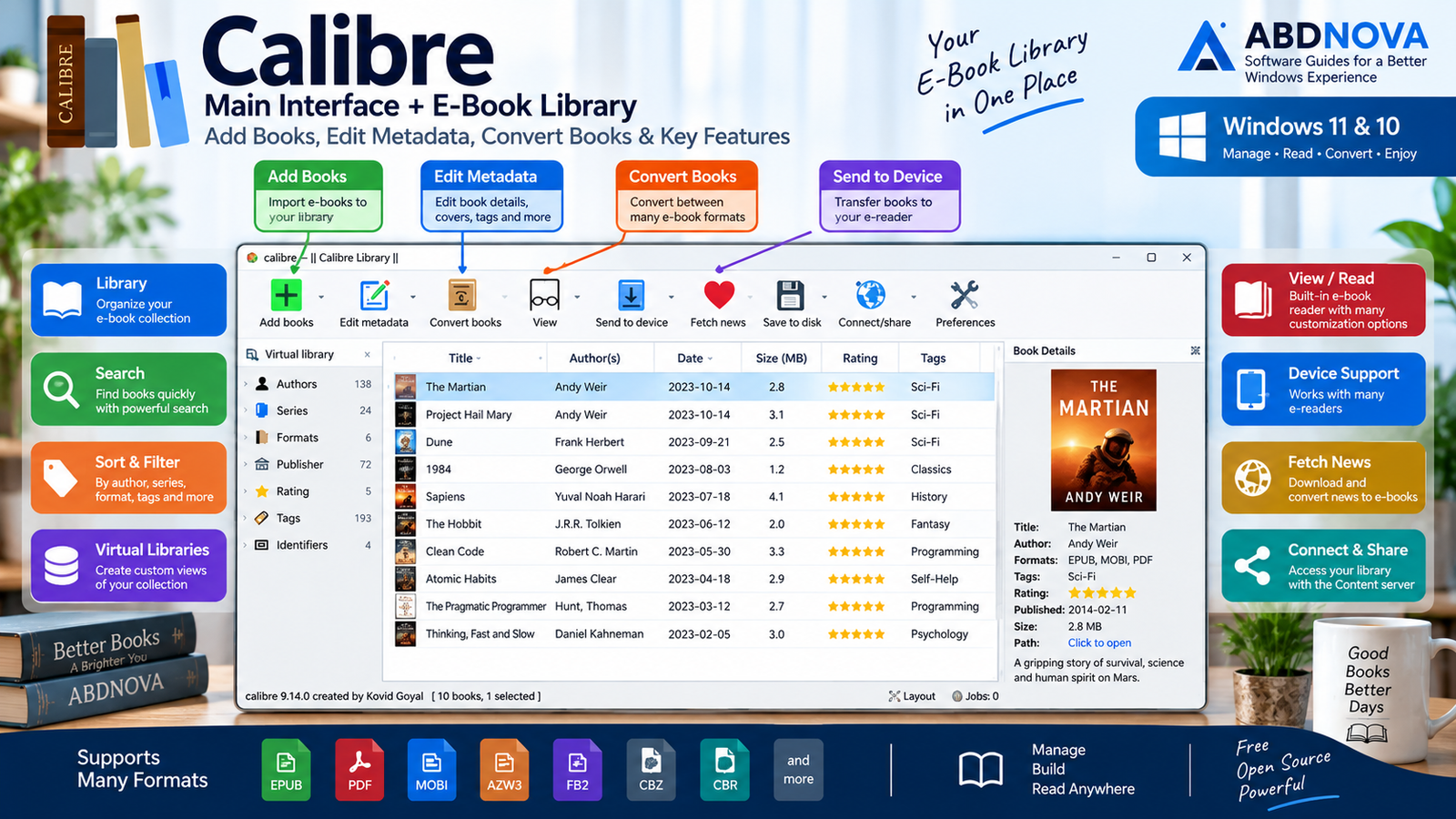
Calibre Main Interface
Calibre’s main window is built around your e-book library. Its toolbar provides quick access to the most commonly used functions.
- Add books
- Edit metadata
- Convert books
- View
- Send to device
- Fetch news
- Save to disk
- Connect/share
Books imported into Calibre appear in its library database, where they can be searched, sorted, filtered, converted, opened, transferred or edited.
Organize Your E-Book Library
Library management is one of Calibre’s strongest features. Instead of maintaining hundreds of e-books as unrelated files and folders, you can create a searchable catalog containing detailed information about every book.
Calibre can manage metadata including:
- Book title
- Author
- Publisher
- ISBN
- Series
- Tags
- Cover artwork
- Description
Metadata can also be edited manually. Advanced users can work with multiple libraries, virtual libraries, saved searches, custom columns, cover browsing and other organizational tools.

Convert E-Books Between Formats
Calibre includes a powerful e-book conversion system for changing compatible books from one format to another.
This can be useful when an e-book format is not suitable for your preferred reader or device.
Depending on the source and output format, conversion options can include:
- Page layout
- Fonts and styling
- Table of contents
- Margins
- Metadata
- Book structure
- Output profile
Calibre can also determine an appropriate output format when transferring content to supported reading devices.
Built-In E-Book Reader
You do not necessarily need another application to read books stored in your Calibre library. Calibre includes a customizable built-in e-book viewer supporting major e-book formats.
Reader features include:
- Table of contents
- Text search
- Highlights
- Bookmarks
- Read aloud
- Dictionary lookup
- Custom reading appearance
- Image zoom
- Keyboard navigation
- Copying supported text and images
PDF Reading and Editing Alongside Calibre
Calibre is primarily designed for managing, reading and converting e-books, but Windows users may sometimes need a dedicated PDF application for more specialized PDF workflows.
For lightweight PDF reading, you can also check our SumatraPDF Download for Windows guide. If you regularly work with standard PDF documents and Adobe’s PDF ecosystem, see Adobe Acrobat Reader Download. For users who need more advanced PDF viewing, annotation and editing tools, our PDF-XChange Editor Download for Windows guide covers another useful option.
Edit E-Book Metadata and Covers
Incorrect or incomplete metadata can make a large digital library difficult to navigate.
Calibre’s metadata editor lets you correct titles, authors, tags, descriptions, covers and other book information.
It can also retrieve available metadata and cover information from online sources, helping clean up libraries containing poorly named or incomplete e-book files.
Transfer Books to E-Readers
Calibre can communicate with many e-reader devices. When a supported device is connected, a Device option appears in the interface.
You can inspect books stored on the device and transfer compatible content between your reader and the Calibre library.
When necessary, Calibre can convert a compatible book to a more suitable format before transferring it.

Calibre Advanced Features
Edit EPUB, KEPUB and AZW3 E-Books
Calibre goes beyond library management by including an integrated e-book editor.
The current editor supports EPUB, KEPUB and AZW3 books and exposes the HTML and CSS used inside the e-book while providing a live preview of changes.
Advanced editing tasks include:
- Editing HTML and CSS
- Search and replace
- Managing images and fonts
- Fixing book structure
- Renaming or merging files
- Cleaning up formatting
- Previewing changes
Calibre Content Server
The built-in Content server can make your Calibre library accessible through a web browser.
This allows compatible phones, tablets, computers and other devices to access books from a Calibre library.
Fetch News and Convert It to E-Books
Calibre can download content from supported news sources and convert it into an e-book.
Scheduled news downloads can be added automatically to the library and transferred to a compatible connected reader.
Calibre Plugins
Calibre can be expanded through community-developed plugins that add or modify functionality.
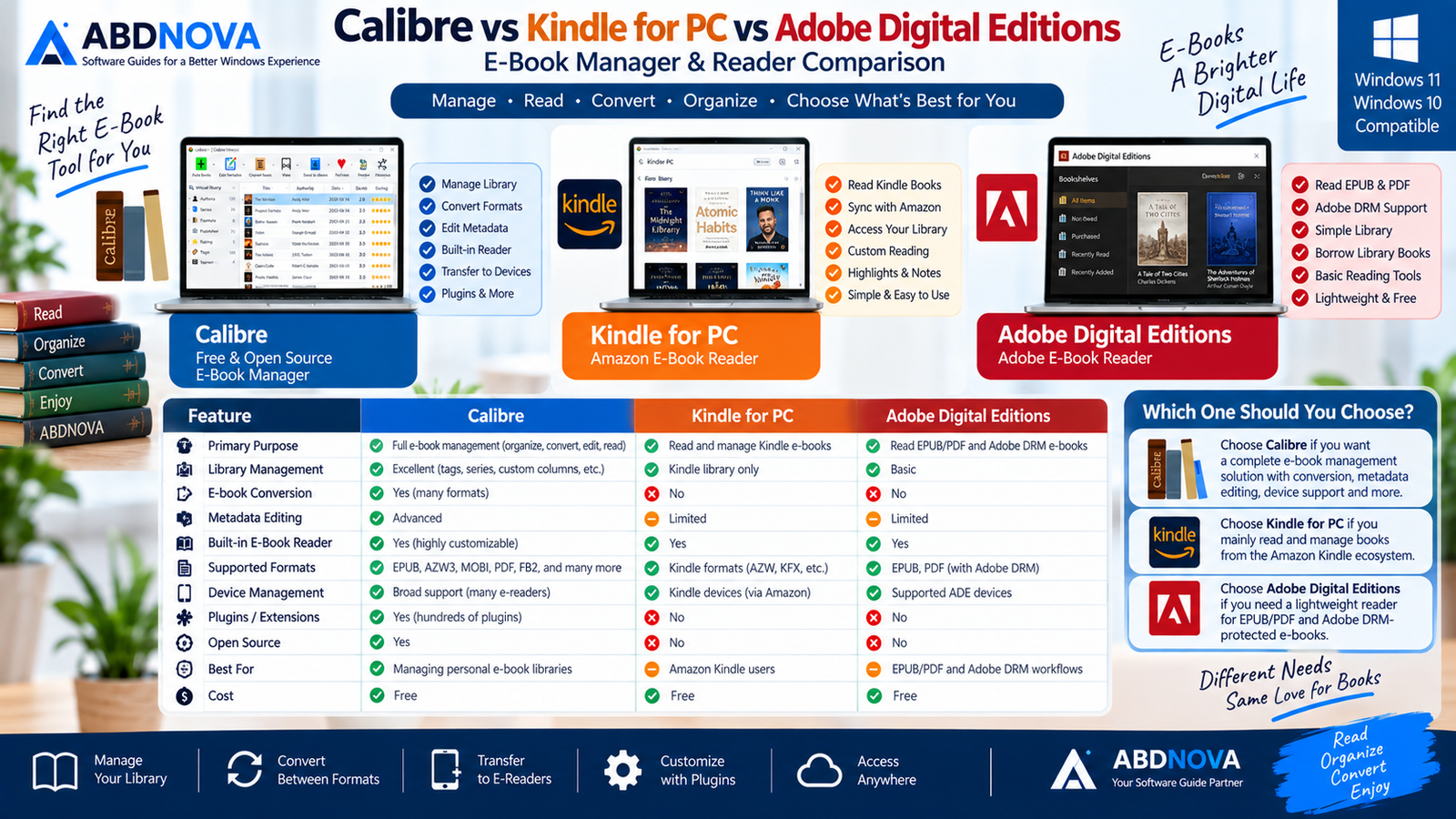
Calibre vs Kindle for PC vs Adobe Digital Editions
These applications overlap in some areas, but they are designed for different e-book workflows.
| Feature | Calibre | Kindle for PC | Adobe Digital Editions |
|---|---|---|---|
| Library Management | Excellent | Kindle-focused | Basic |
| E-Book Conversion | Yes | No | No |
| Metadata Editing | Advanced | Limited | Limited |
| Built-In Reader | Yes | Yes | Yes |
| E-Book Editing | Yes | No | No |
| Device Management | Broad support | Kindle ecosystem | Supported ADE devices |
| Open Source | Yes | No | No |
| Best For | Personal e-book libraries | Amazon Kindle books | EPUB/PDF and Adobe DRM workflows |
Calibre is generally the most flexible of the three for managing DRM-free personal e-book collections, converting formats, editing metadata and working across multiple reader ecosystems.
Kindle for PC is better suited to users centered on Amazon’s Kindle ecosystem, while Adobe Digital Editions has a different role for supported Adobe DRM content.

Troubleshooting Calibre on Windows
Calibre Won’t Install
Make sure your Windows version is supported. The latest Calibre release requires Windows 10 version 1809 or newer.
Also confirm that you downloaded the installer directly from the official Calibre website.
My E-Reader Isn’t Detected
Try reconnecting the reader, changing the USB cable or USB port, and confirming that Windows itself recognizes the device.
Support can vary between device models and connection methods.
My Book Won’t Convert
The source file may be damaged, unsupported or protected by DRM.
Calibre’s normal conversion tools are intended for compatible e-book files and do not provide authorization to bypass copyright protection.
Book Information Is Incorrect
Select the book and use Edit metadata to correct its title, author, cover, tags, series or other information.
Calibre Library Has Problems
Avoid manually reorganizing files inside Calibre’s managed library folders. Calibre maintains its own database and manages the library structure itself.
Library maintenance tools are also available for rare database problems.
Safe Official Calibre Download
Calibre is completely free and open source, so there is no reason to download modified installers, repacks or cracked copies.
For Windows 11 and supported Windows 10 PCs, use the current release directly from the official Calibre project.
Frequently Asked Questions
Is Calibre free?
Yes. Calibre is completely free and open-source software.
Does Calibre work on Windows 11?
Yes. The current release supports Windows 10 version 1809 and higher, which includes Windows 11.
Is Calibre 32-bit or 64-bit?
The current Windows release offered on the official Calibre download page is 64-bit. Previous releases remain available separately.
Is there a portable Calibre version?
Yes. Calibre provides an official portable edition that can keep the application, library and settings together.
Can Calibre convert EPUB books?
Yes. E-book conversion is one of Calibre’s main features, with support for many compatible input and output formats.
Can Calibre send books to an e-reader?
Yes. Calibre supports communication with many e-reader devices and can transfer compatible books to supported devices.
Can I read e-books directly in Calibre?
Yes. Calibre includes a customizable built-in e-book viewer with search, highlighting, read aloud, dictionary lookup and navigation tools.
Does Calibre remove DRM?
Calibre’s official documentation states that DRM-protected files should be used through authorized software and services appropriate to that content.
Final Thoughts
Calibre Download for Windows is much more than a basic e-book reader. It provides a complete environment for organizing digital libraries, editing metadata, converting compatible e-books, reading books on Windows, transferring content to supported e-readers and editing EPUB, KEPUB and AZW3 files.
Its combination of powerful library management, broad format and device support, advanced editing tools, portability and completely free open-source licensing makes Calibre one of the most capable options for managing a personal e-book collection on Windows 11 and modern Windows 10 PCs.
Download Calibre for Windows
Get the latest 64-bit Windows release directly from the official Calibre project.


