


PDF24 Creator Download for Windows 11 & 10
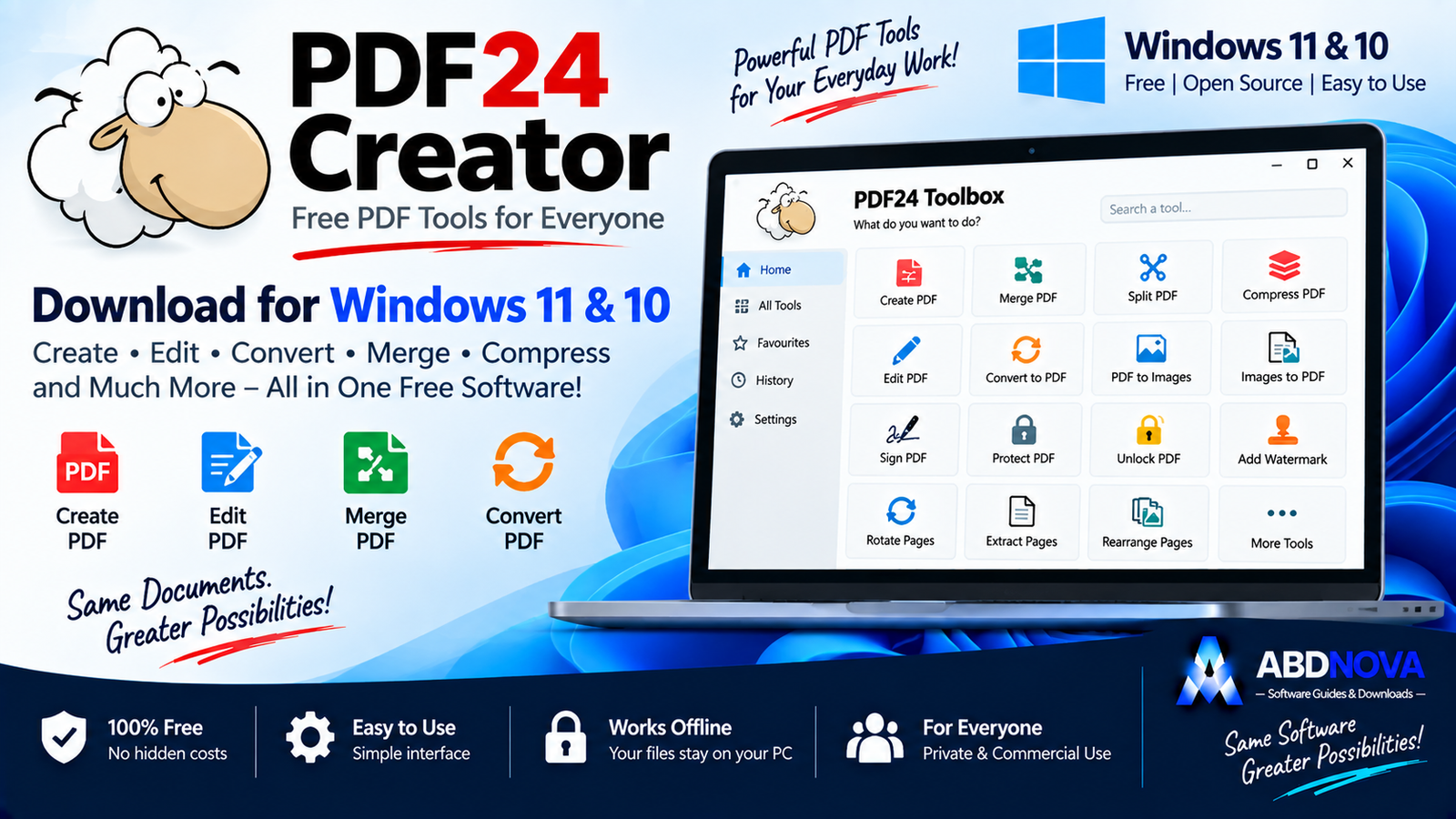
Download PDF24 Creator for Windows 11 and 10 to create, merge, split, compress, edit, convert, sign, OCR, protect and manage PDF documents offline.
PDF24 Creator Download for Windows gives Windows users a free all-in-one PDF toolkit for creating, editing, merging, splitting, converting, compressing, reading, signing, protecting and managing PDF files.
Instead of installing several separate PDF utilities, PDF24 Creator combines a PDF Creator, virtual PDF printer, PDF Reader, PDF Converter, PDF Compressor, OCR, page-management tools, watermarking, signatures, redaction, PDF comparison and other utilities in one Windows desktop package.
PDF24 Creator Download for Windows – Quick Overview
| Information | Details |
|---|---|
| Software | PDF24 Creator |
| Current Version | 11.30.1 |
| Release Date | April 21, 2026 |
| Windows 11 | Supported |
| Windows 10 | Supported |
| Price | Free |
| Private Use | Free |
| Commercial Use | Free |
| Offline Desktop Tools | Yes |
| Create PDF | Yes |
| Edit PDF | Yes |
| Merge / Split PDF | Yes |
| Compress PDF | Yes |
| Convert PDF | Yes |
| PDF Reader | Yes |
| Virtual PDF Printer | Yes |
| OCR | Yes |
| Sign PDF | Yes |
| Watermark | Yes |
| Page Numbers | Yes |
| Protect / Unlock | Yes |
| Redact PDF | Yes |
| EXE Installer | Yes |
| MSI Package | Yes |
| Microsoft Store | Yes |
What Is PDF24 Creator?
PDF24 Creator is a Windows desktop PDF toolkit designed to handle many common PDF jobs from one application.
PDF24 Creator includes tools for:
- Create PDF.
- Merge PDF.
- Split PDF.
- Compress PDF.
- Edit PDF.
- Sign PDF.
- Convert PDF.
- Images to PDF.
- PDF to images.
- Extract images.
- Protect PDF.
- Unlock PDF.
- Rotate pages.
- Remove pages.
- Extract pages.
- Rearrange pages.
- OCR.
- Watermarks.
- Page numbers.
- Compare PDFs.
- Redaction.
PDF24 Creator EXE vs MSI vs Microsoft Store
EXE Installer
For a normal home or individual Windows PC, the standard EXE installer is the easiest option.
MSI Package
The MSI package is more appropriate when PDF24 Creator needs to be deployed across multiple company computers.
Microsoft Store
PDF24 Creator can also be installed through the Microsoft Store for users who prefer Store-based application installation.
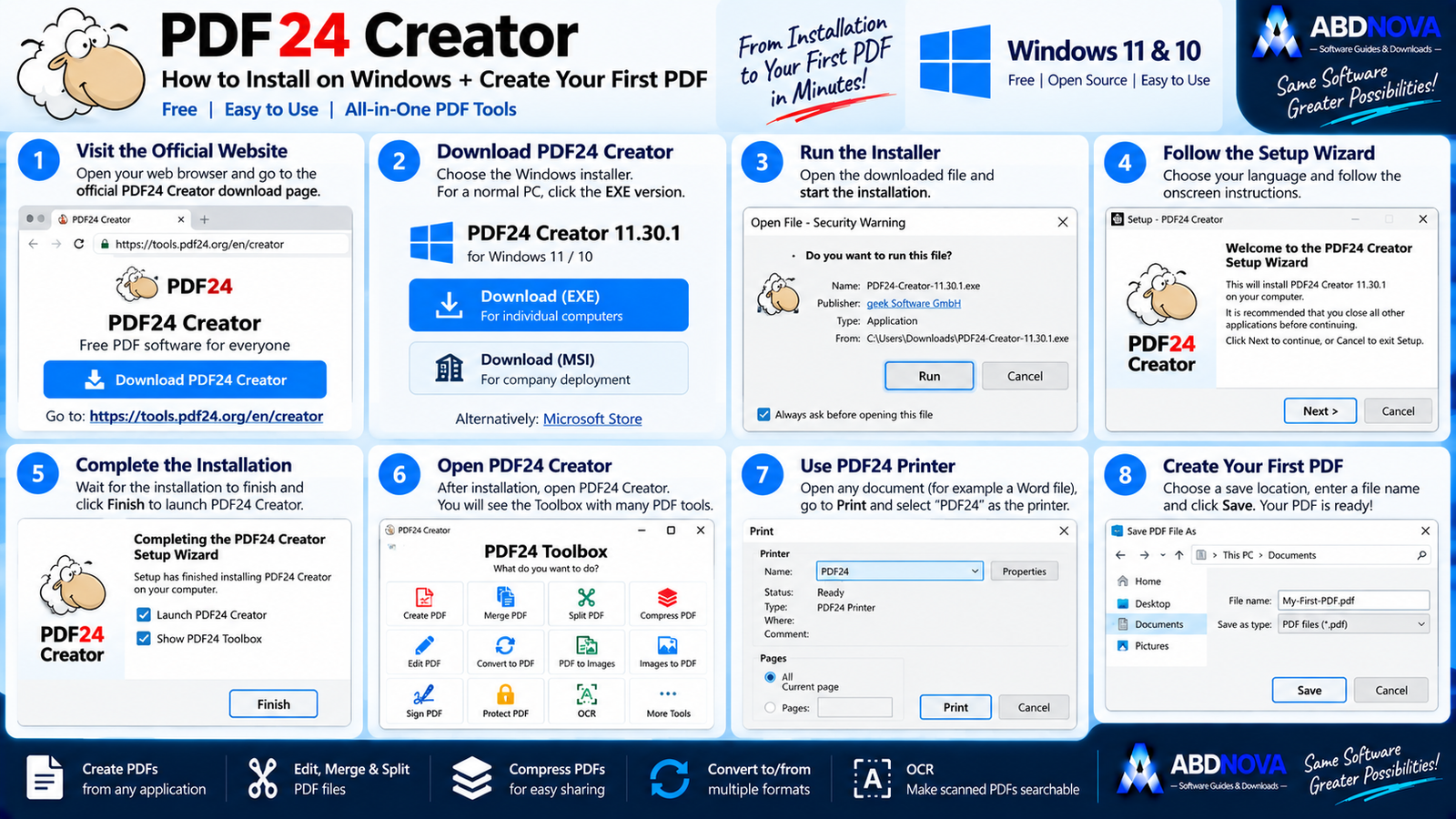
How to Install PDF24 Creator on Windows
- Open the official PDF24 Creator download page.
- Choose the current Windows EXE installer for a normal PC.
- Download the setup file.
- Open the installer.
- Follow the setup wizard.
- Complete installation.
- Launch PDF24 Creator.
PDF24 also installs a virtual PDF printer, allowing you to create PDF files from applications that support printing.

PDF24 Creator Main Interface & Toolbox
PDF24 Creator uses a central Toolbox that gives direct access to individual PDF tools.
Create a PDF
The Creator interface supports drag and drop so documents and images can be added and converted where appropriate.
Virtual PDF Printer
PDF24 installs a virtual printer in Windows.
This can be useful with:
- Word processors.
- Web browsers.
- Accounting software.
- Office applications.
- Other printable documents.
PDF Reader
PDF24 Creator includes a lightweight PDF Reader for normal viewing and everyday document use.

PDF24 Creator Merge, Split, Compress, OCR & Sign Tools
Merge PDF Files
PDF24 can combine several PDF files into one document.
Split PDF Files
Large PDF files can be split when you only need selected chapters, invoices, forms or document sections.
Rearrange PDF Pages
Page-management tools can:
- Add pages.
- Remove pages.
- Extract pages.
- Rotate pages.
- Sort pages.
- Move pages.
Convert Files to PDF
PDF24 can convert documents and images into PDF.
Examples:
Office Document → PDF
Convert PDF to Other Formats
PDF files can also be converted to supported output formats. Image export is useful when individual PDF pages are needed as separate image files.
Compress PDF
PDF24 includes a dedicated compression tool for reducing large PDF files.
Image-heavy scanned documents can often be reduced more than PDFs containing mostly optimized text.
PDF OCR
OCR stands for Optical Character Recognition.
PDF24 can recognize text inside scanned documents and image-based PDFs and create a searchable text layer.
This can be particularly useful for:
- Invoices.
- Receipts.
- Contracts.
- Letters.
- Archived paperwork.
Sign PDF
PDF24 includes a signature tool for documents such as forms, agreements and approval paperwork.

PDF24 Creator Editing, Security & Document Tools
Protect PDF
PDF documents can be protected using password and PDF security settings.
Use strong passwords for confidential files.
Unlock PDF
The Unlock PDF tool is intended for documents where you have legitimate authorization to remove applicable restrictions.
Add a Watermark
Watermarks can mark documents as:
- CONFIDENTIAL.
- DRAFT.
- COPY.
- Company-owned material.
Add Page Numbers
Page numbering is useful for reports, manuals, proposals, contracts, training documents and long PDF files.
PDF Overlay
PDF Overlay can combine document content with digital paper, company stationery or standard document backgrounds.
Redact PDF
Redaction tools can remove sensitive information before a document is shared.
Compare PDFs
PDF24 can compare two PDF files to help identify differences between contracts, reports, policies, forms and revised documents.
PDF/A and PDF/X
PDF24 supports advanced output workflows including:
- PDF.
- PDF/A.
- PDF/X.
- JPG.
- PNG.
PDF/A is useful for archival workflows, while PDF/X is associated with professional print workflows.
Advanced Save Profiles
Reusable profiles can store settings related to:
- Metadata.
- Password security.
- Compression.
- Resolution.
- Watermarks.
- Page numbers.
- Underlays.
- Overlays.
- Attachments.
- Signatures.
PDF24 Creator Works Offline
One of the major advantages of PDF24 Creator is its offline desktop workflow.
The source document states that locally processed files remain on the PC rather than being uploaded to the Internet through the desktop Creator workflow.
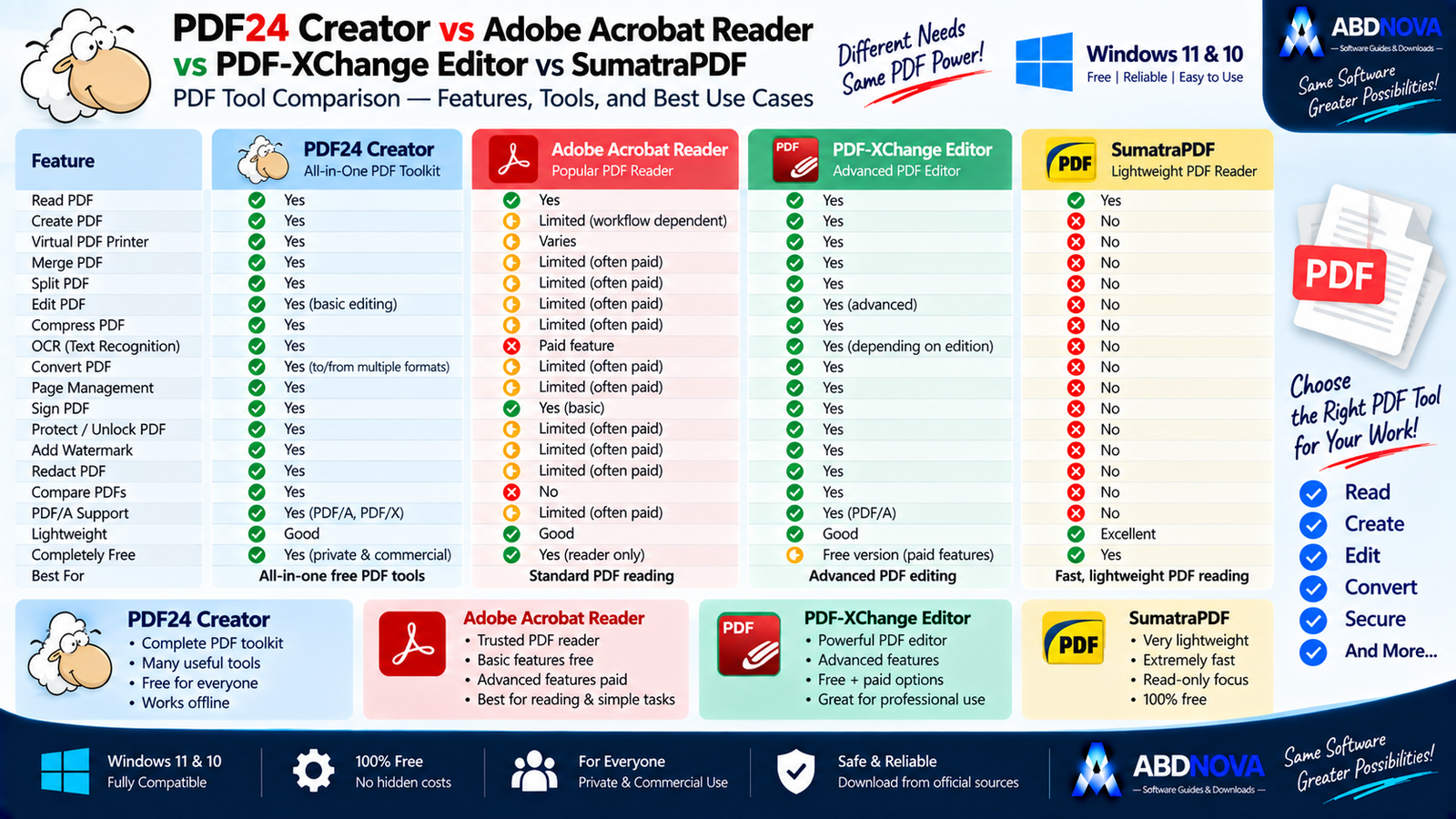
PDF24 Creator vs Adobe Acrobat Reader vs PDF-XChange Editor vs SumatraPDF
| Feature | PDF24 Creator | Adobe Acrobat Reader | PDF-XChange Editor | SumatraPDF |
|---|---|---|---|---|
| Read PDF | Yes | Yes | Yes | Yes |
| Create PDF | Yes | Limited by workflow | Yes | No |
| Virtual PDF Printer | Yes | Varies | Yes | No |
| Merge / Split | Yes | Some features may require paid Acrobat | Yes | No |
| Compress PDF | Yes | Paid/workflow dependent | Available tools | No |
| PDF OCR | Yes | Acrobat paid features | Available depending on edition/features | No |
| Page Management | Yes | Advanced Acrobat features | Strong | No |
| PDF Conversion | Yes | Limited/paid depending on task | Strong | No |
| Lightweight Reading | Good | Good | Good | Excellent |
| Offline PDF Toolkit | Excellent | Reader-focused | Excellent | Reader-focused |
| Free Core Suite | Yes | Reader is free | Free + paid features | Yes |
| Best For | All-in-one free PDF tools | Standard PDF reading | Advanced PDF editing | Lightweight PDF reading |
PDF24 Creator is aimed at users who want a broad collection of PDF tools in one package, while Adobe Acrobat Reader is mainly a mainstream reader, PDF-XChange Editor targets more advanced editing workflows, and SumatraPDF is particularly attractive for lightweight reading.
PDF24 Creator 11.x vs 9.x
The official download page continues to provide an older 9.x branch alongside the current 11.x release.
The source document notes that the 9.x branch does not include Toolbox, OpenJDK or WebView2.

PDF24 Creator Troubleshooting
PDF24 Creator Won’t Install
Confirm that the system is running Windows 11 or Windows 10.
Then try:
PDF24 Printer Is Missing
- Restart Windows.
- Check the Windows printer list.
- Repair or reinstall PDF24 Creator.
- Confirm installation completed successfully.
PDF File Is Too Large
Use the PDF Compression tool and experiment with appropriate quality and resolution settings.
Image-heavy PDFs may shrink significantly, but excessive compression can make text or graphics look poor.
OCR Isn’t Accurate
Try:
- Cleaner scans.
- Higher-resolution source images.
- Straight pages.
- Good contrast.
- Correct language settings.
PDF Won’t Open
Try another PDF first. If other files open normally, the problem may be specific to the original document.
Is PDF24 Creator Safe?
Yes, when downloaded directly from the official PDF24 website.
- PDF24 Creator Crack.
- PDF24 Creator Pro Crack.
- PDF24 Premium Activated.
- Modified PDF24.
- Repacked PDF24 installers.
PDF24 Creator is already available free of charge for private and commercial use, so there is no legitimate reason to search for a cracked version.
Safe PDF24 Creator Download for Windows
The safest source for PDF24 Creator Download for Windows is the official PDF24 website.
Use the official PDF24 Creator page to get the current Windows installer or review the available installation options.
Frequently Asked Questions
Is PDF24 Creator free?
Yes. PDF24 Creator is free for private and commercial use.
What is the current PDF24 Creator version?
The version listed in the supplied source is PDF24 Creator 11.30.1, released April 21, 2026.
Does PDF24 Creator work on Windows 11?
Yes. Windows 11 is supported.
Does PDF24 Creator work on Windows 10?
Yes. Windows 10 is supported.
Does PDF24 Creator work offline?
Yes. The installed desktop solution can perform PDF tasks locally on the PC.
Can PDF24 Creator merge PDFs?
Yes. PDF merge is one of its core tools.
Can PDF24 Creator compress PDFs?
Yes. A dedicated PDF compression tool is included.
Does PDF24 Creator include OCR?
Yes. OCR can recognize text in scanned documents and create searchable PDF output.
Can PDF24 Creator create PDFs from the Print menu?
Yes. Installation includes the virtual PDF24 printer.
Should I download EXE or MSI?
Choose EXE for an individual computer. MSI is intended for broader corporate deployment.
Can PDF24 Creator sign PDFs?
Yes. A PDF signature tool is included.
Can PDF24 Creator redact PDFs?
Yes. PDF24 includes a dedicated redaction tool.
Final Thoughts
PDF24 Creator Download for Windows is an excellent option for Windows 11 and Windows 10 users who want a broad collection of PDF utilities without paying for a traditional premium PDF suite.
Its combination of PDF creation, virtual printing, reading, merging, splitting, conversion, compression, OCR, signatures, page management, watermarking, security, redaction, comparison and offline processing makes it useful for home, office and business workflows.
For most individual Windows users, the standard EXE installer is the simplest choice. Download it directly from the official PDF24 developer source.
Ready to download PDF24 Creator?
Get the current Windows installer directly from the official PDF24 website. ABDNOVA recommends official sources only.


