

Avira Free Security Download for Windows 11 & 10
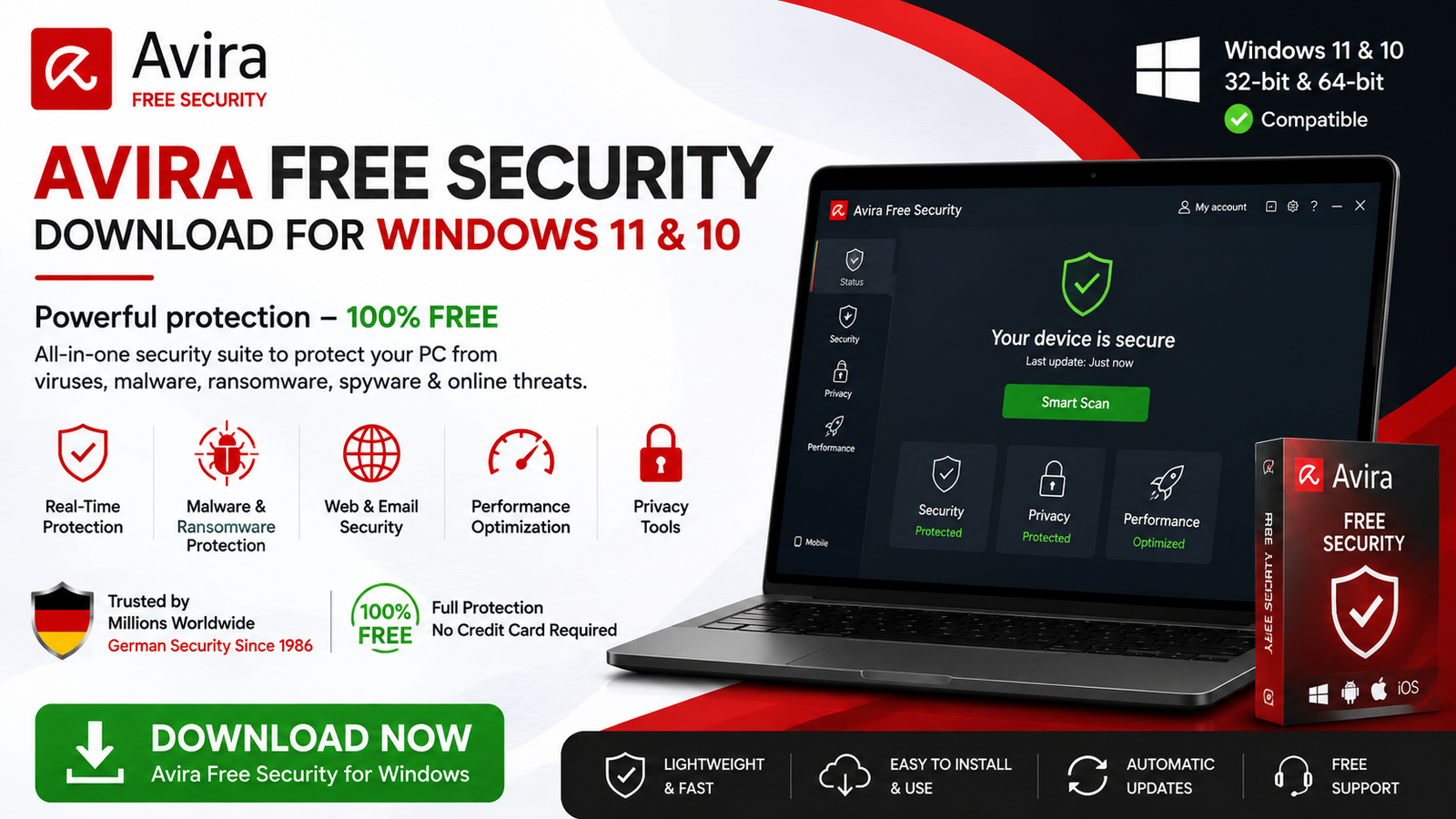
Download Avira Free Security for Windows 11 and Windows 10 to get real-time antivirus protection, Smart Scan, ransomware protection, browser security, VPN, password tools, and PC optimization features.
Avira Free Security is a free security suite for Windows that combines antivirus protection with additional privacy and performance tools.
It helps protect your computer against viruses, malware, spyware, ransomware, phishing attempts, potentially dangerous downloads, and other online threats.
Unlike a basic antivirus that focuses only on malware scanning, Avira Free Security brings several tools into one application. Depending on the feature and free-tier limitations, users can access antivirus scanning, real-time protection, Smart Scan, quarantine, software updating, VPN functionality, password-management tools, browser protection, and PC optimization features.
Avira Free Security supports Windows 11 and Windows 10, including supported conventional Windows PCs and compatible Windows 11 ARM systems. Windows 10/11 in S Mode is not supported.
This guide explains Avira Free Security Download for Windows, installation, Smart Scan, Full Virus Scan, real-time protection, quarantine, ransomware protection, browser safety, privacy tools, troubleshooting, and safe downloading.
What Is Avira Free Security?
Avira Free Security is Avira’s all-in-one free security application for Windows.
Instead of focusing exclusively on virus detection, the application organizes its tools around three main areas:
- Security — Antivirus, virus scans, quarantine, software updating, firewall and browser-related protection.
- Privacy — VPN, password-management tools, Browser Safety, privacy settings and related features.
- Performance — Cleaner, startup optimization, battery tools, duplicate-file tools and other optimization features.
Some features or their complete functionality require a paid Avira plan, so users should not assume every tool displayed in the interface is completely unrestricted in the free edition.
Avira Free Security at a Glance
| Information | Details |
|---|---|
| Software | Avira Free Security |
| Developer | Avira |
| Category | Antivirus / Security |
| Windows 11 | Supported |
| Windows 10 | Supported |
| Windows 11 ARM | Supported on compatible ARM processors |
| Windows S Mode | Not supported |
| Processor | 1 GHz minimum |
| RAM | 2 GB minimum on Windows 10/11 |
| Storage | 1.8 GB available space |
| Real-Time Protection | Yes |
| Smart Scan | Yes |
| Full Virus Scan | Yes |
| Quarantine | Yes |
| VPN | Included with free-tier limitations |
| Password Manager | Available |
| Software Updater | Available |
| Price | Free with optional paid features |
Download Avira Free Security for Windows
Security applications should always be downloaded directly from their genuine developer.
Avira provides its official Free Security installer through the Avira website. Avoid modified, repackaged, or pre-activated installers from unknown sources.
- Avira Prime cracked
- Avira Premium activated
- Modified Avira
- Pre-activated Avira
- Avira repack
- Unlimited VPN cracked
A modified security application can introduce exactly the type of malware you are installing antivirus software to prevent.
Avira Free Security System Requirements
| Requirement | Minimum |
|---|---|
| Operating System | Windows 11 / Windows 10 |
| Processor | 1 GHz |
| RAM | 2 GB |
| Available Storage | 1.8 GB |
| Internet | Required for installation and online services |
| Browsers | Chrome, Firefox, Microsoft Edge |
It is sensible to keep additional free disk space available because antivirus software may need temporary storage for updates, scans, and quarantined files.
Windows 11 ARM Support
Avira supports Windows 11 devices using compatible ARM processors, including supported newer ARM-based Windows PCs.
Windows S Mode
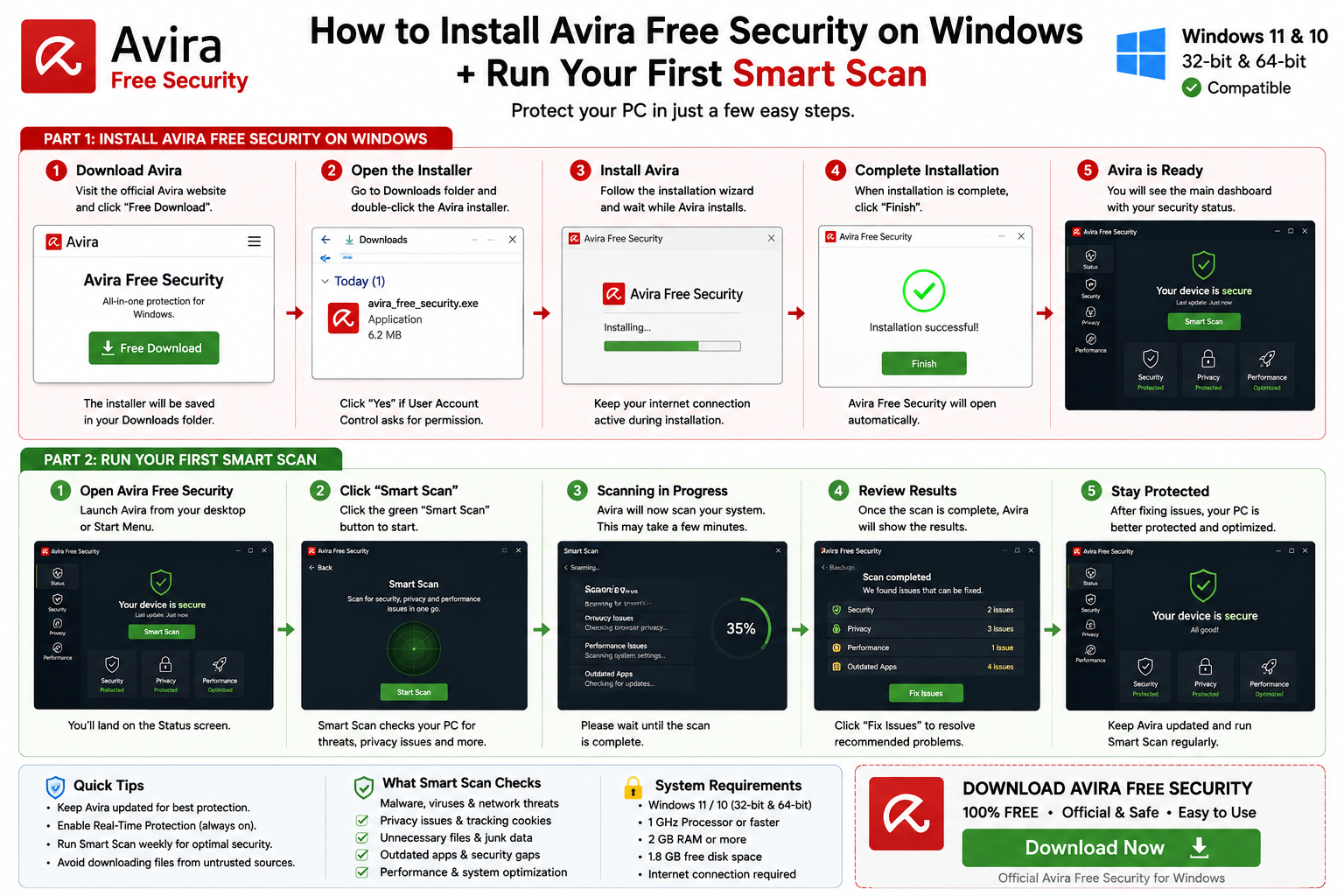
How to Install Avira Free Security on Windows
Step 1: Download Avira Free Security
Visit Avira’s official website and choose Free Download.
Step 2: Open the Installer
Open File Explorer → Downloads and double-click the Avira installer.
If Windows displays a User Account Control prompt, confirm it only after checking that the installer came from Avira.
Step 3: Follow the Installation Wizard
Follow the instructions displayed by Avira. The installer will download and configure the required components.
Keep your internet connection active during installation.
Step 4: Open Avira Free Security
After installation finishes, launch Avira. The main dashboard should display your current security status.
Step 5: Run Your First Smart Scan
Running Smart Scan after installation is a useful first step.
Avira uses Smart Scan to check the device for security, privacy, and performance-related issues.
Avira Free Security Main Interface
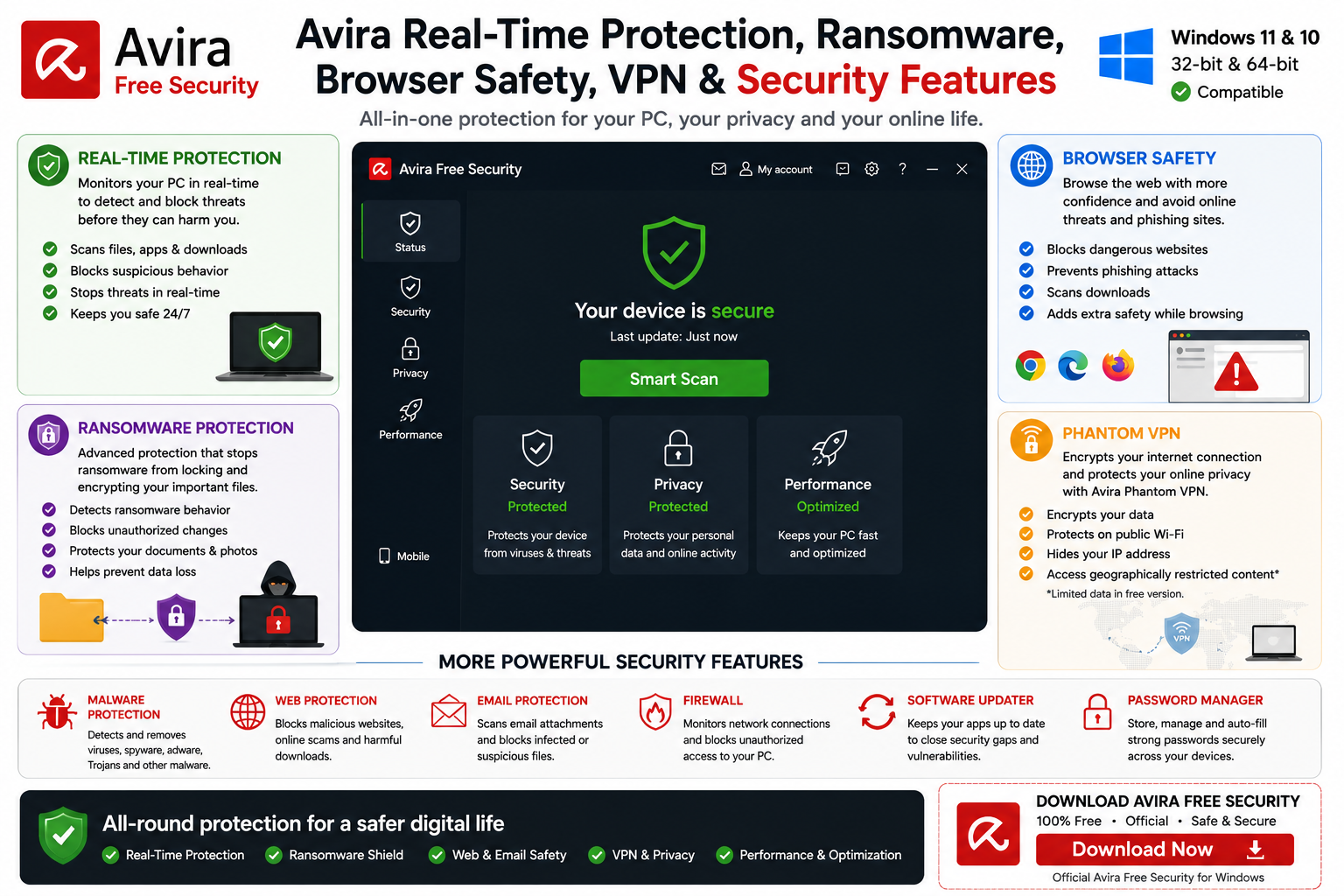
Avira Free Security organizes its main tools into Security, Privacy, and Performance sections.
Security
- Antivirus
- Full Virus Scan
- Quarantine
- Software Updater
- Firewall
- Safe Shopping
Privacy
- Browser Safety
- VPN
- Password-management tools
- File Shredder
- Privacy settings
Performance
- Cleaner
- Startup Optimizer
- Battery Saver
- Driver Updater
- Duplicate-file tools
Avira Real-Time Protection, Ransomware & Browser Safety
Real-Time Protection
Real-time protection is one of the most important antivirus features.
Instead of waiting for you to manually start a scan, Avira monitors potentially dangerous activity while you use Windows.
This can help protect your PC while you:
- Download files
- Install programs
- Open applications
- Browse websites
- Use external storage
- Work with documents
Unless you are performing specific troubleshooting, leave real-time protection enabled.
Ransomware Protection
Ransomware is malware designed to encrypt or otherwise restrict access to data and demand payment.
Avira includes ransomware protection as part of its broader antivirus protection.
Browser Safety
Avira Browser Safety is intended to provide additional protection against malicious websites, phishing attempts, and online tracking.
Continue to avoid suspicious download buttons, fake login pages, pirated software sites, unknown extensions, and unexpected email links.
Avira Smart Scan, Full Virus Scan, Malware Detection & Quarantine
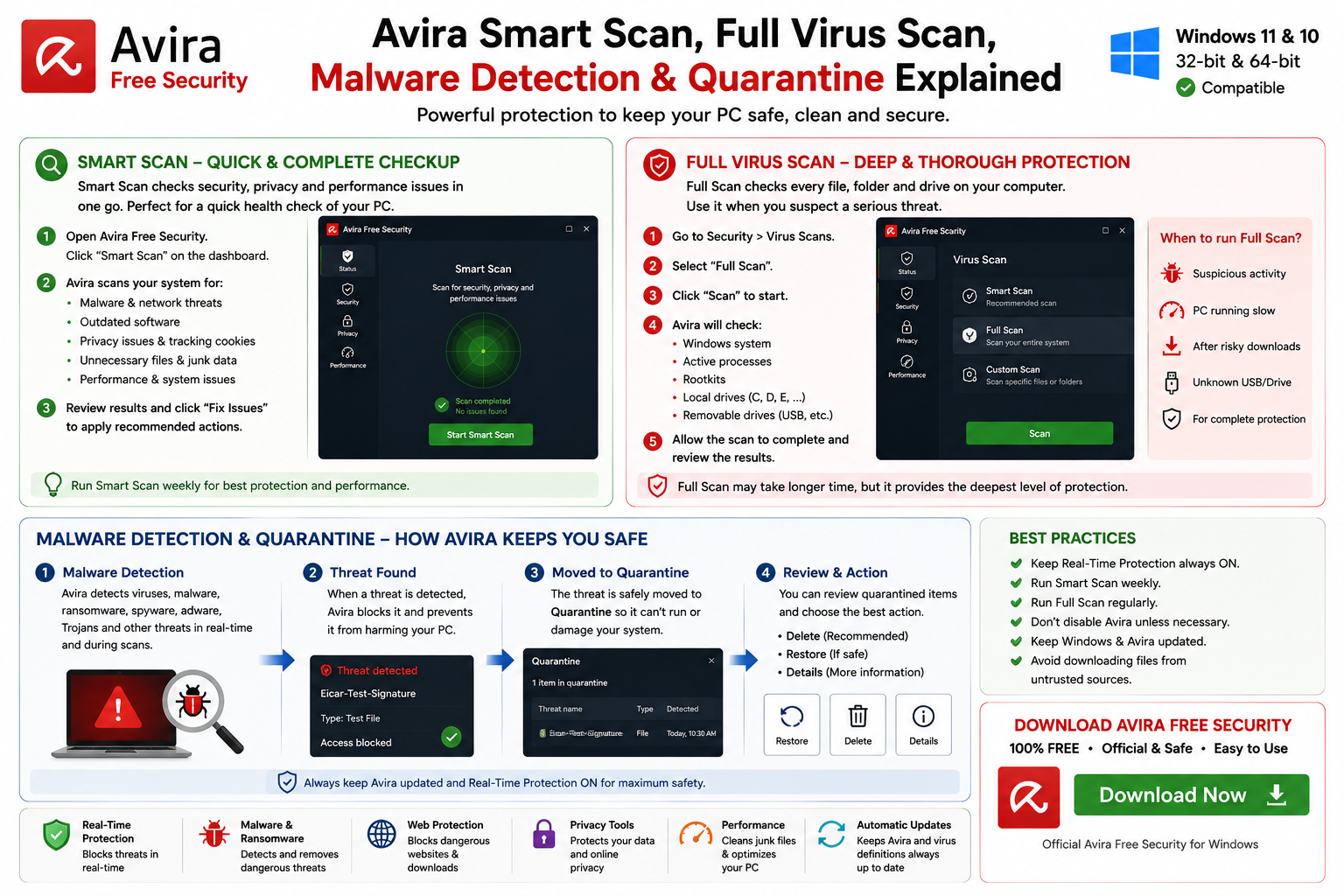
Avira Smart Scan
Smart Scan provides a convenient all-in-one check instead of requiring users to open several tools separately.
Avira Smart Scan can look for areas such as:
- Malware
- Network threats
- Outdated software
- Tracking cookies
- Unnecessary files
- Privacy problems
- Performance issues
How to Run Smart Scan
Open Avira Free Security, locate Smart Scan from the main dashboard, start the scan, and review the results when it finishes.
Avira Full Virus Scan
For a deeper malware check, open:
A Full Scan can check areas including:
- Windows system
- Active processes
- Rootkits
- Local drives
- Removable drives
A Full Scan takes longer because substantially more of the system is inspected.
When Should You Run a Full Scan?
- When you suspect malware
- When the PC behaves strangely
- After Avira detects suspicious activity
- After installing questionable software
- After connecting an unknown external drive
- When you want a comprehensive malware check
Avira Custom Scan
A Custom Scan lets you focus on a particular folder, downloaded files, external storage, USB drives, or another specific location.
Malware Detection
Avira is designed to detect multiple categories of malicious software, including viruses, Trojans, spyware, ransomware, adware, rootkits, and other malware.
Avira Quarantine
When Avira identifies a high-risk file, it can move that file to Quarantine so it cannot normally continue operating.
Users can review quarantined files and choose whether to delete or restore them.
False Positive Detection
Occasionally, antivirus software may incorrectly flag a legitimate application.
If you believe Avira detected a safe program:
- Do not disable antivirus completely
- Verify the application’s source
- Update Avira
- Download the application again from its official developer
- Investigate the detection
- Restore or exclude it only if you are confident it is safe
Avira Phantom VPN
Avira Free Security includes access to Phantom VPN functionality.
A VPN can encrypt traffic between your Windows device and the VPN service, which can be particularly useful on networks you do not fully trust.
The free edition has limitations compared with Avira’s paid VPN offering.
If you want a dedicated VPN application, you can also read our Proton VPN Download for Windows guide.
Avira Password Manager
Avira also integrates password-management functionality.
A password manager can help users create stronger passwords, store login credentials, avoid password reuse, and manage multiple accounts more easily.
For important accounts, use unique passwords and enable two-factor authentication whenever available.
Avira Software Updater
Outdated applications can contain known security vulnerabilities.
Avira Free Security includes Software Updater functionality designed to identify outdated programs and help users update vulnerable applications.
Continue installing important Windows updates through Windows Update even when using a third-party software updater.
Avira Firewall
Avira’s Security section includes firewall management functionality.
Most everyday users should leave the recommended firewall configuration enabled rather than changing advanced networking rules without a specific reason.
Avira Performance Tools
Avira Free Security is more than an antivirus application. Its Performance area can include tools related to:
- Cleaning unnecessary files
- Startup optimization
- Duplicate files
- Battery management
- Drivers
- General system optimization
Avira Free Security vs Microsoft Defender
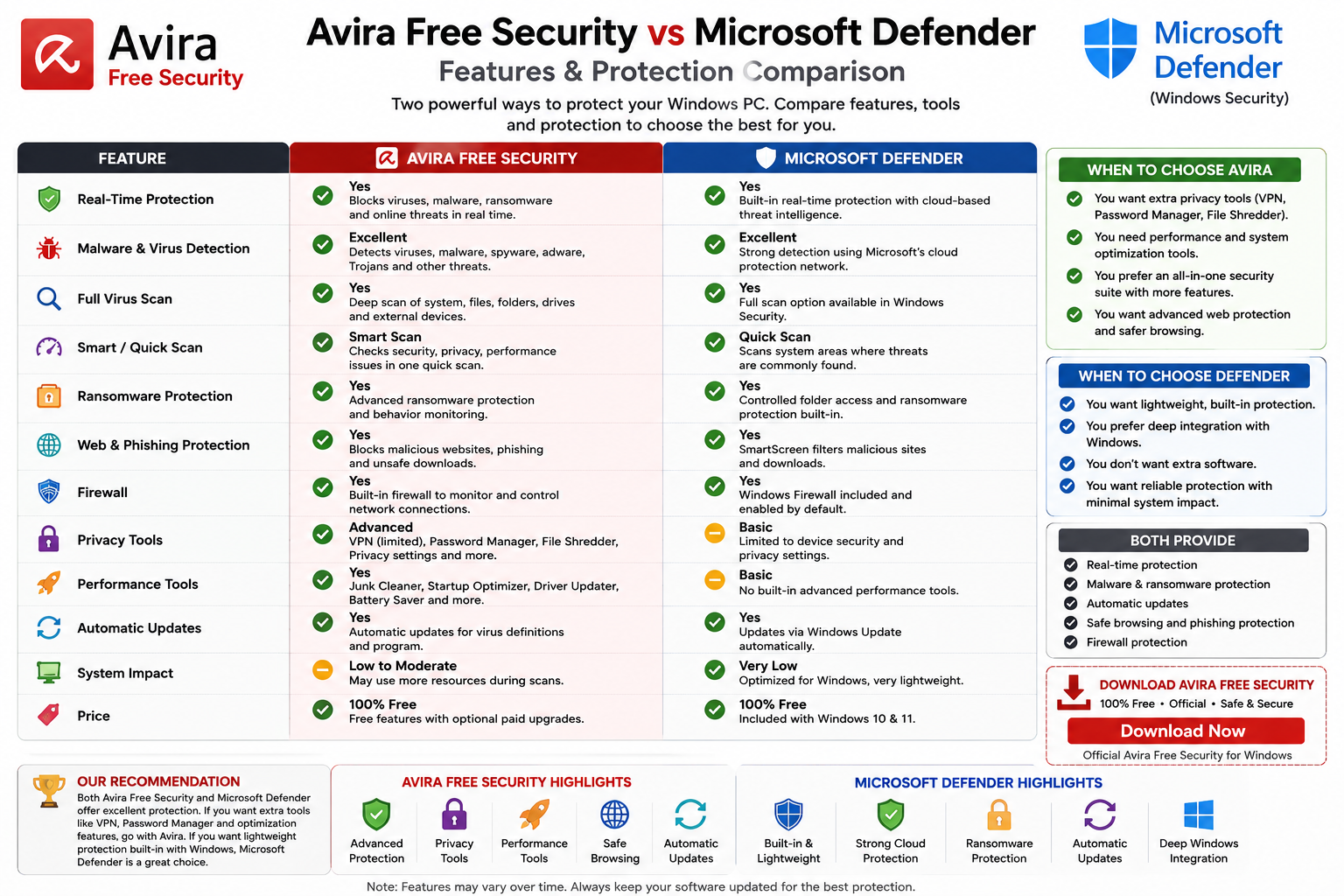
Windows 11 and Windows 10 already include Microsoft Defender Antivirus through Windows Security.
Therefore, Avira is an optional alternative rather than something every Windows user must install.
Avira Free Security May Appeal to Users Who Want:
- A dedicated third-party antivirus interface
- Smart Scan
- Additional privacy tools
- VPN functionality
- Password-management tools
- Browser protection
- Software updating
- PC optimization tools
Microsoft Defender May Appeal to Users Who Want:
- Antivirus built directly into Windows
- Minimal additional software
- Windows Security integration
- Automatic Windows-based security management
Both approaches can provide everyday malware protection when correctly configured and updated.
Should You Run Avira With Another Antivirus?
Avoid running several third-party real-time antivirus applications simultaneously because they can interfere with one another.
If you want an additional on-demand malware scanner rather than another primary real-time antivirus, read our Malwarebytes Download for Windows guide.
Does Avira Slow Down Windows?
All real-time antivirus software requires some CPU, memory, and disk activity.
You may notice increased resource usage during:
- Full Virus Scan
- Smart Scan
- Software updates
- Virus-definition updates
- Initial installation
If performance suddenly becomes unusually poor, check whether a scan or update is currently running.
Avira Free Security Troubleshooting
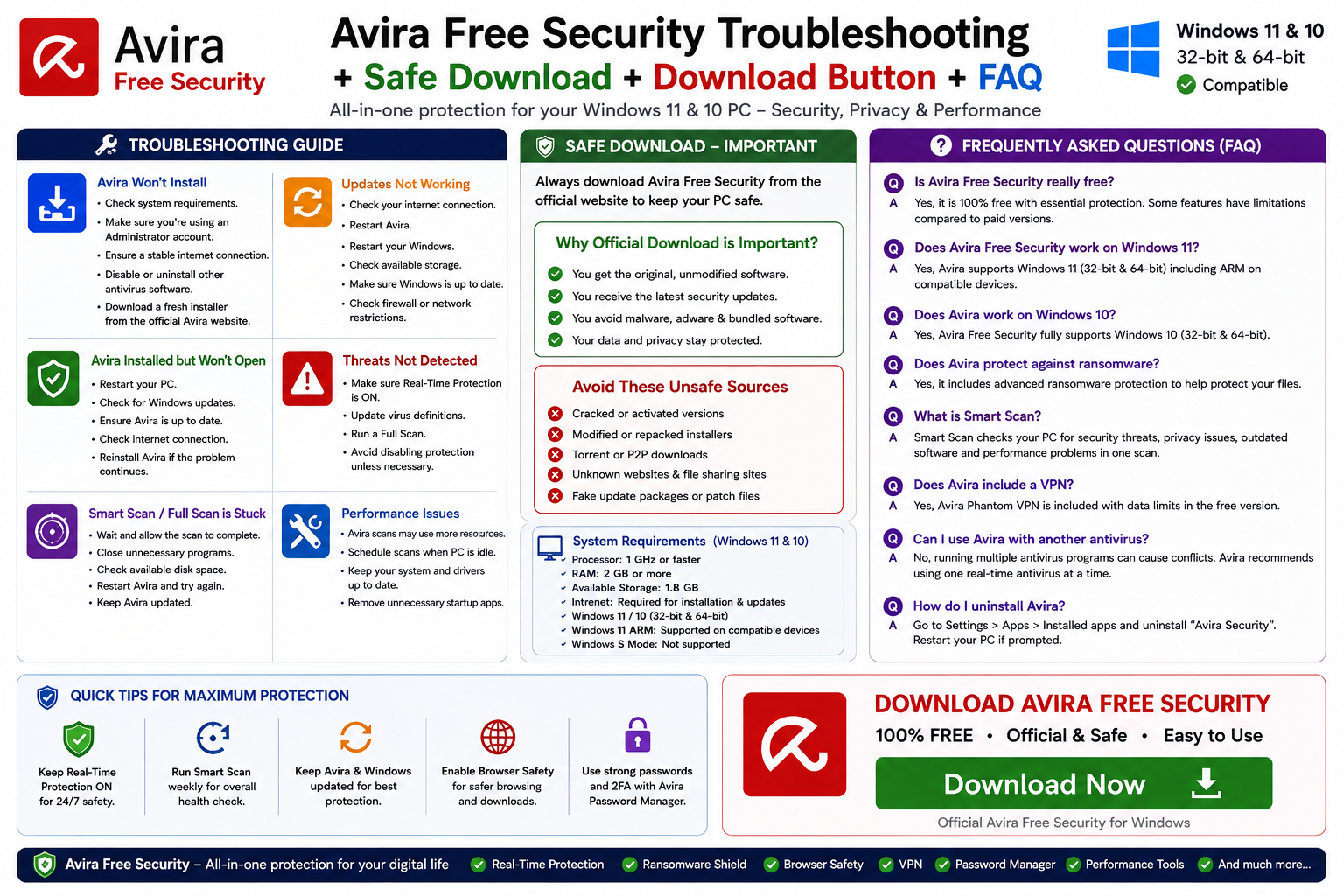
Avira Free Security Won’t Install
- Check the system requirements.
- Make sure your internet connection is stable.
- Use a Windows administrator account.
- Install important Windows updates.
- Check whether another antivirus is creating a conflict.
- Download a fresh installer directly from Avira.
Avira Installed but Won’t Open
- Restart Windows.
- Check Windows updates.
- Verify your internet connection.
- Try opening Avira again.
- Check whether another security application is interfering.
- Reinstall Avira if the installation appears damaged.
Avira Smart Scan Is Stuck
- Wait a little longer
- Close unnecessary applications
- Check available disk space
- Restart Avira
- Restart Windows
- Update Avira
- Run the scan again
A Full Scan can naturally take significantly longer than Smart Scan on PCs with large drives or many files.
Avira Updates Not Working
- Check your internet connection
- Restart Avira
- Restart Windows
- Check available storage
- Make sure Windows is updated
- Check firewall or network restrictions
Do not ignore persistent antivirus-update problems because current threat information is important for detecting newer malware.
How to Uninstall Avira Free Security
Windows 11
Open Settings → Apps → Installed apps.
Find Avira Security, open its menu, and choose Uninstall.
Windows 10
Open Settings → Apps → Apps & features, find Avira, and select Uninstall.
Restart Windows after removal if requested.
Is Avira Free Security Safe?
The genuine Avira Free Security application downloaded directly from Avira is legitimate security software.
However, no antivirus can make unsafe behavior completely safe.
You should still:
- Keep Windows updated
- Use strong passwords
- Enable two-factor authentication
- Avoid cracked software
- Be careful with email attachments
- Avoid suspicious websites
- Back up important data
Safe Download – Important
Always download Avira Free Security from the official Avira Free Security page.
- Cracked Avira Prime
- Modified installers
- Pre-activated versions
- Torrent copies
- Fake update packages
- Unknown download portals
This is particularly important for antivirus software because it operates with significant access to your Windows system.
ABDNOVA does not host cracked or modified Avira installers. Our final download button directs visitors to Avira’s official source.
Frequently Asked Questions
Is Avira Free Security really free?
Yes. Avira Free Security is available free of charge, although some features have limitations and Avira offers paid products with expanded functionality.
Does Avira Free Security work on Windows 11?
Yes. Windows 11 is supported.
Does Avira work on Windows 10?
Yes. Avira Free Security supports Windows 10.
Does Avira support ARM PCs?
Yes. Avira supports compatible Windows 11 ARM devices.
Does Avira work in Windows S Mode?
No. Avira states that Windows 11/10 in S Mode is not supported.
How much RAM does Avira need?
The source article lists 2 GB RAM as the minimum for Windows 10 and Windows 11.
How much disk space does Avira need?
The source article lists 1.8 GB of available disk space.
What does Avira Smart Scan check?
Smart Scan can check security, privacy, and performance-related issues including malware, network threats, outdated software, tracking cookies, unnecessary files, and other issues.
Does Avira have a Full Virus Scan?
Yes. Avira’s Full Scan can inspect areas including Windows, active processes, rootkits, local drives, and removable drives.
Does Avira quarantine malware?
Yes. Avira can quarantine high-risk files so they can be reviewed, deleted, or restored when appropriate.
Does Avira protect against ransomware?
Yes. Ransomware protection is included among Avira’s antivirus capabilities.
Does Avira Free Security include a VPN?
Yes. Avira Free Security includes VPN functionality, although free-tier limitations apply compared with paid plans.
Does Avira include a password manager?
Yes. Password-management functionality is included as part of Avira’s broader security suite.
Do I need Avira if Windows has Microsoft Defender?
Not necessarily. Windows already includes Microsoft Defender Antivirus. Avira is an alternative for users who prefer its interface and additional privacy, VPN, password, updating, and optimization tools.
Can I install Avira with another antivirus?
Running multiple third-party real-time antivirus applications is generally not recommended because they can conflict.
Is cracked Avira Prime safe?
No. Avoid cracked or modified antivirus software. Use Avira’s genuine free edition or purchase paid products legitimately.
Final Thoughts
Avira Free Security is more than a basic virus scanner. It combines real-time antivirus protection, Smart Scan, Full Virus Scan, quarantine, ransomware protection, browser-related security, VPN functionality, password-management tools, software updating, and performance features in one Windows security suite.
For Windows 10 and Windows 11, the source article lists a 1 GHz processor, 2 GB RAM, and 1.8 GB of available storage. Compatible Windows 11 ARM devices are also supported, while Windows S Mode is not supported.
Windows users already have Microsoft Defender, so Avira is not mandatory. It makes more sense for users who prefer Avira’s interface and want its broader combination of security, privacy, and performance tools.
Most importantly, download Avira only from its official source, keep real-time protection and updates enabled, avoid cracked software, and maintain separate backups of important files.
Ready to download Avira Free Security?
Get the official Windows security suite directly from Avira. ABDNOVA recommends official sources only.


