

Telegram Desktop Download for Windows

Telegram Desktop Download for Windows gives Windows 11 and Windows 10 users a free desktop messaging app for chats, groups, channels, file sharing, voice and video calls, screen sharing, and cloud-synced conversations across multiple devices.
Telegram Desktop Download for Windows – Overview
| Software | Telegram Desktop |
| Category | Communication |
| Platform | Windows |
| Windows 11 | Supported |
| Windows 10 | Supported |
| Desktop App | Available |
| Portable Version | Available |
| Web Version | Available |
| Cloud Sync | Yes |
| Voice & Video Calls | Yes |
| Groups & Channels | Yes |
| File Sharing | Yes |
| Price | Free |
What Is Telegram Desktop?
Telegram Desktop is the computer version of Telegram’s cloud-based messaging service. It lets you access regular Telegram cloud chats on a Windows desktop or laptop while keeping them synchronized across supported phones, tablets, and computers.
Telegram Desktop Main Interface

The Telegram Desktop interface gives quick access to your chat list, search, conversations, message box, settings, groups, and channels. It is especially convenient for users who spend a lot of time working on a PC.
Telegram Desktop Features

Cloud-Based Messaging
Your regular Telegram cloud chats can sync across supported devices, making it easy to switch between your phone, laptop, desktop, and tablet.
File Sharing
Telegram supports sharing documents, photos, videos, ZIP files, audio, PDFs, and other common file types. Standard users can share individual files up to Telegram’s current standard limit, while Premium can offer a higher limit.
Groups and Channels
Telegram groups are designed for discussions and large communities, while channels are primarily designed for broadcasting information to an audience.
Voice, Video and Screen Sharing
Telegram supports voice and video calls as well as supported screen sharing on desktop. Before sharing your entire screen, close any private documents or notifications you do not want others to see.
Telegram Desktop 64-bit & Windows Compatibility

Telegram provides an official desktop application for modern Windows PCs. ABDNOVA focuses on Windows 11 and Windows 10. For the latest supported build and architecture, use Telegram’s current official download page rather than an old installer from an unofficial source.
Telegram Desktop Installer vs Portable
| Version | Best For |
|---|---|
| Installer | Most regular Windows users |
| Portable | Users who prefer a no-install setup or separate application folder |
For a personal computer you use every day, the normal installed version is usually the simpler choice. Telegram also provides an official portable Windows build.
How to Install Telegram Desktop on Windows

- Visit the official Telegram Desktop download page.
- Select the Windows desktop download option.
- Download the installer.
- Open the downloaded setup file.
- Select the installation language if requested.
- Choose the installation location.
- Continue through the setup wizard.
- Click Install.
- Wait for installation to complete.
- Launch Telegram Desktop.
How to Log In to Telegram Desktop

After launching Telegram Desktop, connect it to your Telegram account using the available login method. Telegram can be used on multiple devices, and regular cloud chats synchronize between them.
Security Tip: Never give your Telegram login or verification code to another person.
Telegram Desktop File Sharing, Groups & Channels
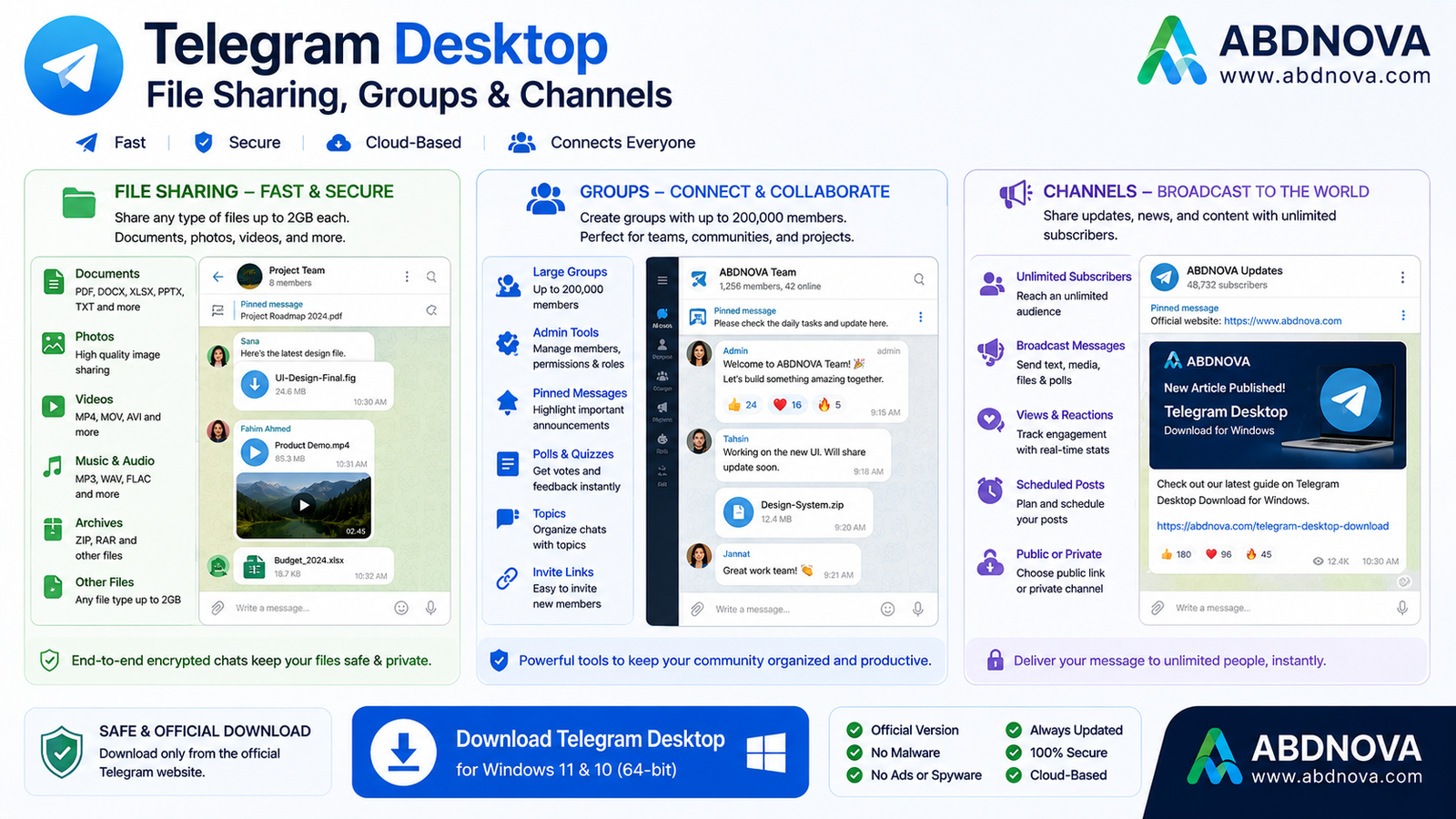
Telegram is especially useful for large groups, channels, community discussions, content distribution, and file sharing. Groups are primarily for conversation, while channels are designed more for broadcasting updates and content.
Telegram Privacy & Security
It is important to understand the difference between Telegram’s regular Cloud Chats and Secret Chats. Regular Cloud Chats use Telegram’s cloud encryption model and are designed to synchronize across devices. Secret Chats use end-to-end encryption, are device-specific, and are not stored as part of Telegram Cloud.
For additional account protection, enable 2-Step Verification from:
Settings → Privacy and Security → 2-Step Verification
Telegram Desktop vs Telegram Web
| Feature | Desktop | Web |
|---|---|---|
| Installation | Required | No |
| Messaging | Yes | Yes |
| Groups | Yes | Yes |
| Channels | Yes | Yes |
| Regular PC Use | Recommended | Convenient |
| Browser Required | No | Yes |
Telegram Desktop vs WhatsApp Desktop
Both Telegram and WhatsApp provide Windows desktop apps, messaging, calls, groups, channels, and file sharing. Telegram is especially attractive for users who want large communities, extensive channels, bots, large file sharing, portable Windows availability, and cloud-synced access across multiple devices.
Related Guide: Read our WhatsApp Download for Windows guide.
Common Telegram Desktop Problems and Fixes

Telegram Won’t Install
Restart Windows, download a fresh installer from the official Telegram website, run setup again, and check whether Windows security software has blocked the installer.
Telegram Desktop Won’t Open
Close Telegram completely, restart Windows, update Telegram, download the latest official installer, or reinstall the application if necessary.
Telegram Is Not Connecting
Check your internet connection, router, Windows Firewall, VPN or proxy settings, and Telegram service availability. Try another network if necessary.
Telegram Notifications Not Working
Check both Telegram notification settings and Windows Settings → System → Notifications.
Telegram Using Too Much Storage
Telegram provides cache-management controls. Open Settings → Data and Storage → Storage Usage and clear cached content if needed. Clearing cache does not delete your cloud conversations.
Is Telegram Desktop Free?
Yes. Telegram Desktop can be downloaded and used without purchasing the software. Telegram also offers optional Premium features.
Is Telegram Desktop Safe to Download?
Use Telegram’s official website, avoid modified installers and suspicious third-party download pages, keep Telegram updated, never share verification codes, and enable 2-Step Verification for stronger account security.
Related Communication Guides
For another desktop messaging app, see our Discord Download for Windows guide.
For meetings and collaboration, see our Microsoft Teams Download for Windows guide.
Telegram Desktop FAQ
Is Telegram Desktop free?
Yes. Telegram is free to use, with optional Premium features available.
Can I use Telegram on my PC and phone at the same time?
Yes. Telegram supports simultaneous access across multiple devices, with regular cloud chats syncing between them.
Can Telegram Desktop make video calls?
Yes. Telegram supports voice and video calling functionality.
Can Telegram Desktop share my screen?
Yes. Telegram supports screen sharing on supported desktop calls.
Does Telegram have a portable version for Windows?
Yes. Telegram provides a portable Windows version alongside the normal desktop download.
Are all Telegram chats end-to-end encrypted?
No. Regular Cloud Chats use Telegram’s cloud encryption model, while Secret Chats use end-to-end encryption and are device-specific.
Final Thoughts
Telegram Desktop is a practical Windows messaging app for chats, file sharing, groups, channels, voice and video calls, and multi-device cloud synchronization. The official portable version also gives users an alternative to a traditional Windows installation.
If you are looking for Telegram Desktop Download for Windows, use the official Telegram source, keep the app updated, and enable additional account security such as 2-Step Verification.
Ready to download Telegram Desktop?
Windows 11 & 10 • Free • Official Source
ABDNOVA does not host the Telegram installer. The button opens the official Telegram Desktop download page.


