

Adobe Illustrator Download for Windows 11 & 10
Adobe Illustrator Download for Windows gives designers a professional vector graphics application for creating logos, icons, illustrations, typography, packaging, posters, web graphics and other scalable artwork.
Unlike raster-based image editors, Illustrator primarily works with vector paths, anchor points, curves, fills and strokes. This means artwork can be enlarged from a small icon to a large banner without the normal pixelation associated with enlarging low-resolution raster images.
Adobe distributes Illustrator through Creative Cloud, which manages installation, licensing, updates, fonts, plugins and integration with other Adobe applications.
Adobe Illustrator for Windows at a Glance
| Feature | Details |
|---|---|
| Software | Adobe Illustrator |
| Developer | Adobe |
| Software Type | Vector graphics and design |
| Windows Support | Windows 11 and supported Windows 10 versions |
| Architecture | 64-bit |
| Minimum RAM | 8 GB |
| Recommended RAM | 16 GB |
| Installation Space | 2 GB minimum plus additional installation space |
| GPU | DirectX 12 or OpenGL 4.0+ compatible |
| Installation | Adobe Creative Cloud |
| License | Commercial / Subscription |
| Free Trial | 7 days |
| Best For | Logos, vectors, icons, illustrations, typography and professional design |
Download Adobe Illustrator for Windows 11 & 10
The safest way to download Illustrator is directly from Adobe. Adobe’s normal desktop workflow uses Creative Cloud to download, install and update Illustrator.
The normal installation process is:
- Open Adobe’s official Illustrator page.
- Choose the trial or an appropriate subscription.
- Sign in with your Adobe account.
- Install Adobe Creative Cloud.
- Open the Apps section.
- Find Illustrator.
- Select Install.
- Launch Illustrator after installation.
Adobe Illustrator for Windows 11
Current Illustrator releases support modern 64-bit Windows 11 systems. Adobe’s Illustrator 30.0+ requirements list Windows 11 24H2 and 23H2 among supported versions.
Illustrator on Windows 11 can be used for:
- Logo and brand identity design.
- Vector illustration.
- Icons and interface graphics.
- Posters and flyers.
- Packaging artwork.
- Typography.
- Infographics.
- Print layouts.
- Social media graphics.
- Web assets.
For demanding projects, 16 GB or more RAM and SSD storage generally provide a better experience than the minimum configuration.
Adobe Illustrator for Windows 10
Illustrator also supports specific Windows 10 releases. Adobe’s current Illustrator 30.0+ requirements list Windows 10 22H2 and Windows 10 21H2 LTSC.
Simply having Windows 10 does not guarantee that an older installation meets the requirements of the latest Illustrator release.
- Check your Windows version.
- Install available Windows updates.
- Update your graphics driver.
- Update Creative Cloud.
- Confirm sufficient RAM and storage.
Adobe Illustrator System Requirements for Windows
| Component | Requirement |
|---|---|
| Processor | Compatible multicore 64-bit processor meeting Adobe requirements |
| RAM | 8 GB minimum; 16 GB recommended |
| Storage | At least 2 GB available plus additional installation space |
| Display | 1024 × 768 minimum; 1920 × 1080 recommended |
| GPU Memory | 1 GB minimum; 4 GB recommended for GPU Performance |
| Graphics API | DirectX 12 or OpenGL 4.0 or later |
| Internet | Required for activation, subscription validation and online services |
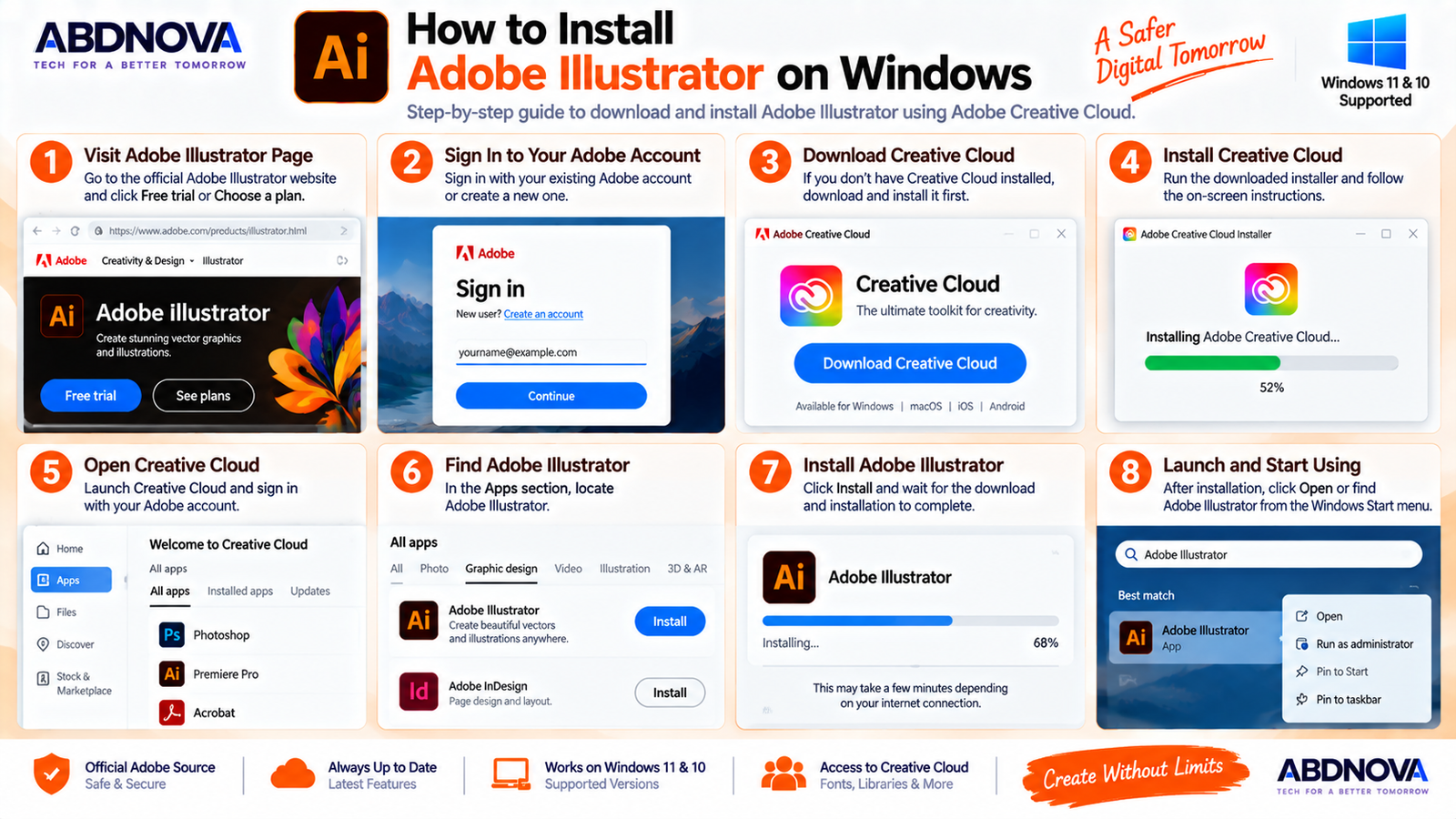
How to Install Adobe Illustrator on Windows
Step 1: Visit Adobe
Open Adobe’s official Illustrator website rather than using a third-party software download site.
Step 2: Choose Your Plan or Trial
Select the Illustrator plan you need or start the currently available 7-day trial.
Step 3: Sign In
Sign in using your Adobe account or create one if necessary.
Step 4: Install Creative Cloud
Download and install the Adobe Creative Cloud desktop application if it is not already installed.
Step 5: Open Creative Cloud
Launch Creative Cloud and sign in.
Step 6: Find Illustrator
Open the Apps section and locate Adobe Illustrator.
Step 7: Click Install
Select Install. Creative Cloud will download the required files and complete the installation.
Step 8: Launch Illustrator
After installation, select Open or launch Adobe Illustrator from the Windows Start menu.
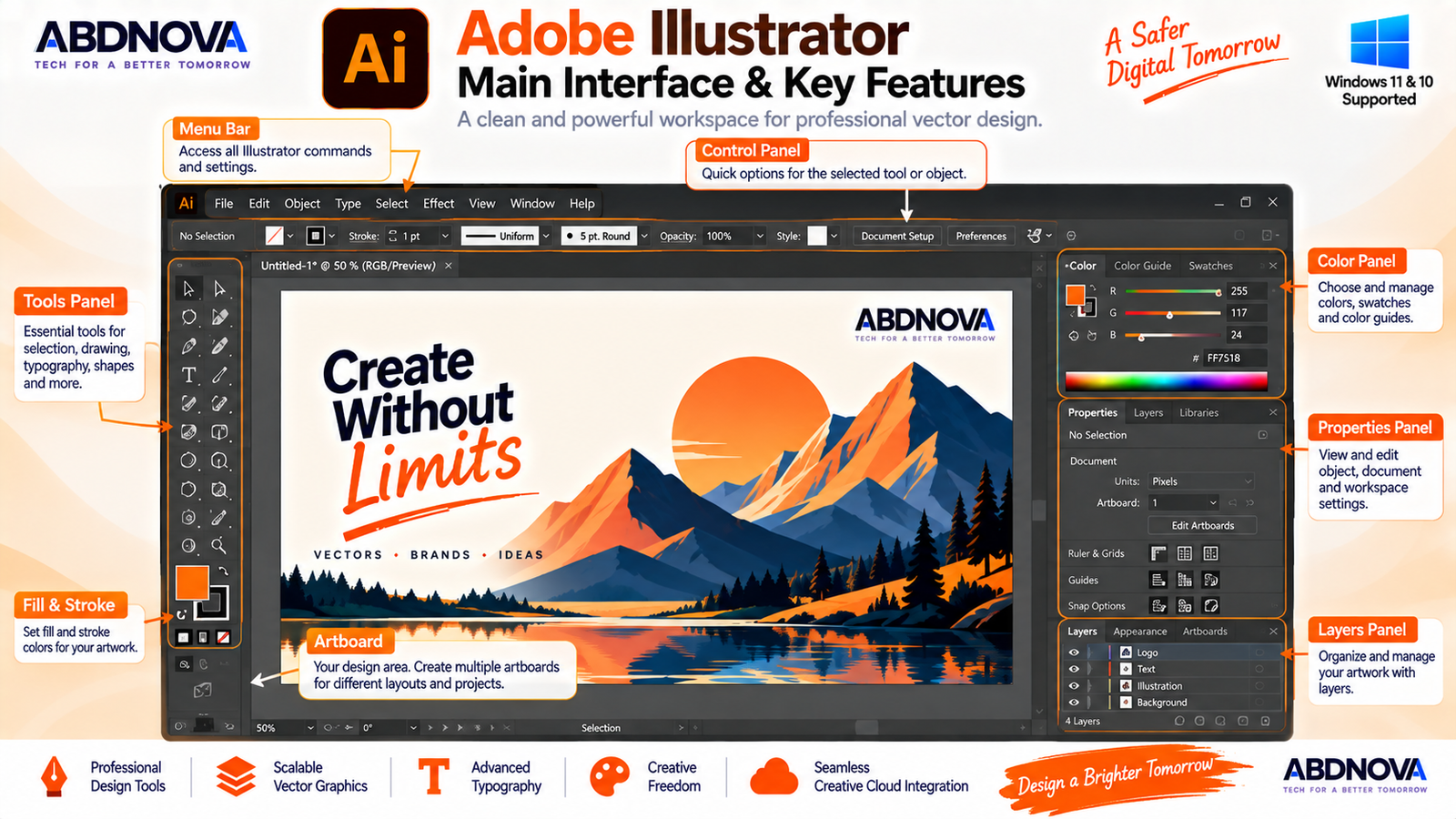
Adobe Illustrator Main Interface & Key Features
Illustrator provides a professional workspace with tools and panels organized around vector design.
Tools Panel
The Tools panel provides commonly used tools such as:
- Selection Tool.
- Direct Selection Tool.
- Pen Tool.
- Type Tool.
- Shape tools.
- Paintbrush Tool.
- Pencil Tool.
- Eraser Tool.
- Gradient Tool.
- Eyedropper.
- Shape Builder Tool.
Artboards
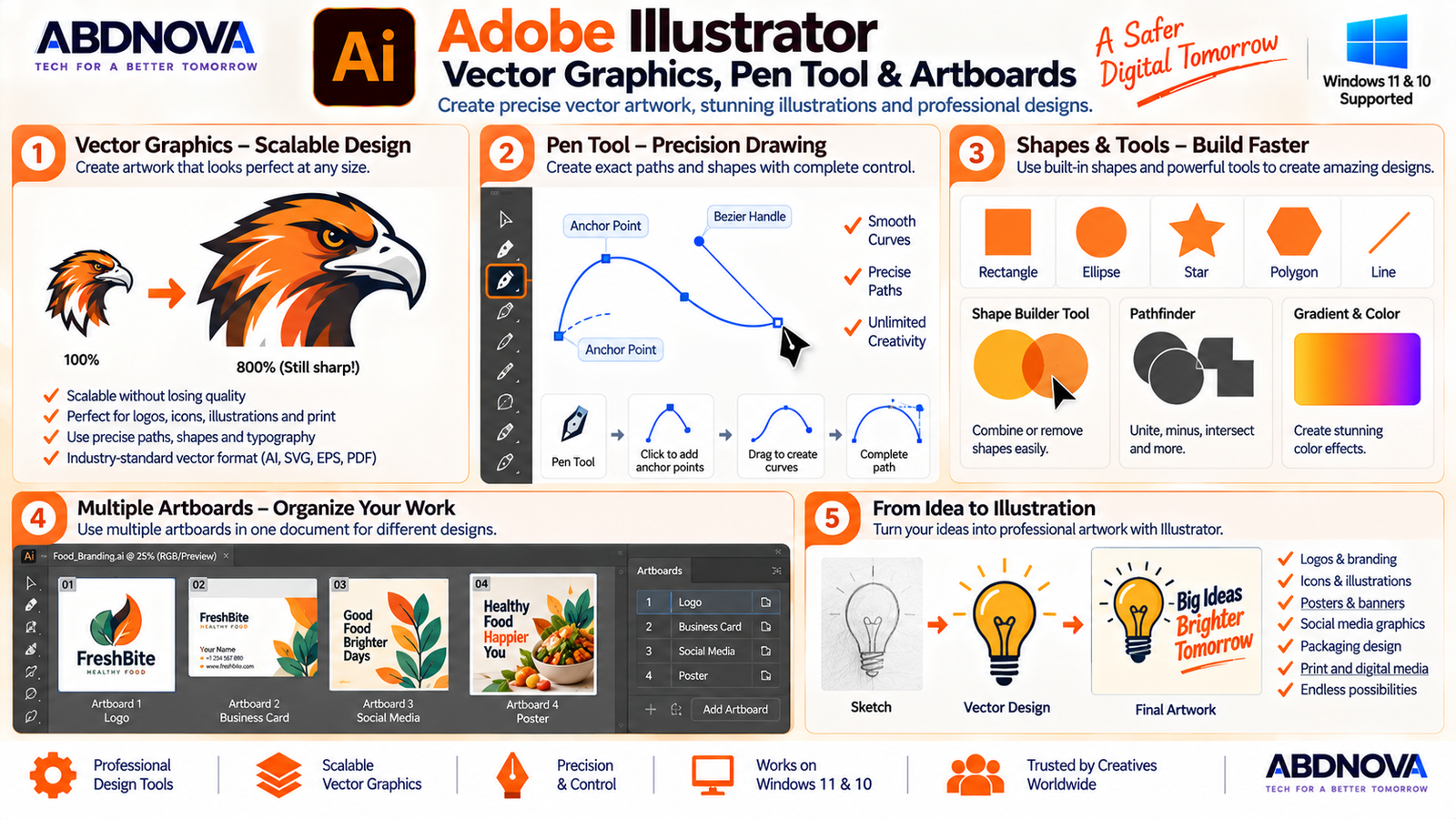
An artboard is a primary design area. A single Illustrator document can contain multiple artboards, making it easy to create different pages, icons, logo variations or social graphics in one project.
Properties Panel
The Properties panel displays controls related to the currently selected object.
Layers Panel
Layers organize complex artwork into manageable groups and objects.
Adobe Illustrator Vector Graphics, Pen Tool & Artboards
Vector Graphics & Scalable Artwork
Vector graphics are one of Illustrator’s biggest strengths. Vector objects are constructed mathematically using paths, anchor points, curves, fills and strokes.
This makes Illustrator especially useful for:
- Logos.
- Icons.
- Brand graphics.
- Illustrations.
- Packaging.
- Signage.
- Print artwork.
Pen Tool, Paths & Anchor Points
The Pen Tool allows precise creation of straight and curved paths using anchor points and direction handles.
Designers commonly use it for custom logos, icons, complex shapes, tracing, character illustration and technical artwork.
The Direct Selection Tool can then modify individual anchor points and path segments.
Shapes & Shape Builder
Illustrator includes rectangles, ellipses, polygons, stars and lines. Shape Builder lets you visually combine or remove overlapping areas to create new vector objects.
Layers & Artboards
Complex Illustrator documents can contain hundreds or thousands of individual objects. Layers make those elements easier to organize.
- Create layers and sublayers.
- Lock objects.
- Hide elements.
- Reorder artwork.
- Group related elements.
- Rename layers.
- Select individual objects.
Artboards add another organizational level. For example, one branding project could contain separate artboards for a primary logo, icon, horizontal logo, monochrome version and social profile image.
Typography & Text Tools
Illustrator provides extensive professional typography controls, including:
- Point text.
- Area text.
- Text on paths.
- Font families and weights.
- Character spacing.
- Paragraph formatting.
- Variable fonts.
- OpenType features.
- Text outlines.
Adobe Illustrator Generative AI, Image Trace & Creative Tools
Image Trace
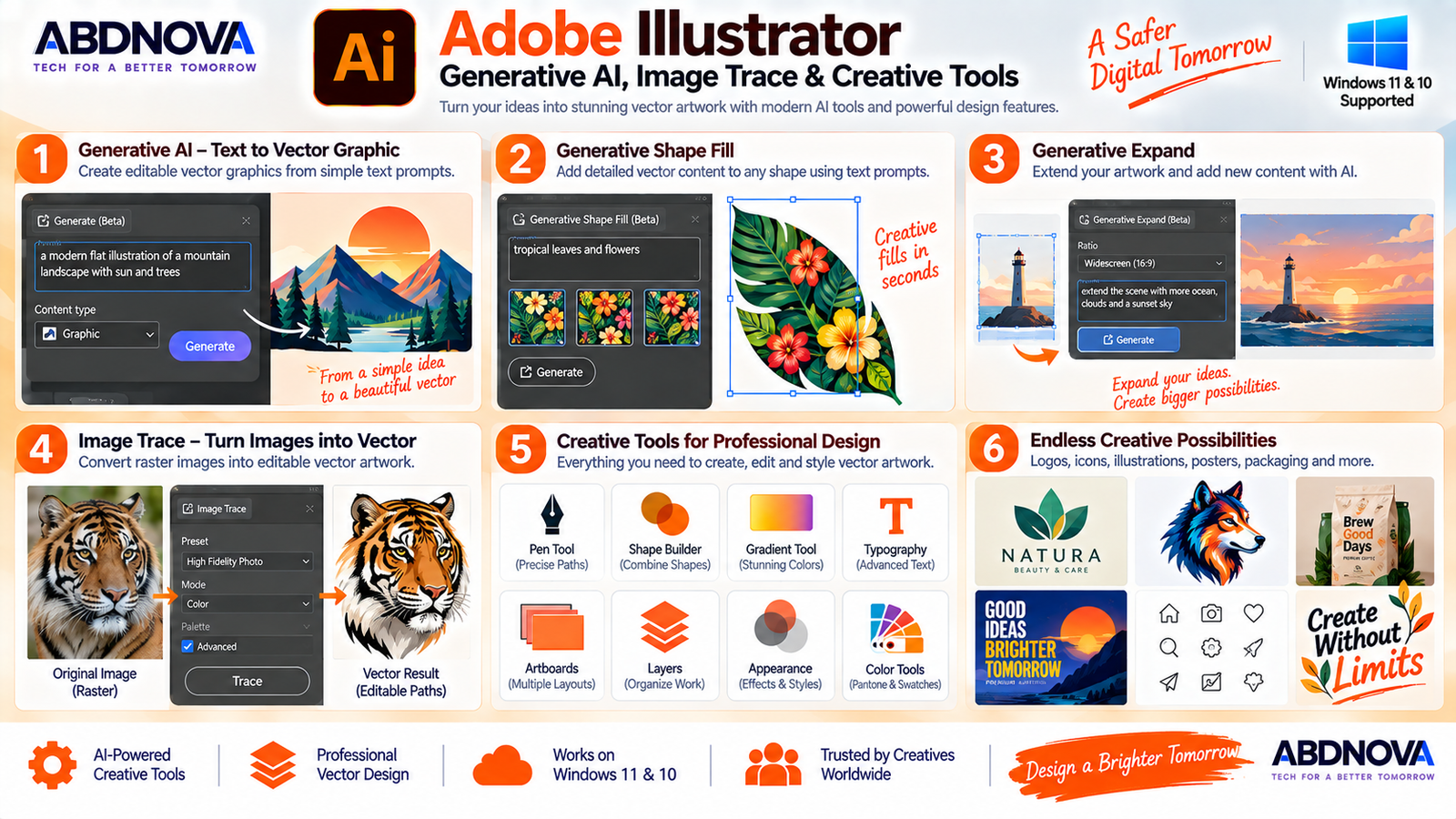
Image Trace converts suitable raster artwork into editable vector paths.
It can be useful for digitizing:
- Sketches.
- Black-and-white artwork.
- Simple logos.
- Scanned drawings.
- Illustrations.
The quality of the vector result depends on the source image and tracing settings.
Gradients, Colors & Appearance
Illustrator provides extensive styling controls for vector artwork, including:
- Solid fills.
- Strokes.
- Linear gradients.
- Radial gradients.
- Freeform gradients.
- Transparency.
- Blending.
- Patterns.
- Multiple fills and strokes.
The Appearance panel can apply multiple visual attributes to one object without requiring duplicate artwork.
Generative AI Features
Current Illustrator releases integrate Adobe Firefly-powered generative tools into vector-design workflows.
Depending on the current version, account and availability, tools can include:
- Text to Vector Graphic.
- Text to Pattern.
- Concept to Vector.
- Generative Shape Fill.
- Generative Expand.
- Remove Background.
- Turntable.
Generative Shape Fill
Generative Shape Fill lets you select a vector shape and use a text prompt to create detailed vector content that follows the selected shape.
Text to Vector Graphic
Text to Vector Graphic can generate editable vector scenes, subjects and icons from written prompts.
Generative Expand
Generative Expand can extend existing artwork and help expand artwork into areas such as print bleed.
Adobe Illustrator for Logos, Icons & Branding
Illustrator is particularly useful for brand design because vector artwork can be resized for many different uses without the same resolution limitations as raster artwork.
A single logo design can be adapted for:
- Websites.
- Business cards.
- Packaging.
- Letterheads.
- Social media.
- Mobile applications.
- Posters.
- Large-format printing.
Illustrator, Photoshop & Creative Cloud
Illustrator works within Adobe’s broader Creative Cloud ecosystem and can be used alongside Photoshop, Acrobat and other Adobe applications.
Illustrator is primarily designed for scalable vector graphics, while Photoshop is especially strong for raster photo editing, retouching and compositing. If your workflow also involves detailed image editing, see our Adobe Photoshop Download for Windows guide.
Using Illustrator and Photoshop together can be useful for workflows that combine vector logos, icons or typography with photographs, textures and raster-based creative work.
Adobe Illustrator vs CorelDRAW vs Inkscape
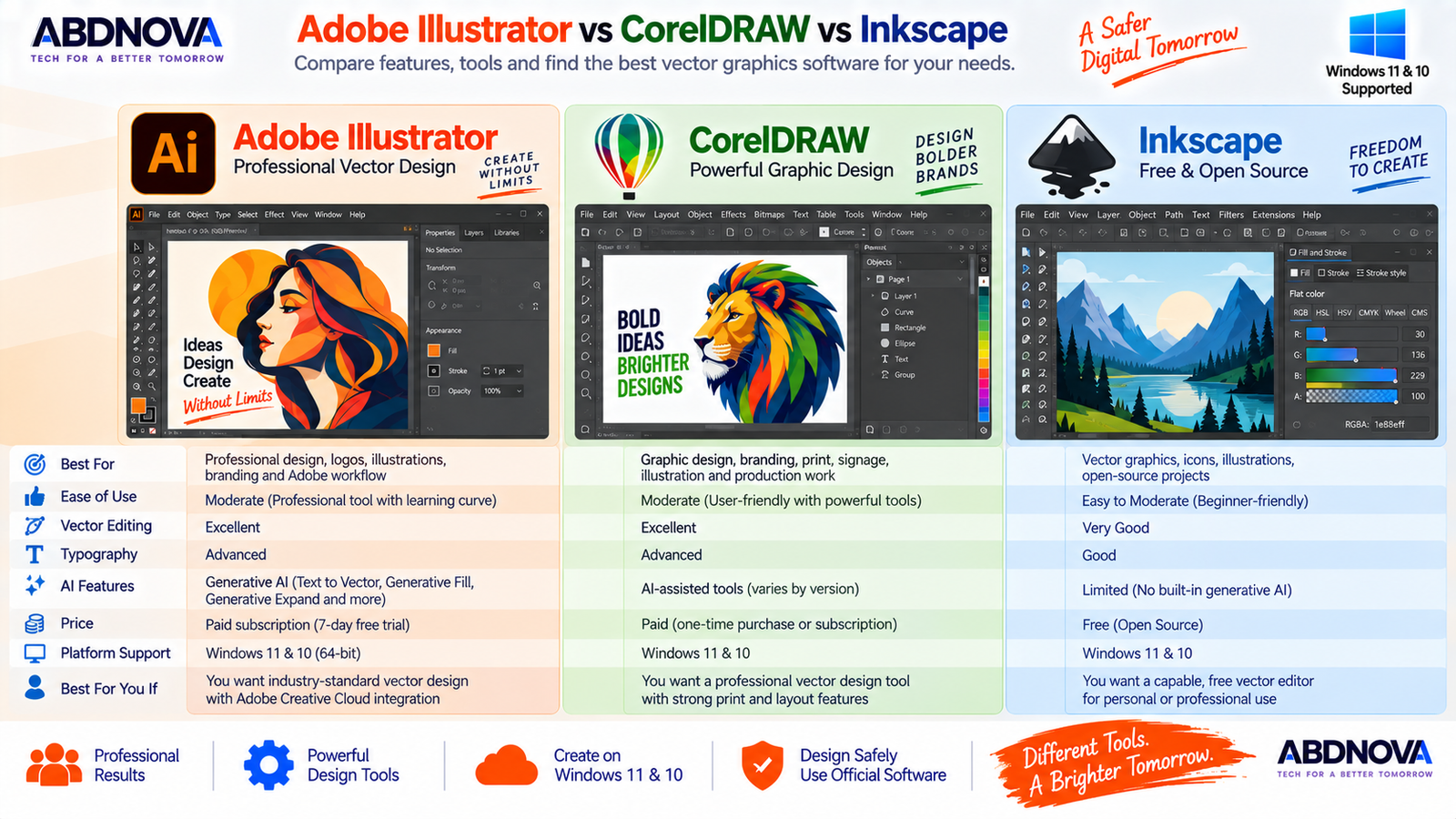
| Feature | Illustrator | CorelDRAW | Inkscape |
|---|---|---|---|
| Primary Focus | Professional vector design | Vector / graphic design | Vector graphics |
| Vector Editing | Excellent | Excellent | Strong |
| Logo Design | Excellent | Excellent | Very good |
| Typography | Advanced | Advanced | Good |
| AI Integration | Strong Adobe integration | Available features vary | More limited |
| Adobe Ecosystem | Yes | No | No |
| Free / Open Source | No | No | Yes |
| Best For | Adobe and professional creative workflows | Professional design and production | Free/open-source vector editing |
Illustrator is especially attractive to designers already working with Adobe applications. CorelDRAW provides another established professional design workflow, while Inkscape is a strong choice when free and open-source vector editing is a priority.
Is Adobe Illustrator Free?
No. Adobe Illustrator is commercial software.
Adobe currently provides a 7-day full-version trial. After the trial period, continued use of the desktop application requires an eligible paid membership.
- Illustrator Crack.
- Illustrator Keygen.
- Pre-Activated Illustrator.
- Illustrator Portable Full Version.
- Modified Creative Cloud.
- Repacked Illustrator.
Adobe Illustrator Troubleshooting on Windows
Adobe Illustrator Not Opening
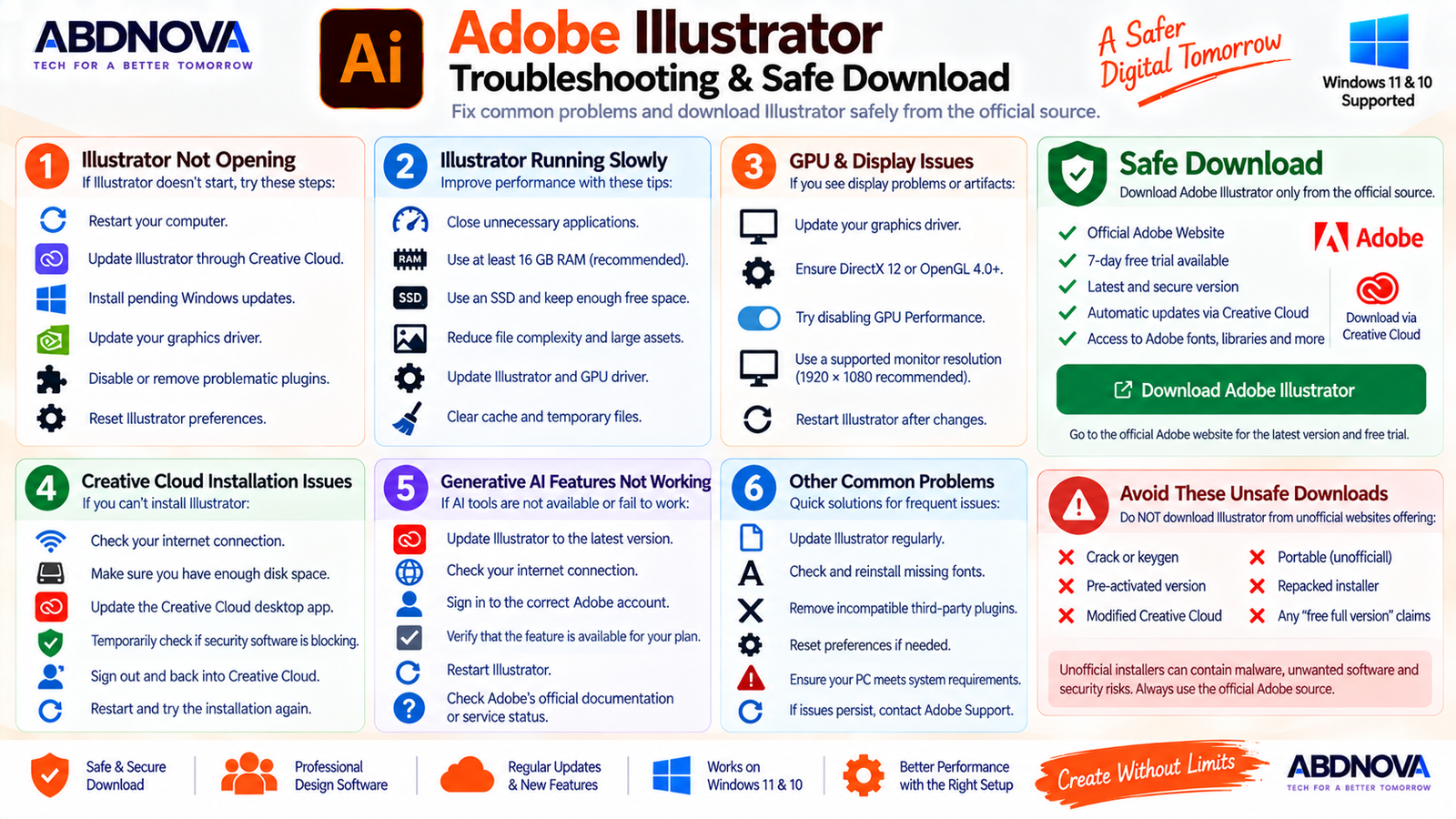
If Illustrator does not start:
- Restart Windows.
- Update Illustrator through Creative Cloud.
- Install available Windows updates.
- Update the graphics driver.
- Check problematic third-party plugins.
- Confirm the PC meets current Illustrator requirements.
- Reset Illustrator preferences when appropriate.
If the issue began immediately after installing a plugin, disable or remove that plugin first.
Adobe Illustrator Running Slowly
Large Illustrator files can become demanding when they contain many objects, effects, linked images or complex paths.
- Close unnecessary applications.
- Update Illustrator.
- Update the GPU driver.
- Keep adequate free disk space.
- Use SSD storage where possible.
- Reduce unnecessary project complexity.
- Check linked assets.
- Use sufficient RAM.
Adobe recommends 16 GB RAM even though the documented minimum is 8 GB.
Illustrator GPU Problems
GPU problems can cause display issues, slow zooming, rendering problems or application instability.
Update the graphics driver from the GPU or computer manufacturer’s official source and confirm that the GPU meets Illustrator’s current requirements.
Temporarily disabling GPU Performance can also help determine whether an issue is graphics-related.
Illustrator Installation Problems
If Creative Cloud cannot install Illustrator:
- Restart Windows.
- Check the internet connection.
- Confirm enough disk space is available.
- Update Creative Cloud.
- Check whether security software is blocking installation.
- Sign out and back into Creative Cloud.
- Retry the installation.
If Creative Cloud itself is damaged, use Adobe’s official troubleshooting or repair process rather than downloading Illustrator elsewhere.
Generative AI Features Not Working
- Update Illustrator.
- Check the internet connection.
- Sign in to the correct Adobe account.
- Verify feature availability for your account and version.
- Restart Illustrator.
- Check Adobe’s current documentation or service status.
How to Update Adobe Illustrator
Creative Cloud normally manages Illustrator updates.
Keeping Illustrator updated provides access to current features, bug fixes, compatibility improvements and security updates.
Safe Adobe Illustrator Download for Windows
Always obtain Illustrator from Adobe’s official website or the official Creative Cloud desktop application.
Unofficial installers can be modified and may contain malware, unwanted software, credential-stealing components or other security risks.
ABDNOVA recommends Adobe’s official Illustrator distribution only. We do not recommend cracked, patched, repacked, keygen-based or pre-activated versions.
Frequently Asked Questions
Does Adobe Illustrator work on Windows 11?
Yes. Adobe’s current Illustrator 30.0+ requirements include Windows 11 24H2 and 23H2.
Does Adobe Illustrator work on Windows 10?
Yes, on supported Windows 10 configurations. Adobe currently lists Windows 10 22H2 and Windows 10 21H2 LTSC for Illustrator 30.0+.
Is Adobe Illustrator free?
Illustrator is paid software, but Adobe currently provides a 7-day trial of the full desktop application.
How much RAM does Illustrator need?
Adobe specifies 8 GB minimum RAM and recommends 16 GB.
Is Illustrator good for logo design?
Yes. Illustrator is particularly suitable for logos because its vector artwork can be resized without normal raster-image pixelation.
Can Illustrator convert an image into a vector?
Yes. Illustrator includes Image Trace for converting suitable raster artwork into editable vector paths.
Does Illustrator include AI tools?
Yes. Current Illustrator versions include generative features such as Text to Vector Graphic, Generative Shape Fill and Generative Expand, with availability depending on the current version and Adobe services.
Do I need Creative Cloud to install Illustrator?
Adobe’s normal desktop workflow uses the Creative Cloud desktop application to download, install, manage and update Illustrator.
Should I download an Illustrator crack?
No. Use Adobe’s official installer and licensing system. Cracked, modified and pre-activated versions can create security, stability, licensing and update problems.
Final Thoughts
Adobe Illustrator Download for Windows provides professional vector-design tools for Windows 11 and supported Windows 10 systems.
Its combination of precise paths, Pen Tool controls, scalable vector artwork, typography, artboards, Image Trace, professional color tools, Creative Cloud integration and newer generative AI features makes Illustrator suitable for projects ranging from simple icons to complete branding systems.
For photo editing and raster-based creative work alongside Illustrator, you can also see our Adobe Photoshop for Windows guide.
For the safest installation, download Illustrator directly from Adobe, install it through Creative Cloud, keep the application updated and avoid modified or cracked installers.
Download Adobe Illustrator for Windows
Get the latest Illustrator desktop application and available trial directly from Adobe.


