


PDF-XChange Editor Download for Windows 11 & 10

Download PDF-XChange Editor for Windows 11 and 10 to view, edit, annotate, OCR, search, sign and manage PDF documents with a powerful desktop interface.
PDF-XChange Editor Download for Windows gives Windows users a feature-rich PDF viewer and editor for reading, creating, editing, annotating, OCR-processing, signing, searching and managing PDF documents.
Unlike lightweight PDF readers that mainly open documents, PDF-XChange Editor provides a much broader collection of editing and productivity tools inside a Windows desktop application.
One of its biggest advantages is its free-feature model. More than 70% of Editor features can be used without purchasing a license. However, certain licensed features remain visible in the free version and can add a watermark if used without the required license.
PDF-XChange Editor Download for Windows – Quick Overview
| Information | Details |
|---|---|
| Software | PDF-XChange Editor |
| Current Version | 11.0.1.0 |
| Updated | June 8, 2026 |
| Windows 11 | Supported |
| Windows 10 | Supported |
| Free Features | More than 70% |
| PDF Viewer | Yes |
| Edit PDF Content | Yes |
| Annotations | Yes |
| Comments | Yes |
| Basic OCR | Free |
| Digital Signatures | Yes |
| PDF Creation | Yes |
| Printer Lite | Included |
| Portable Version | Yes |
| MSI Installer | Yes |
| Editor Plus | Available |
| Fillable Form Creation | Editor Plus |
| Enhanced OCR | Editor Plus |
What Is PDF-XChange Editor?
PDF-XChange Editor is a Windows PDF productivity application designed to do much more than simply display PDF files.
Key capabilities include:
- Open and read PDF documents.
- Edit existing PDF content.
- Add comments and annotations.
- Highlight and mark up text.
- Run OCR on scanned PDFs.
- Search recognized document text.
- Create PDF files.
- Digitally sign PDFs.
- Manage PDF pages.
- Work with forms.
- Use PDF-XChange Printer Lite.
- Run the official portable version.
PDF-XChange Editor Free vs Licensed Features
PDF-XChange Editor does not work like a normal time-limited trial.
The developer states that more than 70% of Editor features do not require a license.
Licensed Feature Without License → Watermark May Be Added
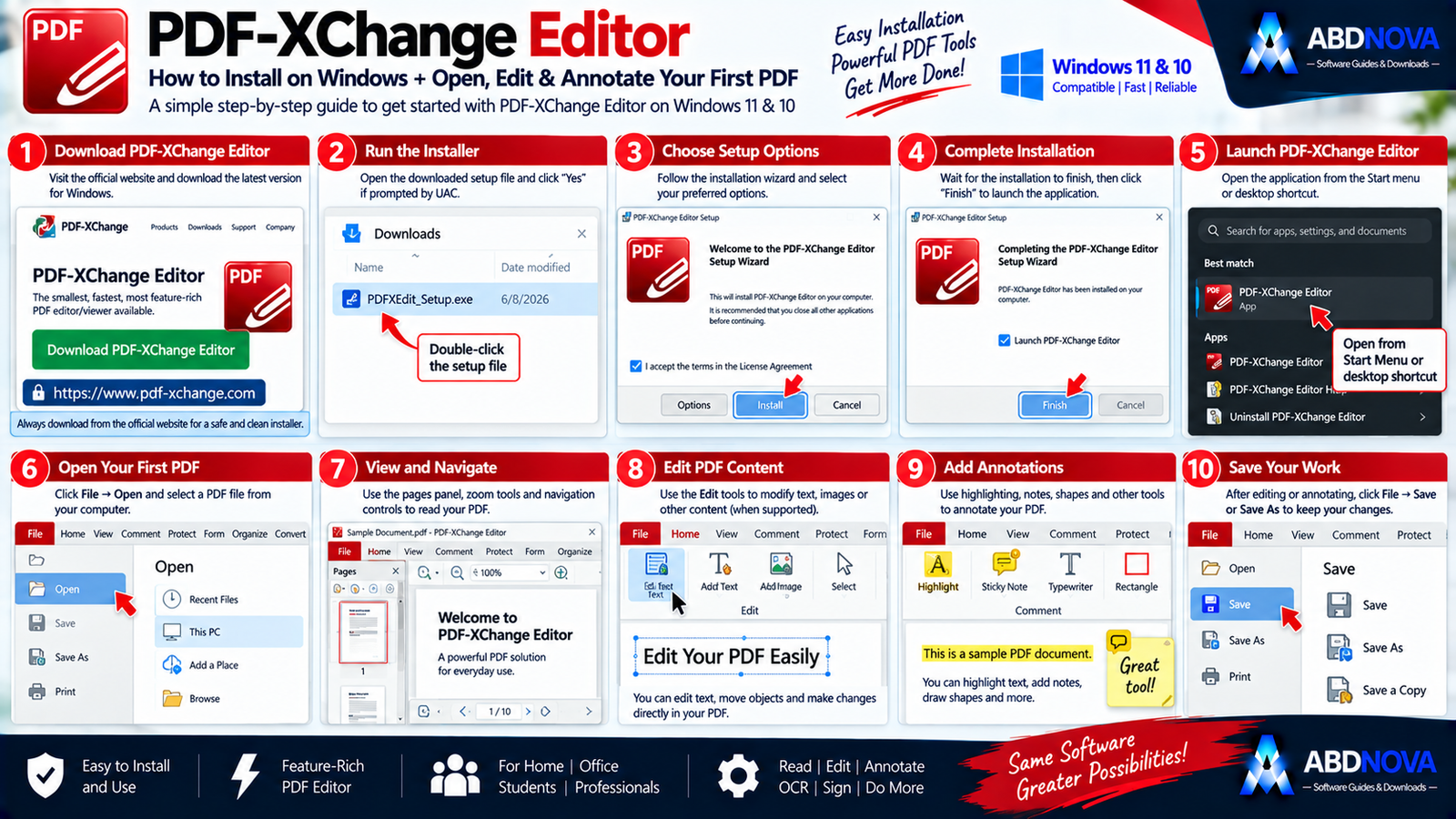
How to Install PDF-XChange Editor on Windows
- Visit the official PDF-XChange Editor download page.
- Select PDF-XChange Editor.
- Choose the Windows package recommended for your architecture.
- Download the installer.
- Open the setup package.
- Review the installation options.
- Complete installation.
- Launch PDF-XChange Editor.
- Select File → Open.
- Choose your first PDF document.
You can then begin reading, searching, commenting, editing or annotating the PDF.
PDF-XChange Editor MSI vs Portable Version
MSI Installer
The official documentation generally recommends the appropriate MSI package for the system architecture.
MSI packages are also useful for enterprise and managed Windows deployment.
Portable Version
PDF-XChange Editor also has an official portable version.
The portable build:
- Requires no traditional installation.
- Makes no normal Registry installation changes.
- Can run from a USB device.
- Stores user settings inside its application folder.
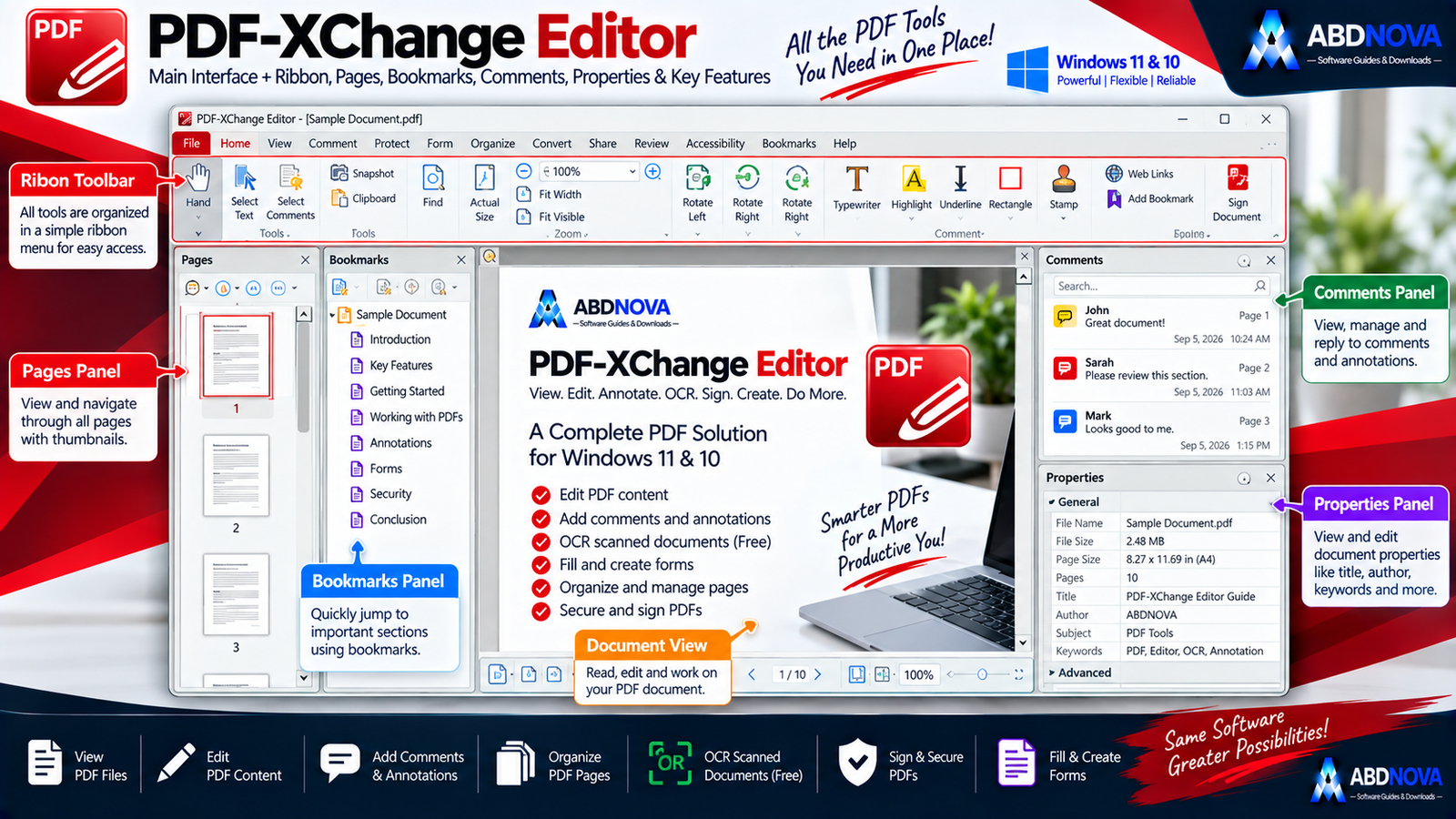
PDF-XChange Editor Main Interface
PDF-XChange Editor uses a ribbon-style desktop interface designed for document viewing, editing and navigation.
Ribbon Toolbar
The Ribbon provides quick access to viewing, editing, commenting, organizing and document tools.
Document Tabs
Multiple PDF documents can stay open at the same time and be switched using tabs.
Pages / Thumbnails Panel
The thumbnail panel helps users navigate longer documents and manage pages visually.
Bookmarks
Bookmarks provide fast navigation inside structured PDF documents.
Comments Panel
Annotations and review comments can be managed from the comments interface.
Main Document View
This is the central workspace where PDFs are displayed and edited.
Open, Read & Search PDF Files
For ordinary PDF reading, PDF-XChange Editor provides:
- Zoom controls.
- Page navigation.
- Search.
- Full-screen viewing.
- Multiple document tabs.
- Page thumbnails.
- Bookmarks.
- Selection tools.
If you only need a very lightweight reader without advanced editing tools, see our SumatraPDF Download for Windows guide.

PDF-XChange Editor PDF Editing Explained
Edit PDF Text & Content
One of the biggest differences between PDF-XChange Editor and a basic reader is its ability to work with existing PDF content.
Depending on the document and selected tool, you can edit:
- Text.
- Formatting.
- Document content.
- Page elements.
Comments & Annotations
PDF-XChange Editor includes extensive markup tools such as:
- Highlight.
- Underline.
- Strikeout.
- Sticky Notes.
- Text Boxes.
- Callouts.
- Shapes.
- Arrows.
- Stamps.
- Drawing tools.
These are useful for contracts, reports, assignments, manuals, team reviews and business documents.
Highlight PDF Text
- Open the PDF.
- Select the Highlight tool.
- Drag across the required text.
- Save the document.
Manage PDF Pages
Depending on the available feature and license level, page-management workflows can include:
- Reordering pages.
- Rotating pages.
- Inserting pages.
- Deleting pages.
- Extracting pages.
- Managing document structure.
Digital Signatures
PDF-XChange Editor supports digital signing for workflows where certificate-based document verification is appropriate.
A digital signature is different from simply placing a picture of a handwritten signature onto a page.

PDF-XChange Editor Advanced Features
OCR Scanned PDFs
OCR stands for Optical Character Recognition.
It can convert text inside scanned PDF images into searchable recognized content.
Basic OCR is available free of charge in PDF-XChange Editor.
Enhanced OCR
PDF-XChange Editor Plus includes a more advanced OCR engine intended for more demanding OCR workflows.
Advanced OCR → Editor Plus may be more suitable
Create PDF Files
PDF-XChange Editor can create PDF documents in addition to opening and editing existing files.
PDF-XChange Printer Lite
PDF-XChange Printer Lite is included with Editor.
This makes it possible to create PDF output from printable documents, web pages, reports, forms and images.
Forms
Regular Editor can work with PDF forms, while Editor Plus adds tools for creating and editing fillable forms.
Editor Plus Features
Officially highlighted additional Editor Plus features include:
- Enhanced OCR.
- Compare Documents.
- Identify Forms.
- Create fillable forms.
- Edit fillable forms.
- Dynamic stamps.
Why Did PDF-XChange Add a Watermark?
If PDF-XChange Editor adds a watermark to an output file, this usually means a licensed feature was used without the appropriate license.
It does not mean that every Editor function requires payment.

PDF-XChange Editor vs PDF24 Creator vs PDFsam Basic vs SumatraPDF
| Feature | PDF-XChange Editor | PDF24 Creator | PDFsam Basic | SumatraPDF |
|---|---|---|---|---|
| Read PDFs | Excellent | Yes | Basic workflow | Excellent |
| Edit PDF Content | Strong | Basic tools | No | No |
| Annotations | Excellent | Strong | Basic | Limited |
| OCR | Yes | Yes | No | No |
| Enhanced OCR | Editor Plus | Different workflow | No | No |
| Digital Signatures | Yes | Yes | No | No |
| Merge / Split | Yes | Yes | Excellent | No |
| PDF Creation | Yes | Yes | No | No |
| Virtual PDF Printer | Included | Yes | No | No |
| Portable | Yes | Depends on package | Yes | Yes |
| Best For | Advanced PDF editing | Free all-in-one PDF tools | Split / merge / page management | Lightweight reading |
The best choice depends on what you need. PDF-XChange Editor is aimed at advanced PDF viewing, editing, OCR and annotation. PDF24 Creator provides a broader free PDF toolbox, PDFsam Basic specializes in merge, split and page-management workflows, while SumatraPDF focuses on fast lightweight PDF reading.

PDF-XChange Editor Troubleshooting
PDF-XChange Editor Won’t Install
First verify that your system is running Windows 10 or later.
Using the official MSI recommended for your system architecture may also help.
PDF Opens but Cannot Be Edited
Some PDFs may contain:
- Scanned pages.
- Security restrictions.
- Flattened content.
- Complex page structures.
A scanned PDF may require OCR before its text can be recognized.
OCR Doesn’t Recognize Text Correctly
Try:
- Higher-resolution scans.
- Straight pages.
- Clear text.
- Good contrast.
- Correct OCR language.
For demanding OCR workflows, Enhanced OCR in Editor Plus may provide better results.
A Watermark Appeared
Check whether you used a licensed feature. Licensed features used without a suitable license may add watermarks to document output.
Portable Version Doesn’t Save Settings Where Expected
The portable edition stores settings in its own application folder rather than the normal installed-app configuration locations.
Is PDF-XChange Editor Safe?
Yes, when downloaded directly from the official PDF-XChange website.
The developer states that downloads from its website use clean, optimized installers without third-party add-ons, extra offers or bundled downloads.
- PDF-XChange Editor Crack.
- PDF-XChange Editor Pro Crack.
- Activated PDF-XChange.
- Modified installers.
- Unknown repacks.
- Third-party download bundles.
Safe PDF-XChange Editor Download for Windows
The safest source for PDF-XChange Editor Download for Windows is the official PDF-XChange website.
Use the official PDF-XChange Editor download page to get the latest stable Windows release.
Frequently Asked Questions
What is the latest PDF-XChange Editor version?
The current stable version is PDF-XChange Editor 11.0.1.0, updated June 8, 2026.
Does PDF-XChange Editor work on Windows 11?
Yes. The current release supports Windows 10 and later, including Windows 11.
Does PDF-XChange Editor work on Windows 10?
Yes. Windows 10 is officially supported.
Is PDF-XChange Editor free?
More than 70% of Editor features can be used without a license.
Does the free version expire?
The normal free functionality is not a conventional time-limited trial. Licensed features follow separate licensing rules.
Why does PDF-XChange Editor add a watermark?
A watermark can appear when a licensed feature is used without the required license.
Is OCR free in PDF-XChange Editor?
Yes. Basic OCR is available in the regular free Editor.
What is Enhanced OCR?
Enhanced OCR is an Editor Plus feature designed for more advanced OCR workflows.
Does PDF-XChange Editor have a portable version?
Yes. An official portable version is available.
Can PDF-XChange Editor edit PDF text?
Yes. It provides tools for editing existing PDF content, although some advanced functions may require a license.
Does PDF-XChange Editor support digital signatures?
Yes. Digital signing is an officially supported capability.
What is the difference between Editor and Editor Plus?
Editor Plus adds features such as Enhanced OCR, Compare Documents, form identification, fillable-form creation and editing, and dynamic stamps.
Final Thoughts
PDF-XChange Editor Download for Windows is an excellent choice for Windows 11 and Windows 10 users who need substantially more functionality than a simple PDF reader.
Its combination of PDF viewing, content editing, annotations, comments, free OCR, digital signatures, PDF creation, portable operation and included PDF-XChange Printer Lite makes it particularly useful for office, study, document-review and professional PDF workflows.
The free version is unusually capable, but remember the licensing rule: more than 70% of features are free, while using certain licensed features without a license can add watermarks.
Ready to download PDF-XChange Editor?
Get the latest stable Windows release directly from the official PDF-XChange website. ABDNOVA recommends official sources only.


