
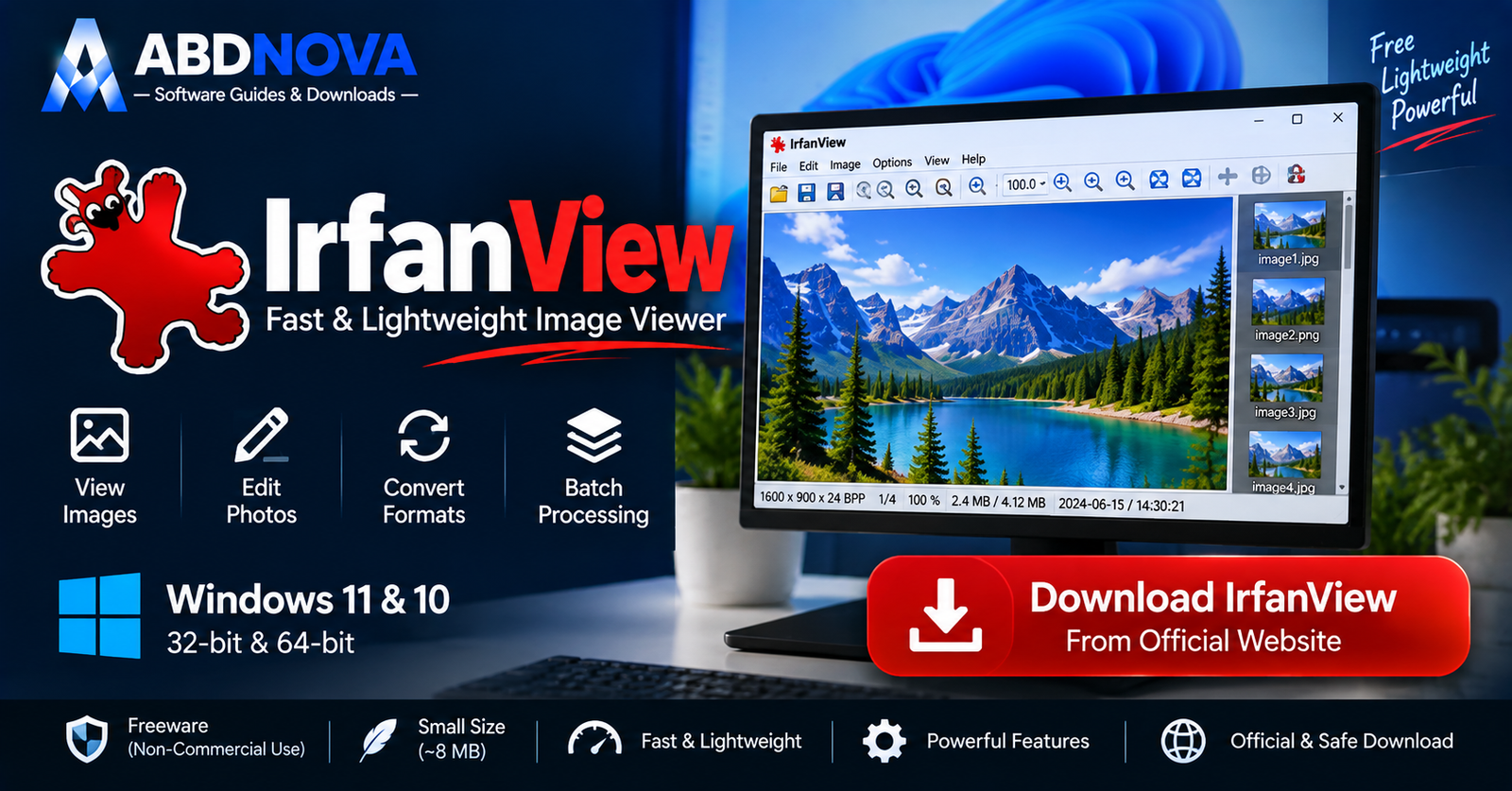

IrfanView Download for Windows – Fast Image Viewer & Converter
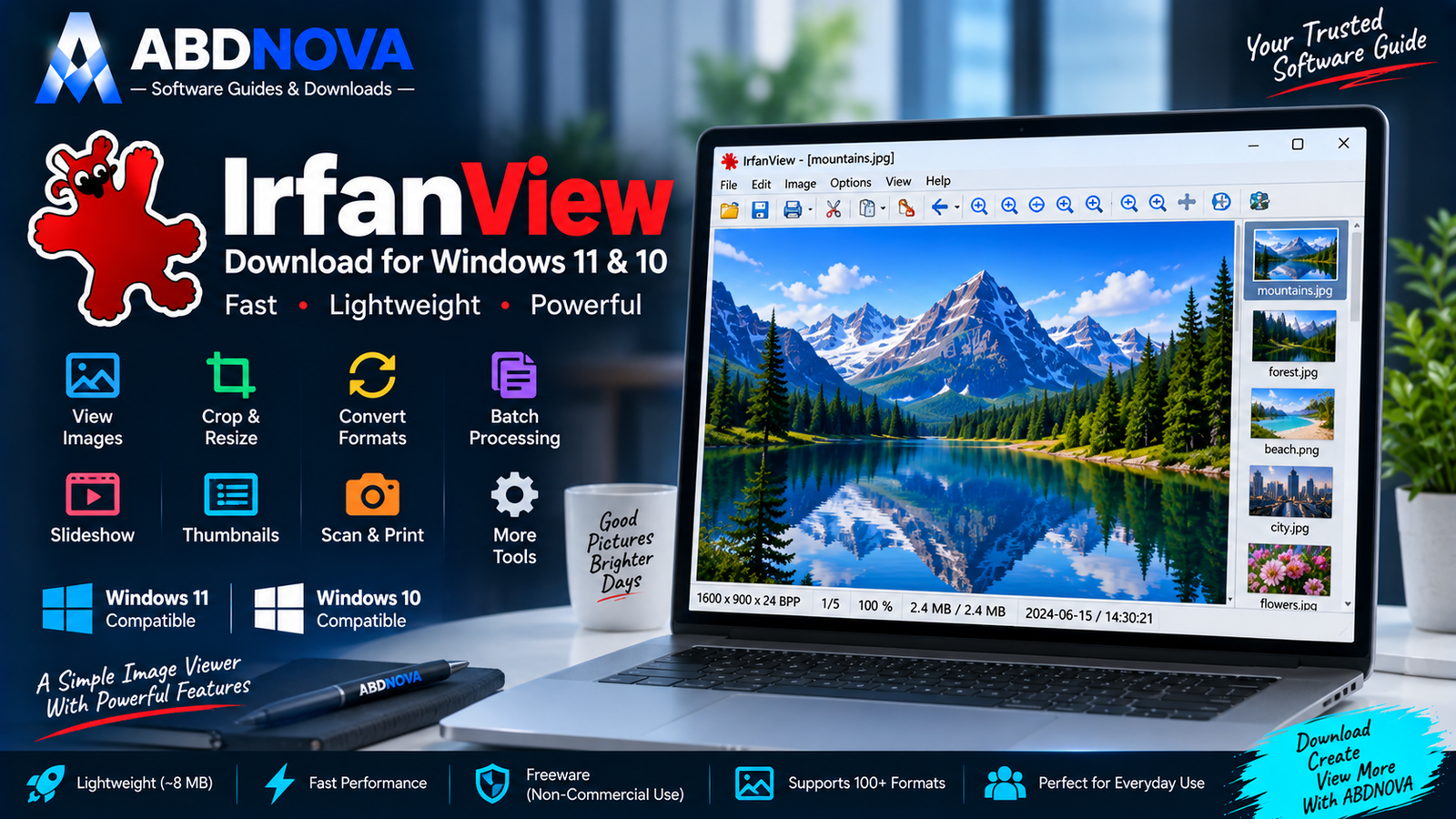
Download IrfanView for Windows 11 and 10 to quickly view, resize, crop, convert and batch-process images with a lightweight desktop utility.
IrfanView Download for Windows gives Windows 11 and Windows 10 users a fast and lightweight image viewer with useful tools for image conversion, resizing, cropping, batch processing, slideshows, scanning, printing and basic image editing.
Unlike large photo-management or professional editing applications, IrfanView is designed to open quickly and use very few system resources. The core application is only around 8 MB, making it especially useful when speed and simplicity matter.
IrfanView also supports additional formats and capabilities through optional PlugIns.
IrfanView Download for Windows – Quick Overview
| Information | Details |
|---|---|
| Software | IrfanView |
| Current Version | 4.75 |
| Type | Image Viewer / Image Utility |
| Windows 11 | Supported |
| Windows 10 | Supported |
| 64-bit | Available |
| 32-bit | Available |
| Image Viewer | Yes |
| Basic Image Editing | Yes |
| Batch Conversion | Yes |
| Batch Rename | Yes |
| Slideshow | Yes |
| Thumbnails | Yes |
| PlugIns | Yes |
| Portable Use | Yes |
| License | Freeware for non-commercial use |
| Official Source | IrfanView.com |
What Is IrfanView?
IrfanView is a Windows-focused graphic viewer created by Irfan Skiljan.
Although its main purpose is image viewing, it provides much more functionality than a basic photo viewer.
IrfanView can be used to:
- View images.
- Resize and crop photos.
- Rotate images.
- Convert image formats.
- Compress JPG files.
- Rename multiple files.
- Batch-convert images.
- Create slideshows.
- Create contact sheets.
- Scan images.
- Print photos.
- View image metadata.
- Apply basic effects.
- Work with additional formats through PlugIns.
IrfanView 64-bit vs 32-bit
IrfanView 64-bit
For most modern Windows 11 and Windows 10 computers, choose IrfanView 64-bit.
This is the preferred version for current PCs and works well with modern Windows installations.
IrfanView 32-bit
A 32-bit build is also available and can even run on 64-bit Windows.
Use it only if you have a specific compatibility requirement.
IrfanView PlugIns Explained
The standard IrfanView installation already includes the core functionality needed for normal image viewing and basic editing.
The separate PlugIns package adds extra features and format support.
PlugIns can extend support for:
- AVIF.
- Camera RAW.
- DICOM.
- DjVu.
- EXR.
- Additional image formats.
- Effects.
- Face detection.
- Email functionality.
- CAD-related formats.
- Multimedia functionality.
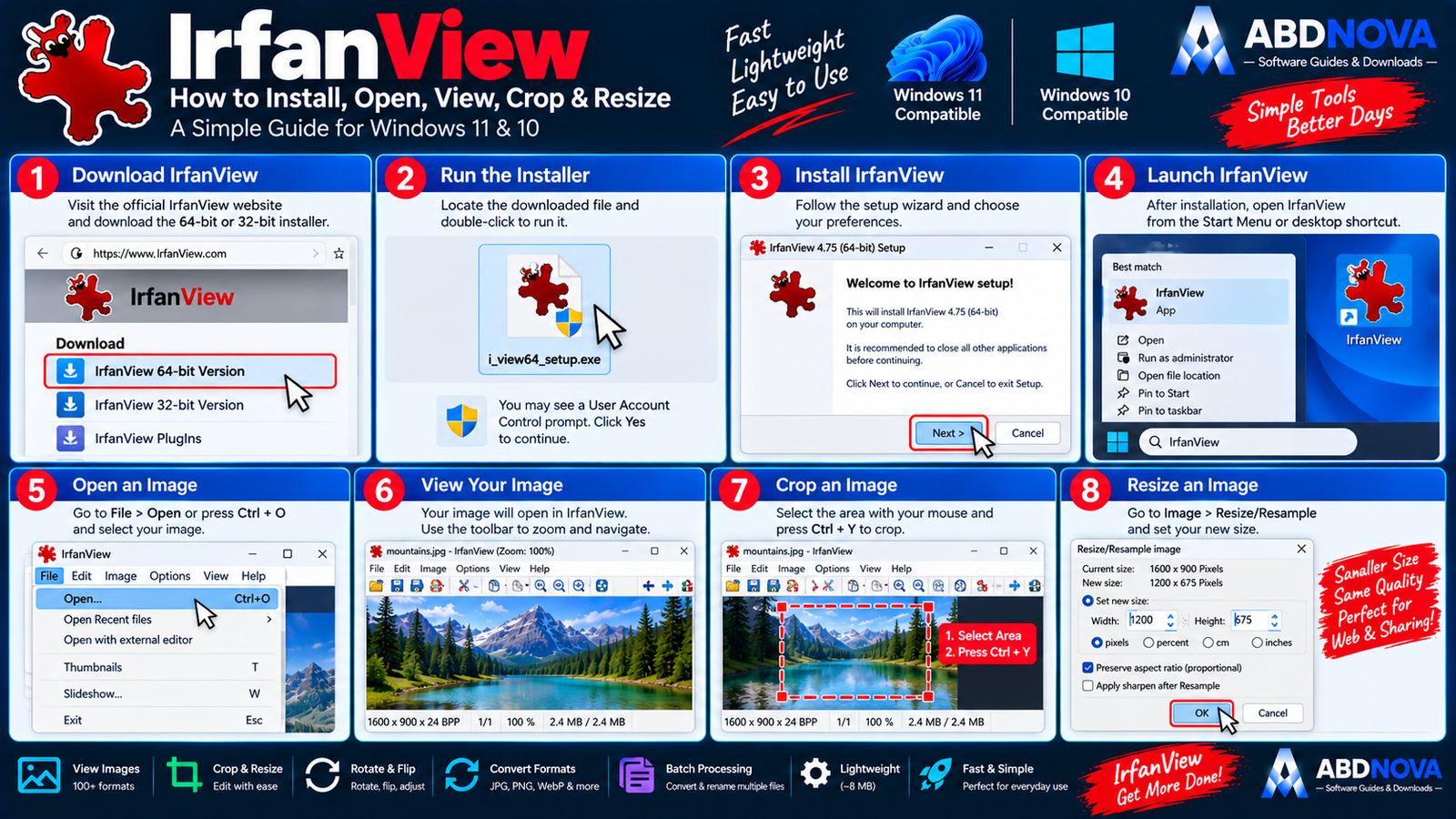
How to Install IrfanView on Windows
- Open the official IrfanView download page.
- Choose the 64-bit version for most modern PCs.
- Download the official installer.
- Open the EXE file.
- Review installation options.
- Choose the installation directory if needed.
- Select shortcut and file-association options.
- Complete installation.
- Launch IrfanView.
- Use File → Open to open your first image.
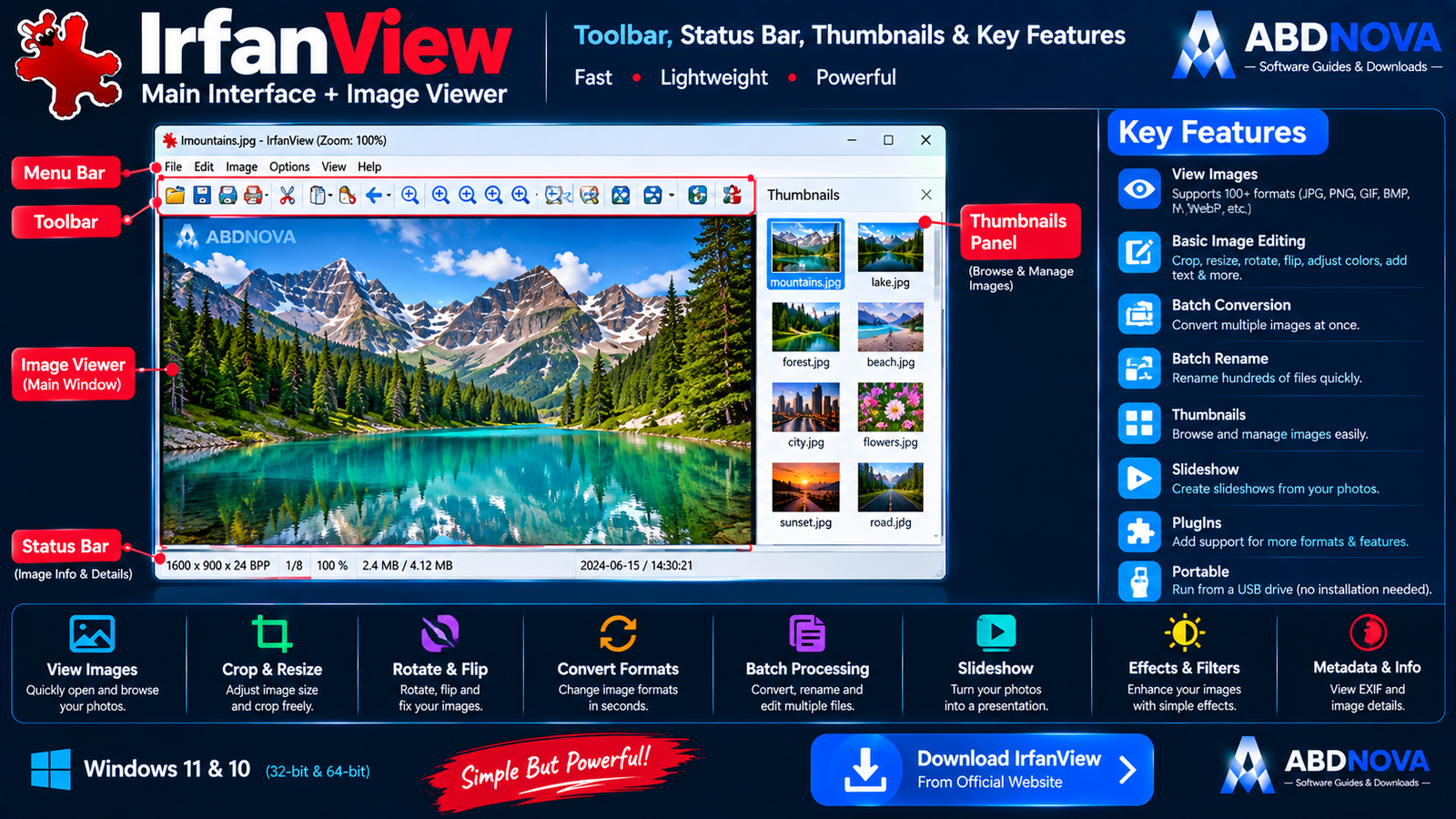
IrfanView Main Interface – Image Viewer, Toolbar & Thumbnails
IrfanView’s interface is intentionally compact and lightweight.
Menu Bar
The main menu provides access to:
- File.
- Edit.
- Image.
- Options.
- View.
- Help.
Toolbar
The toolbar gives quick access to commonly used image-viewing and editing commands.
Image Viewing Area
The selected image appears in the main workspace.
Status Bar
The status bar can display useful information about the current image.
Thumbnail Browser
IrfanView also includes a thumbnail-browsing workflow for visually exploring image folders.
It can help you:
- Browse folders visually.
- Select multiple images.
- Sort images.
- Batch-process files.
- Print multiple images.
- Create contact sheets.
Supported Image Formats
IrfanView supports a broad range of common image formats.
Examples include:
- JPG / JPEG.
- PNG.
- GIF.
- BMP.
- WebP.
- TIFF.
- ICO.
- JPEG 2000.
- JPEG XL.
With appropriate PlugIns or additional software, IrfanView can also work with formats such as:
- AVIF.
- HEIC.
- Camera RAW.
- PSD-related workflows.
- EXR.
- PDF.
- SVG/CAD-related formats.
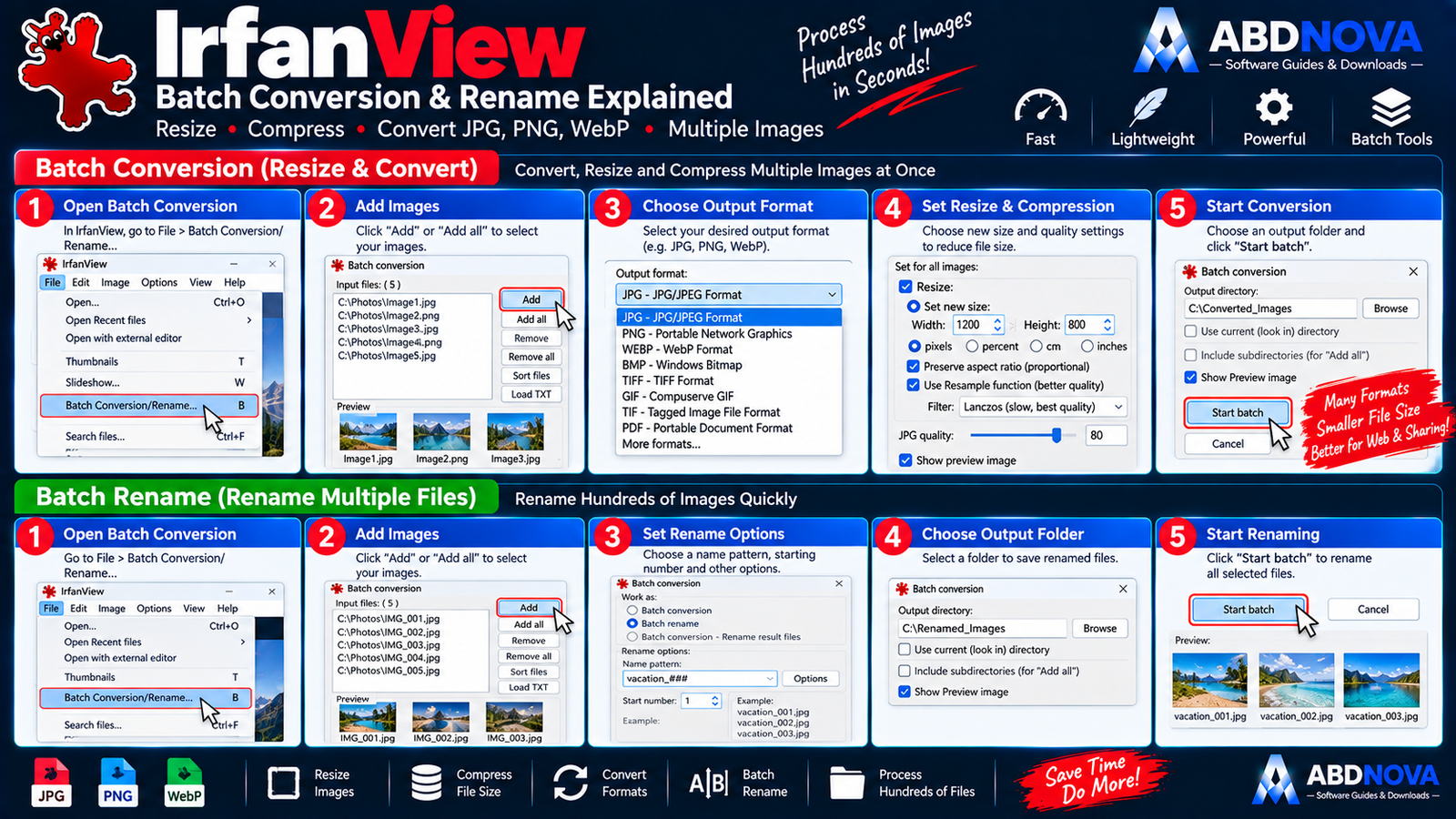
IrfanView Batch Conversion, Rename & Image Compression
Batch Conversion
Batch processing is one of IrfanView’s strongest features.
Instead of converting images one by one, IrfanView can process many files together.
For example:
100 PNG images → Batch Conversion → 100 JPG images
This is especially useful for:
- Website owners.
- Photographers.
- Bloggers.
- Product-image management.
- Large photo collections.
Batch Rename
IrfanView can also rename many files together.
For example:
IMG_4821.jpg → holiday-001.jpg
This is much faster than manually renaming hundreds of images.
Resize Images
IrfanView can resize images to different pixel dimensions.
This is useful for:
- Website images.
- Blog posts.
- Email attachments.
- Social media.
- Thumbnails.
- Reducing storage usage.
Convert Images to Another Format
Format conversion is straightforward.
For example:
BMP → JPG
Open the source image and use:
File → Save As → JPG
Reduce JPG File Size
To reduce the size of a JPG file, you can adjust:
- Image dimensions.
- JPG quality.
- Metadata.
Reducing image dimensions and using a reasonable JPG quality level can significantly lower file size for website images.
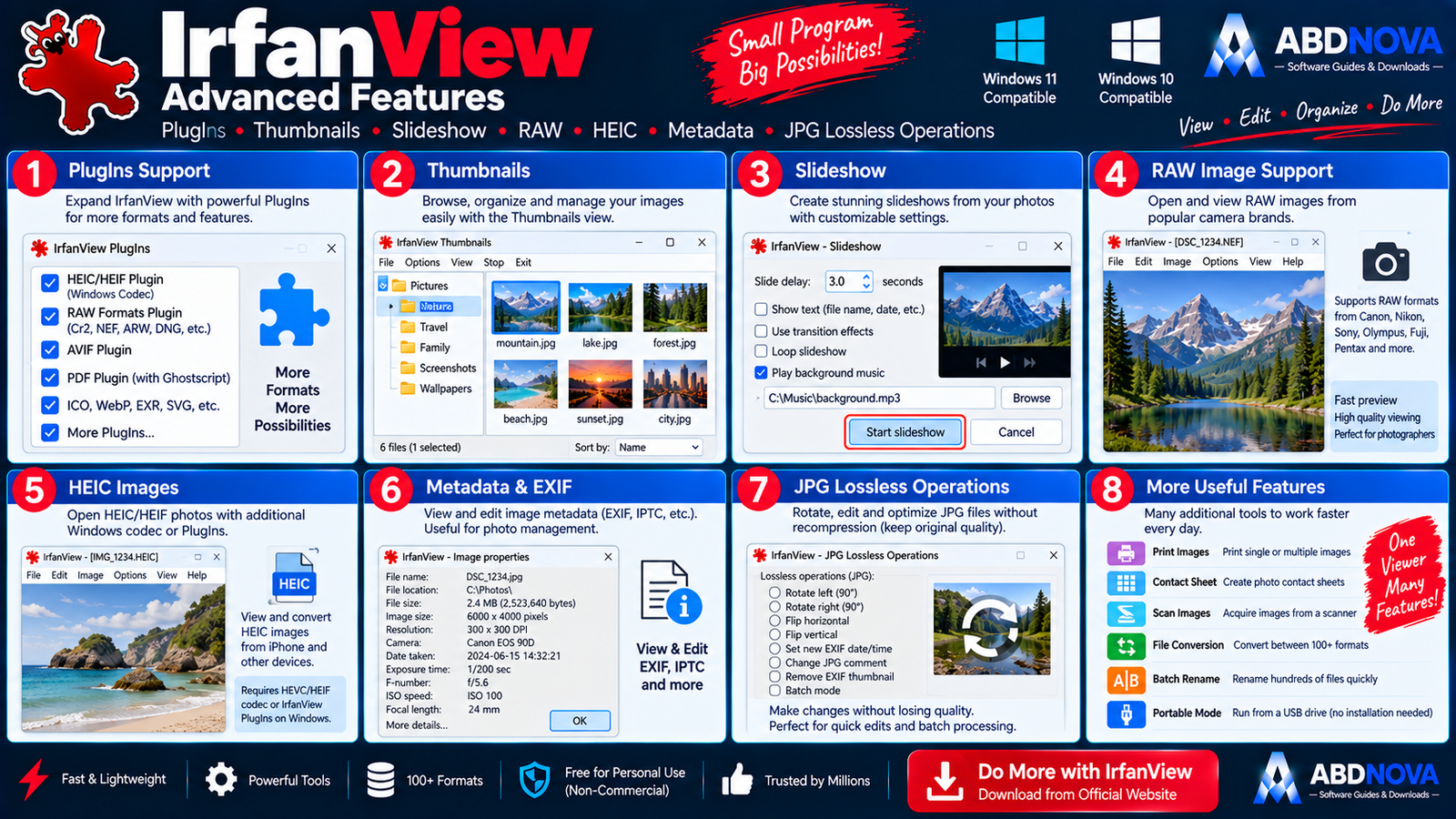
IrfanView Advanced Features – Thumbnails, Slideshows & PlugIns
Create Contact Sheets
IrfanView can combine thumbnails from multiple photos into a single contact sheet.
This is useful for:
- Photo indexes.
- Proof sheets.
- Catalog previews.
- Printing several images.
- Visual archives.
IrfanView Slideshow
You can create slideshows from selected images.
Depending on the installed PlugIns and setup, slideshows can also support additional multimedia functionality.
JPG Lossless Operations
IrfanView supports several JPEG operations that can avoid unnecessary recompression.
Supported lossless workflows can include:
- Rotation.
- IPTC operations.
- Comments.
- EXIF thumbnail rebuilding.
HEIC Images
HEIC support may require additional HEIF/HEVC components or another compatible codec on Windows 10 and Windows 11.
If an HEIC image does not open immediately, that does not necessarily mean IrfanView itself is broken.
RAW Images
IrfanView can work with numerous camera RAW formats through RAW-related support and PlugIns.
Camera workflows can include formats from manufacturers such as Canon, Nikon, Sony, Olympus, Fuji and Pentax.
PDF Support
PDF support is not completely built into the base IrfanView installation.
The official documentation notes that PDF loading requires the IrfanView PlugIns plus a compatible Ghostscript installation.
Portable IrfanView
IrfanView can also be used portably.
Possible portable workflows include:
- Copying the installed IrfanView folder to a USB drive.
- Installing directly into a USB folder.
- Using a ZIP package in a portable location.
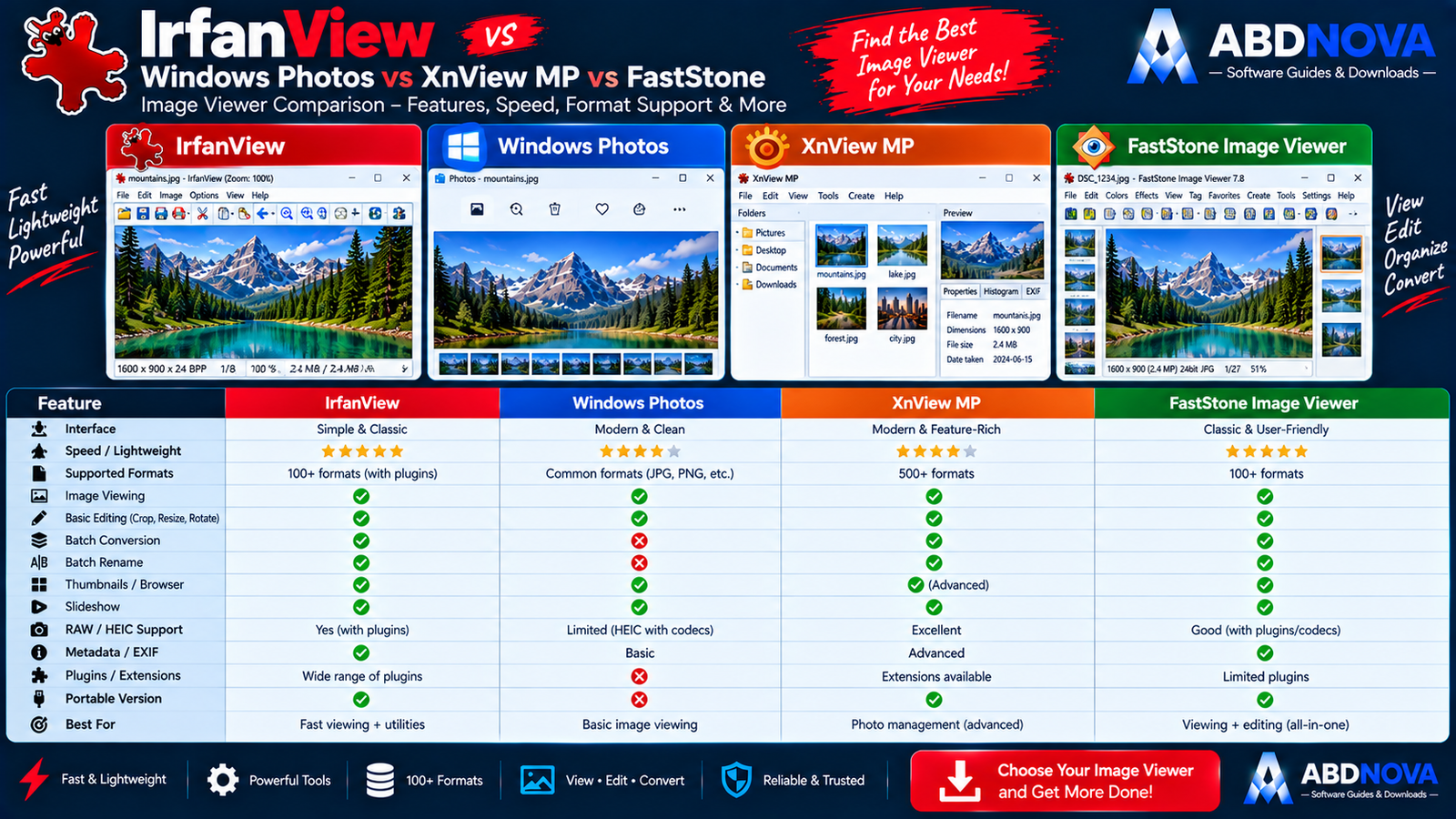
IrfanView vs Windows Photos vs XnView MP vs FastStone Image Viewer
| Feature | IrfanView | Windows Photos | XnView MP | FastStone |
|---|---|---|---|---|
| Fast Image Viewing | Excellent | Good | Excellent | Excellent |
| Lightweight | Excellent | Good | Moderate | Excellent |
| Batch Conversion | Excellent | Limited | Excellent | Excellent |
| Batch Rename | Yes | Limited | Yes | Yes |
| Basic Editing | Yes | Yes | Yes | Yes |
| PlugIns | Strong | No | Different system | Limited |
| Thumbnail Browser | Yes | Yes | Strong | Strong |
| Portable Use | Yes | No | Available | Available |
| Best For | Fast viewing + utilities | Basic Windows viewing | Photo management | Viewing + editing |
IrfanView vs XnView MP
IrfanView is especially attractive when speed, very small program size and batch utilities are the main priorities.
XnView MP provides stronger photo-management capabilities and is generally better suited to users organizing larger image libraries. See our XnView MP Download for Windows guide for its photo-management features, format support and batch tools.
IrfanView vs FastStone Image Viewer
FastStone Image Viewer combines fast image viewing with a more visual browsing and editing workflow. See our FastStone Image Viewer Download for Windows guide for its browsing, editing, image comparison and batch-processing features.
IrfanView is especially attractive when you want a smaller, simpler image utility with strong conversion and batch tools.
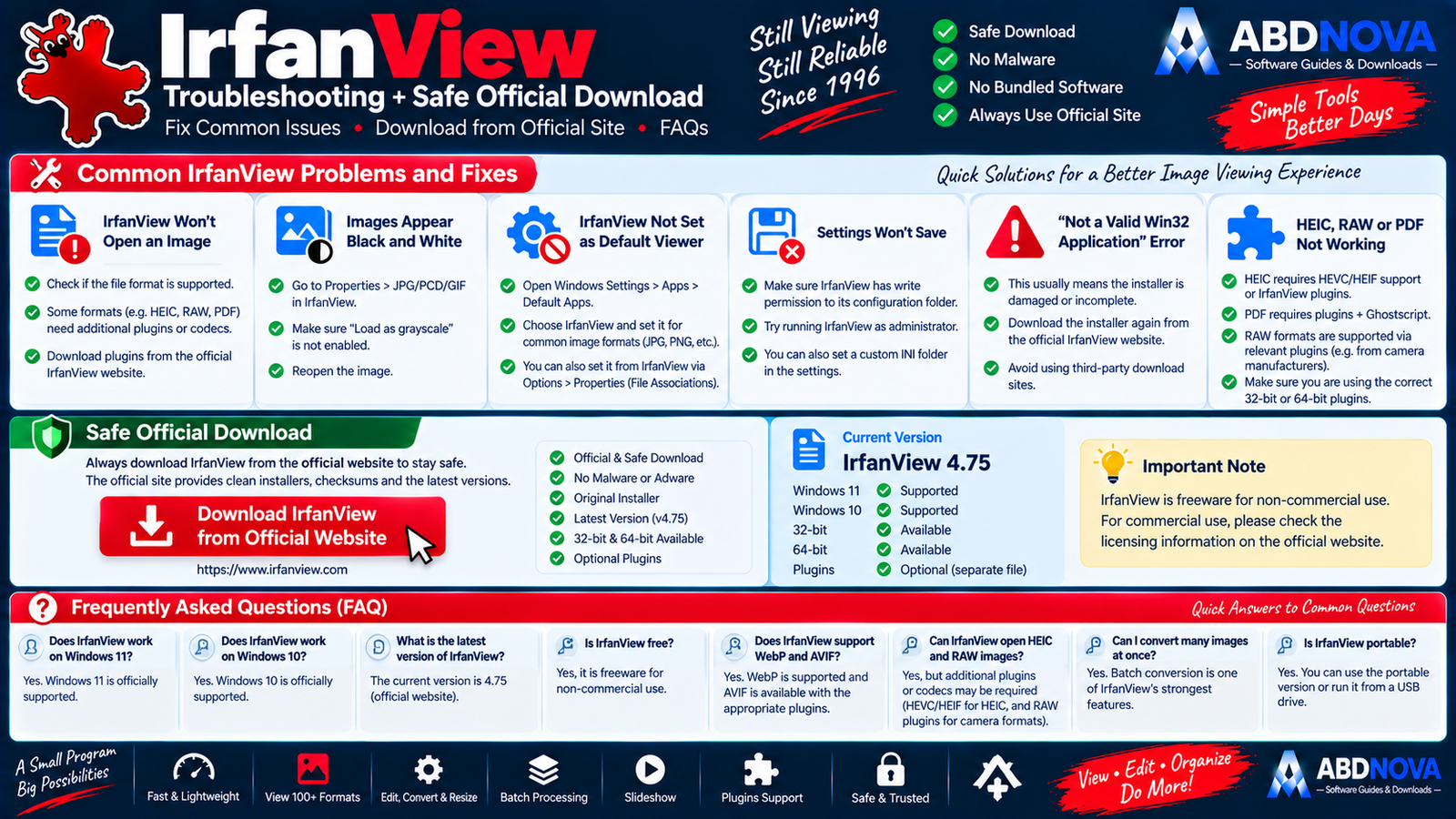
IrfanView Troubleshooting
IrfanView Won’t Open an Image
First check whether the format is supported.
Some formats require:
- IrfanView PlugIns.
- Windows codecs.
- Additional software.
HEIC and PDF are good examples.
Images Appear Black and White
Check:
Properties → JPG/PCD/GIF → Load as grayscale
If this setting is enabled accidentally, color images may appear grayscale.
Windows 11 Won’t Use IrfanView as Default
Open:
Settings → Apps → Default Apps
Then assign the required image extensions to IrfanView.
IrfanView Settings Won’t Save
This can happen when the INI configuration file is stored in a folder where IrfanView does not have write permission.
Installer Says “Not a Valid Win32 Application”
This can indicate a damaged or incomplete installer download.
Download the official installer again and retry.
Is IrfanView Safe?
Yes, when downloaded from the official IrfanView website or one of the download locations listed by the developer.
- IrfanView Crack.
- IrfanView Pro Crack.
- IrfanView Premium.
- IrfanView MOD.
- Pre-Activated IrfanView.
- Repacked IrfanView.
The developer also warns users to be careful with unapproved software-download websites that use custom downloaders or request payment for a free download.
Safe IrfanView Download for Windows
The safest source for IrfanView Download for Windows is the official IrfanView website.
Use the official IrfanView download page to get the current 64-bit or 32-bit version.
Frequently Asked Questions
Does IrfanView work on Windows 11?
Yes. Windows 11 is officially supported.
Does IrfanView work on Windows 10?
Yes. Windows 10 is officially supported.
What is the current IrfanView version?
The official website currently lists IrfanView 4.75.
Is IrfanView available in 64-bit?
Yes. Both 64-bit and 32-bit builds are available.
Is IrfanView free?
IrfanView is freeware for non-commercial use. Commercial use has separate licensing requirements.
Does IrfanView support WebP?
Yes. WebP is included in the supported-format list.
Does IrfanView support AVIF?
Yes, AVIF can be supported through the relevant format or PlugIn support.
Can IrfanView open HEIC?
Yes, but additional HEIC/HEIF/HEVC support may be required on Windows.
Can IrfanView open PDF files?
Yes, but PDF loading requires additional components such as IrfanView PlugIns and a compatible Ghostscript installation.
Can IrfanView convert many images at once?
Yes. Batch conversion is one of IrfanView’s strongest features.
Can IrfanView batch-rename images?
Yes. IrfanView can rename many images together.
Is IrfanView portable?
Yes. IrfanView can be used from a USB drive or another portable folder.
Does IrfanView need PlugIns?
No for basic use. PlugIns are mainly needed for additional formats and extra features.
Is IrfanView safe?
Yes, when downloaded from the official IrfanView website or another developer-approved source.
Final Thoughts
IrfanView Download for Windows is an excellent choice for users who want a fast image viewer without installing a large photo-management suite.
Its biggest advantages are its very small program size, fast image viewing, broad format support, resizing, conversion, batch processing, thumbnails, slideshows, contact sheets and optional PlugIns.
For most Windows 11 and Windows 10 users, the 64-bit version is the best choice. Download IrfanView from the official developer source and add PlugIns only when you need extra format support or functionality.
Ready to download IrfanView?
Get the current 64-bit or 32-bit version directly from the official IrfanView website. ABDNOVA recommends official sources only.


