


Spotify Download for Windows – Music & Podcast Streaming App

Download Spotify for Windows 11 and Windows 10 64-bit to stream music and podcasts, manage playlists, view lyrics, use Local Files and control devices with Spotify Connect.
Spotify Download for Windows gives Windows users a dedicated desktop app for streaming music, podcasts and supported audiobook content.
The Spotify desktop app lets you search for songs and artists, create playlists, follow podcasts, manage Your Library, view lyrics, play legally stored local audio files and switch playback between compatible devices using Spotify Connect.
Spotify offers both Free and Premium plans. Premium adds features such as ad-free music listening and offline music downloads, while some features and content availability can vary by country, account and subscription plan.
Spotify Download for Windows – Quick Overview
| Information | Details |
|---|---|
| Software | Spotify |
| Type | Music & Podcast Streaming App |
| Windows 11 | Supported |
| Windows 10 | 64-bit supported |
| Free Plan | Yes |
| Premium Plans | Yes |
| Music Streaming | Yes |
| Podcasts | Yes |
| Audiobooks | Available in supported regions and plans |
| Playlists | Yes |
| Lyrics | Yes, for supported tracks |
| Local Files | Yes |
| Spotify Connect | Yes |
| Offline Music | Premium |
| Offline Podcasts | Available |
| Web Player | Yes |
| Official Source | Spotify |
What Is Spotify?
Spotify is a streaming platform built around music, podcasts, audiobooks, playlists, recommendations and personalized listening.
On Windows, Spotify can be used for:
- Streaming music.
- Following artists.
- Listening to podcasts.
- Accessing supported audiobooks.
- Creating playlists.
- Managing Your Library.
- Viewing lyrics.
- Playing local audio files.
- Using Spotify Connect.
- Managing playback queues.
- Offline listening with eligible downloads.
- Using the Spotify Web Player.
Spotify Windows System Requirements
Spotify’s current supported-device documentation lists:
- Windows 10 (64-bit).
- Windows 11 or above.

How to Install Spotify on Windows
- Open Spotify’s official Windows download page.
- Download the current Windows installer.
- Avoid unofficial download sites or repackaged installers.
- Open the downloaded setup file.
- Allow Spotify to complete installation.
- Launch Spotify from the Start menu.
- Sign in with your existing Spotify account or create a new account.
- Search for music, artists, albums, playlists, podcasts or audiobooks.
- Start playback.
Spotify Desktop App vs Web Player
You can use Spotify either through the dedicated desktop app or through a supported web browser.
| Feature | Desktop App | Web Player |
|---|---|---|
| Windows Installation | Required | No |
| Music Streaming | Yes | Yes |
| Podcasts | Yes | Yes |
| Playlists | Yes | Yes |
| Lyrics | Yes | Supported |
| Offline Music | Premium | No normal browser offline mode |
| Local Files | Yes | Not equivalent to desktop |
| Spotify Connect | Yes | Supported |
| Best For | Full Windows experience | Quick browser listening |
Spotify officially supports current versions of Chrome, Firefox, Edge, Opera and Safari for its Web Player. If you prefer browser playback, see our Google Chrome Offline Installer or Microsoft Edge Offline Installer guides.

Spotify Main Interface, Home, Search & Your Library
Home
Home displays personalized recommendations, recently played content, mixes and other listening suggestions.
Search
Spotify Search can be used to find songs, artists, albums, playlists, podcasts and audiobooks.
Your Library
Your Library contains saved content such as playlists, artists, albums and podcasts.
Now Playing
The Now Playing area displays the active track and gives access to playback tools.
Queue
The Queue shows upcoming content and allows you to manage what plays next according to the current playback context.
Playback Controls
Common controls include:
- Play.
- Pause.
- Previous.
- Next.
- Shuffle.
- Repeat.
- Seek.
- Volume.
Create and Manage Spotify Playlists
Playlists are one of Spotify’s core features.
You can create playlists for:
- Favorites.
- Workout music.
- Driving.
- Relaxing.
- Study.
- Parties.
- Specific genres.
You can add, remove and reorder tracks as well as customize supported playlist details.
Spotify Search & Music Discovery
Spotify combines direct search with personalized recommendations and discovery tools.
Features can include search autocomplete, recently played activity, Spotify Radio, followed artists and shows, sorting, filtering and personalized recommendations.

Spotify Free vs Spotify Premium
Spotify provides both a free plan and paid Premium plans.
Spotify Free
The Free plan provides access to Spotify’s streaming catalog with plan, region and device-specific limitations.
Advertising and playback restrictions may apply depending on your account and location.
Spotify Premium
Premium includes benefits such as:
- Ad-free music listening.
- Offline music downloads.
- Offline playlists and albums.
- More flexible playback.
- Other Premium benefits depending on plan and region.
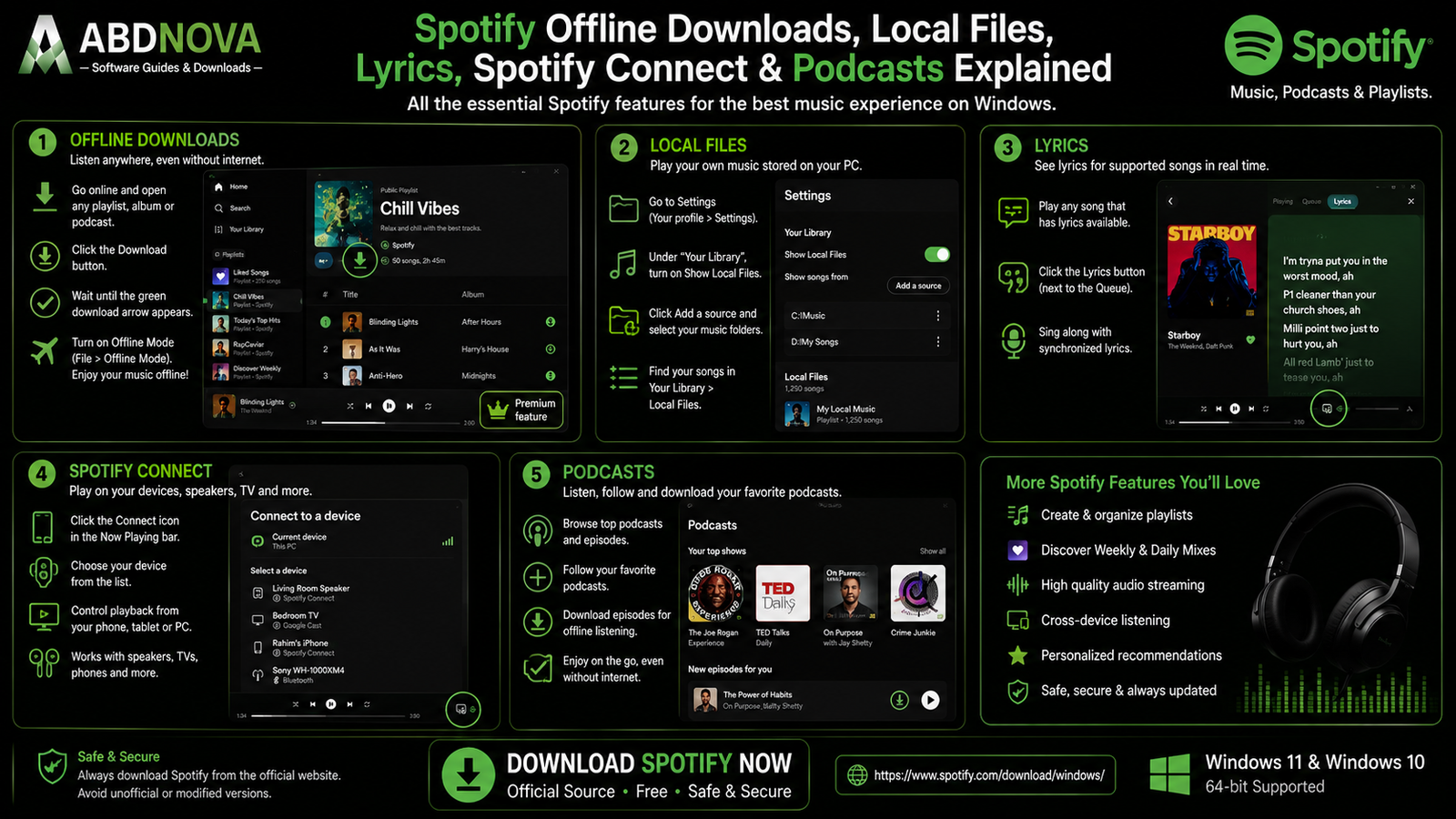
Spotify Offline Downloads, Local Files, Lyrics & Spotify Connect
Download Music for Offline Listening
Spotify Premium users can download supported music for offline playback inside the Spotify app.
On desktop:
- Make sure Spotify is online.
- Open the playlist you want to download.
- Select the Download option.
- Wait for the content to finish downloading.
Spotify does not allow individual songs to be downloaded directly through the normal desktop workflow. Add individual tracks to a playlist and download that playlist instead.
Spotify Offline Mode
After downloading eligible content, Windows users can enable:
Spotify menu → File → Offline Mode
Only downloaded content remains available while Offline Mode is active.
Spotify Offline Download Limits
Spotify currently allows Premium users to download up to 10,000 tracks per device on up to 5 devices.
You also need to reconnect to Spotify at least once every 30 days to keep offline downloads active.
Spotify Downloads Are Not Normal MP3 Files
Spotify offline downloads remain inside Spotify’s authorized playback system. They are not normal MP3 files that can be freely copied around your PC.
- Spotify Premium cracks.
- Spotify song-to-MP3 bypass tools.
- DRM-removal software.
- Modified Spotify clients.
- Pirated Spotify download tools.
Spotify Local Files
Spotify can also play audio files that are already legally stored on your PC.
On desktop:
- Open your profile menu.
- Open Settings.
- Find the Library section.
- Enable Show Local Files.
- Enable existing folders or add a source.
- Open Your Library → Local Files.
This is useful for personal MP3 files, purchased music, recordings and legally ripped CDs that are not part of Spotify’s streaming catalog.
Spotify Lyrics
Spotify provides lyrics for supported songs. Availability can depend on the track and region.
Spotify Connect
Spotify Connect allows you to control compatible playback devices from the Spotify app.
Depending on your setup, playback can be switched between:
- Windows PC.
- Phone.
- Tablet.
- Smart speaker.
- TV.
- Other supported devices.
Spotify also works with supported wireless technologies and ecosystems such as Bluetooth, AirPlay and Chromecast.
Podcasts
Spotify supports podcasts in the same Windows application.
You can follow shows, browse episodes, stream episodes, save episodes and download supported podcast content.
Audiobooks
Spotify also provides audiobook functionality in supported markets and plans.
Catalog access, listening allowances and availability can vary by country and subscription.

Spotify vs Apple Music vs YouTube Music vs MusicBee
| Feature | Spotify | Apple Music | YouTube Music | MusicBee |
|---|---|---|---|---|
| Main Focus | Streaming & discovery | Apple music ecosystem | YouTube-centered music | Local music management |
| Windows App | Yes | Yes | Web/PWA-focused | Yes |
| Free Tier | Yes | No equivalent full free music tier | Yes | Free app |
| Premium Music | Yes | Yes | Yes | Local files |
| Offline Music | Premium | Subscription | Premium | Local files already on PC |
| Podcasts | Strong integration | Separate Apple ecosystem | Varies | Yes |
| Playlists | Excellent | Excellent | Excellent | Strong |
| Music Discovery | Strong | Strong | Strong | Not streaming-focused |
| Local Files | Desktop support | Library-oriented | Limited workflow | Excellent |
| Best For | Streaming, playlists & discovery | Apple ecosystem | YouTube-centered discovery | Large local libraries |
Spotify vs MusicBee
Spotify and MusicBee serve very different purposes.
Spotify is better suited to cloud-based streaming, music discovery, playlists, podcasts and cross-device playback.
MusicBee is much stronger when you own and organize a large local collection with tags, artwork, CD ripping, WASAPI, ASIO and detailed library management.
Spotify vs Apple Music
Spotify focuses heavily on streaming, playlists and cross-platform discovery, while Apple Music is more closely integrated with Apple’s music ecosystem.
Spotify vs YouTube Music
YouTube Music can be attractive for users whose listening habits are closely tied to YouTube content, while Spotify provides a dedicated Windows desktop experience with extensive playlist, podcast and Connect functionality.
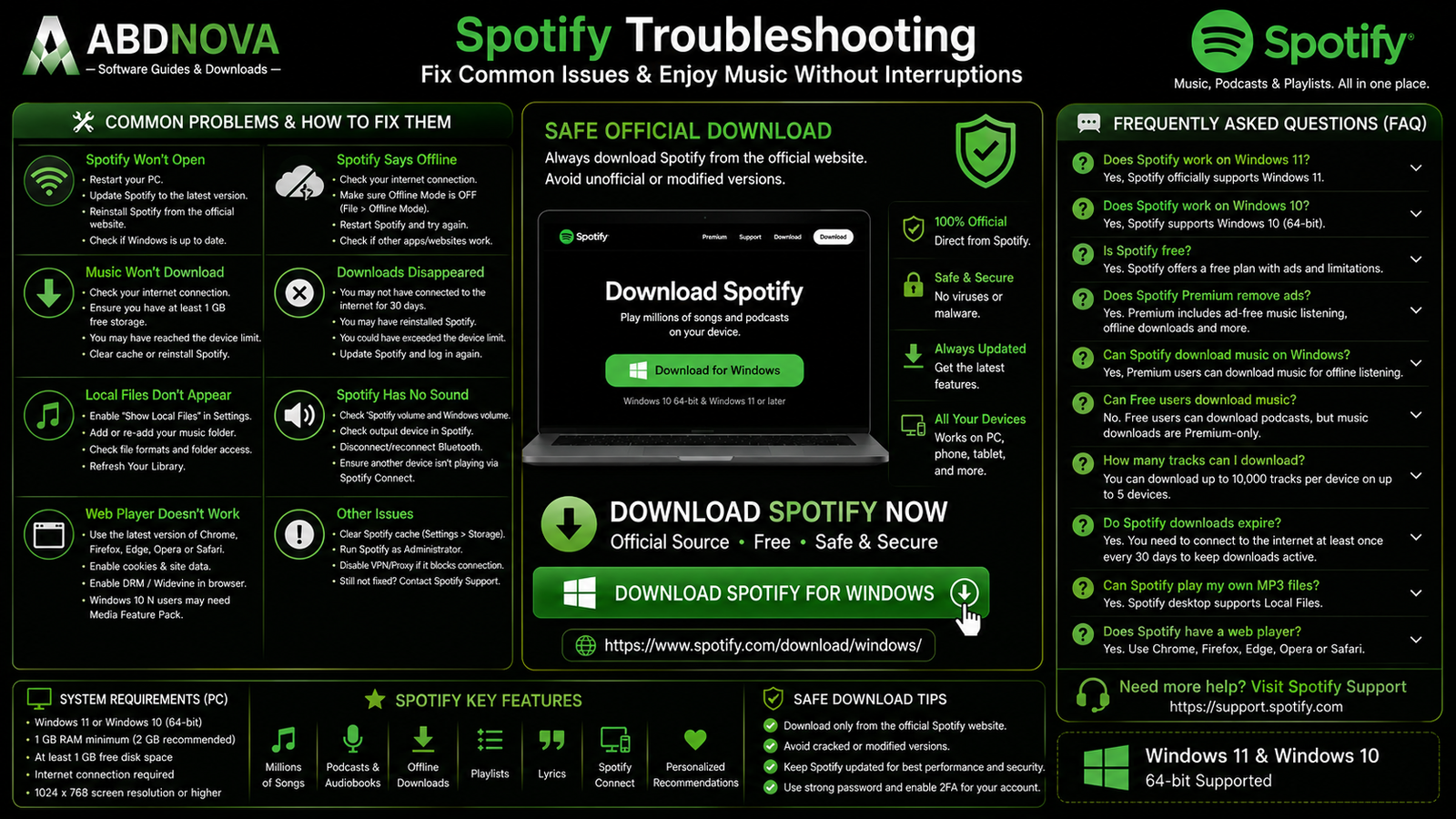
Spotify Troubleshooting
Spotify Won’t Open
Restart Windows, restart Spotify, update the app, reinstall Spotify if necessary and check whether Windows security software is blocking it.
Spotify Says Offline
Check whether Offline Mode is accidentally enabled under the Spotify File menu.
If Offline Mode is disabled, confirm that other websites and applications can access the internet.
Spotify Music Won’t Download
Check:
- Internet connection.
- Available storage.
- Device-limit status.
- Cache-cleaning or battery-saving software.
- Whether Spotify needs restarting.
- Whether reinstalling is necessary.
Spotify recommends keeping at least 1 GB of free storage available for downloads.
Spotify Downloads Disappeared
Possible causes include:
- You did not connect to Spotify for 30 days.
- Spotify was reinstalled.
- You exceeded the supported device limit.
- The Spotify app is outdated.
Spotify Local Files Don’t Appear
Make sure Show Local Files is enabled, the source folder is active, Spotify can access the folder and the files still exist.
Spotify Has No Sound
Check Spotify volume, Windows volume, the selected output device, Bluetooth connections and whether Spotify Connect is currently playing on another device.
Spotify Web Player Doesn’t Work
Make sure your browser is updated and DRM/protected-content playback is enabled when required.
Spotify notes that some Windows 10 N systems can require Microsoft’s Media Feature Pack for protected-content playback.
Safe Spotify Download for Windows
The safest source for Spotify Download for Windows is Spotify’s official Windows download page.
Use the official Spotify Windows download page to install the current desktop app directly from Spotify.
- Spotify Premium Crack.
- Spotify Mod.
- Spotify Premium APK for Windows.
- Spotify Activated.
- Spotify Ad-Free Crack.
- Spotify Premium Unlocked.
- Modified Spotify.
Use Spotify only through the official application, Web Player or other authorized Spotify platforms.
Frequently Asked Questions
Does Spotify work on Windows 11?
Yes. Spotify currently supports Windows 11 or above.
Does Spotify work on Windows 10?
Yes. Spotify’s current desktop requirements specify Windows 10 64-bit.
Is Spotify free?
Yes. Spotify provides a Free plan as well as paid Premium plans.
Does Spotify Premium remove ads?
Spotify Premium includes ad-free music listening.
Can Spotify download music on Windows?
Yes. Premium users can download supported music for offline playback inside the Spotify desktop app.
Can Spotify Free download music?
No. Offline music downloads require Premium. Free users can download podcasts for offline listening.
How many Spotify tracks can I download?
Spotify currently allows up to 10,000 tracks per device on up to 5 devices.
Do Spotify downloads expire?
You need to connect to Spotify at least once every 30 days to keep your offline downloads active.
Can Spotify play my own MP3 files?
Yes. The Spotify desktop app supports Local Files stored on your PC.
Does Spotify have lyrics?
Yes, lyrics are available for supported songs.
Does Spotify support podcasts?
Yes. Podcasts are integrated into the Spotify desktop app.
Does Spotify have a Web Player?
Yes. Spotify supports browser playback through Chrome, Firefox, Edge, Opera and Safari.
Are Spotify offline downloads normal MP3 files?
No. Spotify downloads remain inside Spotify’s authorized offline-playback system and are not provided as ordinary transferable MP3 files.
Is Spotify safe to install?
Yes, when downloaded from Spotify’s official website or another authorized app store.
Final Thoughts
Spotify Download for Windows is a strong choice for Windows 11 and Windows 10 64-bit users who want a dedicated desktop app for streaming music, managing playlists, discovering artists, following podcasts, viewing lyrics, playing local files and controlling compatible devices through Spotify Connect.
Spotify Free is suitable for users who want streaming access without a paid subscription, while Premium adds benefits including ad-free music and offline music downloads.
For offline listening, remember that Spotify downloads remain inside Spotify’s authorized system rather than becoming normal MP3 files. Always install Spotify from the official source and avoid cracked, modified or DRM-bypass tools.
Ready to download Spotify?
Get the current Windows desktop app directly from Spotify’s official website. ABDNOVA recommends official sources only.


