


MPC-BE Download for Windows – Lightweight Media Player

Download MPC-BE for Windows 11 and 10 to play video and audio with hardware decoding, HDR, subtitles, multiple audio tracks, playlists and advanced playback controls.
MPC-BE Download for Windows gives Windows 11 and Windows 10 users a free and open-source media player built around the familiar Media Player Classic design.
MPC-BE, short for Media Player Classic – Black Edition, combines a compact dark interface with updated internal decoders and splitters, hardware acceleration, subtitle support, playlists, media information, video rendering controls and extensive playback customization.
It is particularly attractive if you want a lightweight Windows player but still need detailed control over codecs, renderers, hardware decoding, subtitles, audio tracks, aspect ratio, playback speed and video processing.
MPC-BE Download for Windows – Quick Overview
| Information | Details |
|---|---|
| Software | MPC-BE |
| Full Name | Media Player Classic – Black Edition |
| Current Stable Version | 1.9.1 |
| Release Date | August 8, 2026 |
| Software Type | Video & Audio Player |
| License | GPL v3 |
| Free | Yes |
| Open Source | Yes |
| Windows 11 | Supported |
| Windows 10 | Supported |
| 64-bit Build | Yes |
| 32-bit Build | Yes |
| Hardware Decoding | Yes |
| HDR Playback | Yes |
| Subtitle Support | Yes |
| Playlist Support | Yes |
| MPC Video Renderer | Included |
| yt-dlp Integration | Supported |
| Official Project | MPC-BE / Aleksoid1978 |
What Is MPC-BE?
MPC-BE is an actively maintained free and open-source Windows media player based on the Media Player Classic family of projects.
MPC-BE can be used for:
- Playing video and audio files.
- Opening MKV, MP4, AVI and other media containers.
- Hardware-accelerated video decoding.
- HDR playback.
- Subtitle playback and customization.
- Multiple audio tracks.
- DVD-related playback.
- Playlist management.
- Frame-by-frame playback.
- Playback-speed adjustment.
- Video rotation and zoom.
- Media-information inspection.
- Online-video workflows through yt-dlp.
- Custom filters and renderers.
Which MPC-BE Version Should You Download?
MPC-BE x64
For most modern Intel or AMD Windows 11 and Windows 10 PCs, the x64 installer is the logical choice.
MPC-BE x86
Use the x86 package only when you are running a 32-bit Windows installation or specifically require a 32-bit setup.
MPC-BE Installer vs Portable Archive
Installer
The installer is the easiest option for most users because it can create shortcuts, configure file associations and provide a normal Windows installation.
Archive Version
The archive package can be useful if you prefer a more portable or manual setup. Extract the archive and run MPC-BE without using the normal installation wizard.
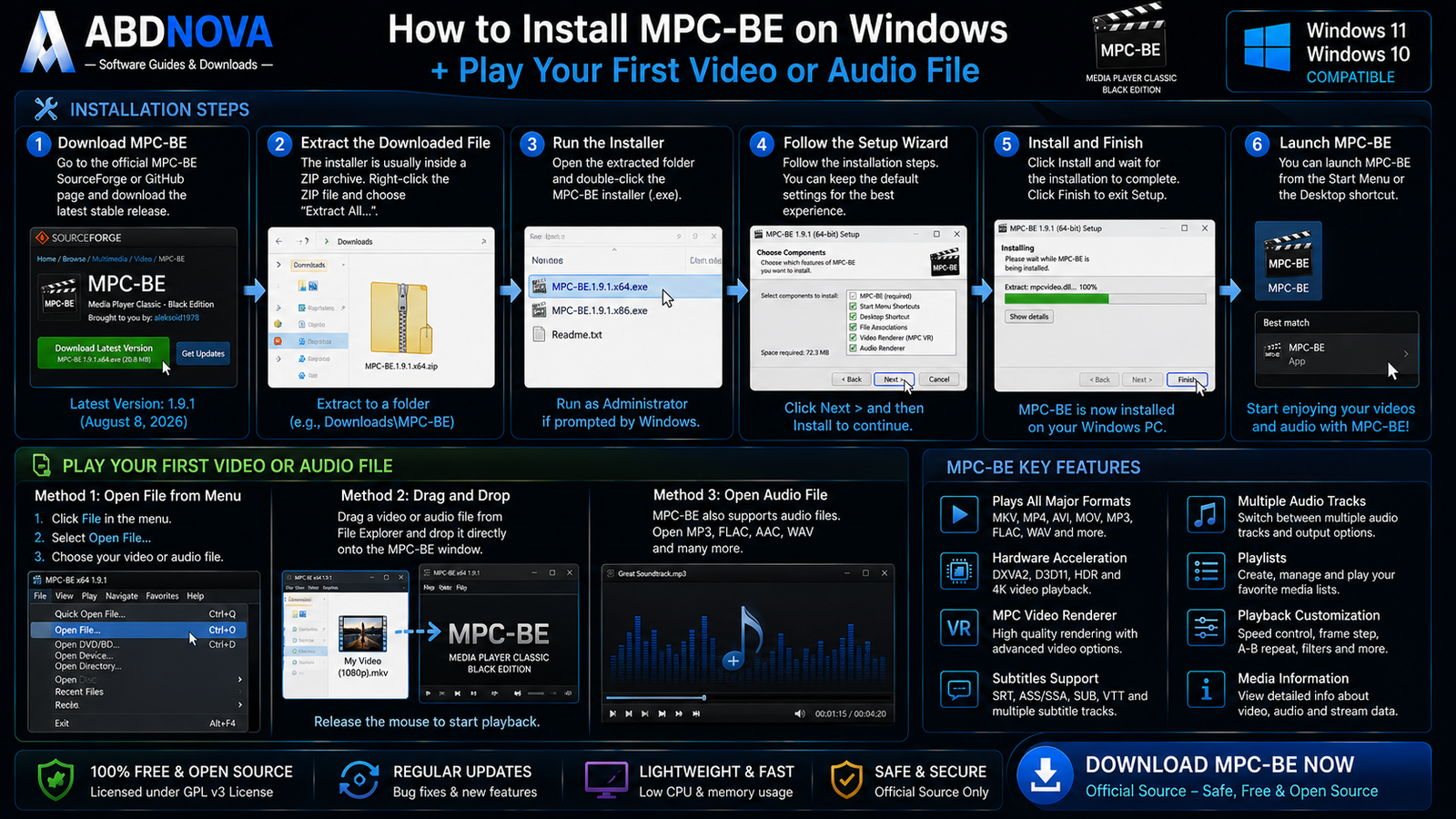
How to Install MPC-BE on Windows
- Open the official MPC-BE SourceForge release page or official GitHub project.
- Choose the latest stable release.
- Select x64 for most modern Windows PCs.
- Download the installer package.
- If the installer is supplied inside a ZIP archive, extract it first.
- Run the setup file.
- Verify the download source if Windows displays a security prompt.
- Follow the installation wizard.
- Launch MPC-BE from the Start menu or desktop shortcut.
- Open your first video.
How to Open Your First Video
Open MPC-BE and choose File → Open File, or simply drag a supported video or audio file into the player window.
Common formats include MP4, MKV, AVI, MOV, FLV, WebM, MP3, FLAC and AAC.

MPC-BE Main Interface & Playback Controls
MPC-BE keeps the compact Media Player Classic layout while adding a darker Black Edition visual style.
Menu Bar
The menu bar provides access to File, View, Play, Navigate, Favorites, Help and advanced settings.
Video Area
The central viewing area displays the active video.
Seek Bar
Use the seek bar to move backward or forward through the current file.
Playback Controls
Common controls include play, pause, stop, previous, next, frame stepping and volume.
Playlist
The built-in playlist allows several video or audio files to be queued and managed for sequential playback.

MPC-BE Video Playback, Hardware Acceleration & HDR
MPC-BE combines a lightweight interface with modern playback functionality.
- Hardware video decoding.
- Hardware deinterlacing.
- Video renderer selection.
- HDR support.
- Subtitle rendering.
- OSD rendering.
- Video rotation and flip.
- Scaling and color processing.
- High-resolution playback.
MPC-BE Hardware Acceleration
Hardware acceleration allows compatible video decoding tasks to use the GPU instead of relying completely on CPU-based software decoding.
This can reduce CPU usage when playing:
- H.264.
- HEVC / H.265.
- VP9.
- AV1.
- High-bitrate video.
- 4K content.
MPC Video Renderer
MPC Video Renderer is one of the strongest components associated with MPC-BE. It supports DXVA2 and Direct3D 11 hardware-decoding workflows.
MPC Video Renderer features include:
- DXVA2 hardware decoding.
- D3D11 hardware decoding.
- Hardware deinterlacing.
- Shader-based processing.
- Multiple resizing algorithms.
- Super Resolution.
- Subtitle and OSD rendering.
- Rotation and flip.
- Dithering.
- HDR playback.
- HDR-to-SDR conversion.
MPC-BE HDR Playback
MPC Video Renderer supports HDR10, HLG and partial Dolby Vision workflows, along with HDR-to-SDR conversion.
MPC-BE 4K Playback
MPC-BE can handle 4K video when your hardware can decode the media efficiently.
For smoother 4K playback:
- Enable hardware decoding.
- Keep GPU drivers updated.
- Use MPC Video Renderer.
- Use fast storage where practical.
- Close unnecessary background applications.
- Confirm that your GPU supports the codec used by the file.
MPC-BE also uses updated FFmpeg-based libraries internally. If you work directly with media conversion, encoding or analysis, see our FFmpeg Download for Windows guide.

MPC-BE Subtitles, Audio Tracks, Playback Speed & yt-dlp
Subtitle Support
MPC-BE supports embedded and external subtitles, multiple subtitle tracks, subtitle styling, positioning, language selection and subtitle-delay controls.
If an external subtitle file uses a matching filename, such as:
Movie.mkv
Movie.srt
the player can make subtitle loading straightforward.
Subtitle Synchronization
If subtitles appear too early or too late, use MPC-BE’s subtitle-delay controls to correct synchronization without editing the original subtitle file.
Multiple Audio Tracks
MKV and Blu-ray-derived files can contain several audio streams such as English, Arabic, French, commentary, stereo or 5.1 surround.
MPC-BE lets you switch between available audio tracks during playback.
Playback Speed
MPC-BE supports playback-speed adjustment, which can be useful for tutorials, lectures, recorded meetings and detailed media review.
Frame Stepping
Frame-by-frame playback helps when you need to inspect an exact moment, capture a specific frame, review animation or investigate encoding problems.
Video Rotation, Zoom & Aspect Ratio
MPC-BE provides controls for zoom, rotation, video position, aspect ratio and scaling.
Media Information
Built-in media-information functionality can show technical details such as:
- Container.
- Video codec.
- Audio codec.
- Resolution.
- Bitrate.
- Frame rate.
- Media streams.
Online Video & yt-dlp
MPC-BE supports workflows involving yt-dlp, allowing supported web-video URLs to be processed through the player.
DVD Playback
MPC-BE contains DVD-related components and continues to receive fixes for DVD playback.

MPC-BE vs MPC-HC vs VLC vs PotPlayer
| Feature | MPC-BE | MPC-HC | VLC | PotPlayer |
|---|---|---|---|---|
| Platform Focus | Windows | Windows | Cross-platform | Windows |
| Free | Yes | Yes | Yes | Yes |
| Open Source | Yes | Yes | Yes | No |
| Hardware Decoding | Yes | Yes | Yes | Yes |
| HDR | Yes | Yes | Yes | Yes |
| Subtitles | Strong | Strong | Strong | Strong |
| Playlists | Yes | Yes | Yes | Yes |
| Customization | Advanced | Advanced | Moderate | Very extensive |
| Best For | Modern BE-style Windows playback | Classic MPC workflow | Cross-platform playback | Deep Windows customization |
MPC-BE vs MPC-HC
MPC-BE and MPC-HC are separate Media Player Classic descendants with different development branches, interfaces and component choices.
Choose MPC-BE if you prefer its Black Edition interface, integrated components and MPC Video Renderer-focused workflow.
MPC-BE vs VLC
VLC is a broader cross-platform media player available beyond Windows. MPC-BE is more Windows-focused and integrates closely with Windows playback technologies and DirectShow-style workflows.
For another open-source playback option, see our VLC Media Player Download for Windows guide.
MPC-BE vs PotPlayer
Both MPC-BE and PotPlayer offer hardware acceleration, subtitle controls, multiple audio tracks, playback customization and high-resolution playback.
The main difference is the project model: MPC-BE is free and open source, while PotPlayer is proprietary freeware.
What’s New in MPC-BE 1.9.1?
MPC-BE 1.9.1 was released on August 8, 2026 and includes several updates and fixes.
- Improved support for some network streams.
- Dolby Vision improvements for AV1.
- MS ADPCM and IMA ADPCM audio support.
- Hardware-decoding fixes for older Intel graphics.
- Improved yt-dlp VP9 detection.
- Long-press left mouse button temporary video speed-up.
- MPC Video Renderer 0.10.7.
- Updated FFmpeg and other libraries.
For normal users, the practical recommendation is simply to use the latest stable official build.

MPC-BE Troubleshooting
MPC-BE Won’t Open
Restart Windows, install the latest stable release, reinstall MPC-BE, reset unusual settings and verify that you downloaded the correct x64 or x86 build.
Video Plays but the Screen Is Black
Switch the video renderer, update your GPU driver, try MPC Video Renderer, reset custom shaders and temporarily disable unusual external filters.
4K Video Stutters
Enable hardware decoding, update GPU drivers, use MPC Video Renderer, close unnecessary background programs and confirm that your GPU supports the video’s codec.
HDR Looks Washed Out
Check Windows HDR settings, MPC Video Renderer settings, GPU drivers, display HDR capability and the HDR format used by the media file.
Subtitles Don’t Appear
Check the selected subtitle track, subtitle visibility, external filename, subtitle renderer and delay settings. You can also load the subtitle manually.
No Audio
Check the selected audio track, Windows volume, MPC-BE volume, audio renderer and speaker configuration.
Online Video Doesn’t Work
Update yt-dlp. Website changes can temporarily break online-video extraction until yt-dlp adds compatibility for the changed service.
Hardware Decoding Doesn’t Work
Check GPU codec support, the graphics driver, hardware-decoder selection, renderer and video codec profile.
Safe MPC-BE Download for Windows
The safest source for MPC-BE Download for Windows is the official MPC-BE project release page.
Use the official MPC-BE SourceForge release directory to get the latest stable x64 or x86 installer.
- MPC-BE Crack.
- MPC-BE Pro.
- MPC-BE Premium.
- Modified MPC-BE.
- Pre-Activated MPC-BE.
- Unofficial MPC-BE repacks.
MPC-BE is already free and open source, so there is no legitimate reason to use a cracked or modified copy.
Frequently Asked Questions
What is the latest MPC-BE version?
The current stable release is MPC-BE 1.9.1.
When was MPC-BE 1.9.1 released?
MPC-BE 1.9.1 was released on August 8, 2026.
Is MPC-BE free?
Yes. MPC-BE is free and open-source software licensed under GPL v3.
Does MPC-BE work on Windows 11?
Yes. Windows 11 is included in the current project requirements.
Does MPC-BE work on Windows 10?
Yes. Windows 10 is supported.
Is there a 64-bit MPC-BE?
Yes. Current releases provide an x64 build, which is the recommended choice for most modern Windows PCs.
Is there a 32-bit MPC-BE?
Yes. Current releases also provide x86 packages for 32-bit Windows installations.
Does MPC-BE support hardware acceleration?
Yes. MPC Video Renderer supports DXVA2 and Direct3D 11 hardware-decoding workflows.
Can MPC-BE play HDR video?
Yes. MPC Video Renderer supports HDR10, HLG and partial Dolby Vision functionality, along with HDR-to-SDR conversion.
Can MPC-BE play 4K video?
Yes, provided your computer has sufficient decoding and rendering capability for the specific media file.
Does MPC-BE support subtitles?
Yes. MPC-BE supports embedded and external subtitles, multiple subtitle tracks, styling, positioning and synchronization controls.
Can MPC-BE play multiple audio tracks?
Yes. You can switch between multiple audio streams available inside supported media files.
Does MPC-BE support playlists?
Yes. MPC-BE includes playlist functionality for managing and playing multiple files.
Can MPC-BE use yt-dlp?
Yes. Current MPC-BE releases include yt-dlp-related functionality for supported online-video workflows.
What is the difference between MPC-BE and MPC-HC?
They are separate Media Player Classic descendants with different development branches, interfaces, components and feature choices.
Is MPC-BE safe?
Yes, when downloaded from the official MPC-BE SourceForge or GitHub project.
Final Thoughts
MPC-BE Download for Windows is an excellent option for users who like the simplicity of Media Player Classic but want a modern Black Edition experience with actively maintained playback components.
Its combination of hardware decoding, MPC Video Renderer, HDR support, modern codec handling, subtitles, multiple audio tracks, playlists, frame stepping, playback-speed controls, media information, yt-dlp integration and extensive customization makes it much more capable than its lightweight interface may initially suggest.
For most modern Windows 11 and Windows 10 computers, MPC-BE 1.9.1 x64 is the logical starting point. Download it from the official MPC-BE project rather than third-party repacks.
Ready to download MPC-BE?
Get the latest stable x64 or x86 release directly from the official MPC-BE SourceForge project. ABDNOVA recommends official sources only.


