


Vim Download for Windows 11 & 10

Download Vim for Windows 11 and Windows 10 to edit text and code with keyboard-driven commands, modes, search and replace, splits, tabs, macros, plugins, and extensive customization.
Vim Download for Windows gives developers, programmers, system administrators, and advanced users a free and open-source text and source-code editor designed around fast keyboard-driven editing.
Unlike conventional editors where most actions depend on menus and mouse clicks, Vim uses different editing modes and keyboard commands. Once you understand the basics, you can navigate, edit, search, replace, copy, delete, save, and manipulate text without constantly reaching for the mouse.
The current stable major release is Vim 9.2, released February 14, 2026. Official Windows packages are available for x64, x86, and ARM64 systems.
Vim Download for Windows – Quick Overview
| Information | Details |
|---|---|
| Software | Vim |
| Full Name | Vi IMproved |
| Current Stable Major Version | Vim 9.2 |
| Release Date | February 14, 2026 |
| Software Type | Text & Source Code Editor |
| License | Free / Open Source |
| Windows 11 | Supported |
| Windows 10 | Supported |
| x64 | Available |
| x86 | Available |
| ARM64 | Available |
| Windows Installer | Available |
| ZIP Package | Available |
| Graphical Version | gVim |
| Terminal Editing | Yes |
| Syntax Highlighting | Yes |
| Splits | Yes |
| Tabs | Yes |
| Search & Replace | Yes |
| Macros | Yes |
| Plugins | Yes |
| Vim9 Script | Yes |
| WinGet Package | vim.vim |
| Official Source | Vim.org |
What Is Vim?
Vim stands for Vi IMproved. It is an advanced editor based on the classic Unix vi editor but adds a much larger collection of editing, programming, customization, scripting, navigation, and productivity features.
Vim can be used for:
- Programming and source code.
- HTML, CSS, and JavaScript.
- Python.
- C and C++.
- Java.
- PHP.
- Rust and Go.
- Markdown.
- Configuration files.
- Shell scripts.
- Server configuration.
- Log files.
- Git commit messages.
- Plain-text editing.
Vim’s major strengths include modal editing, multi-level undo, powerful search and replace, macros, registers, split windows, tabs, plugins, support for many programming languages and file formats, and extensive keyboard control.
Which Vim Version Should You Download?
Vim x64
For most modern Windows 11 and Windows 10 computers using Intel or AMD processors, the x64 build is the sensible default.
Vim ARM64
If your Windows PC uses an ARM processor, choose the official ARM64 Windows package.
Vim x86
The x86 build is still available for users who specifically require a 32-bit Windows version.
Windows-on-ARM PC → ARM64
Legacy 32-bit system → x86
Vim Installer vs ZIP Package
Windows Installer
The signed Windows installer is the easiest choice for most users. It can configure Vim and provide useful Windows integration such as PATH configuration and an Edit with Vim context-menu option.
ZIP Package
Vim also provides ZIP packages for users who prefer manual installation or want more direct control over the files and installation location.
The ZIP version can be useful when you:
- Prefer manual installation.
- Want a separate Vim environment.
- Do not want a conventional setup process.
- Need direct control over the program files.
For beginners, the signed installer is usually easier.
Vim vs gVim – What’s the Difference?
Vim
Traditional Vim normally runs inside a terminal or console window.
It is ideal for users who prefer keyboard-driven workflows and frequently work in command-line environments.
gVim
gVim provides Vim’s editing engine inside a graphical Windows application.
You still use Vim modes, commands, shortcuts, plugins, and editing concepts, but the editor runs in its own graphical window.
How to Install Vim on Windows & Open, Edit, Save and Exit
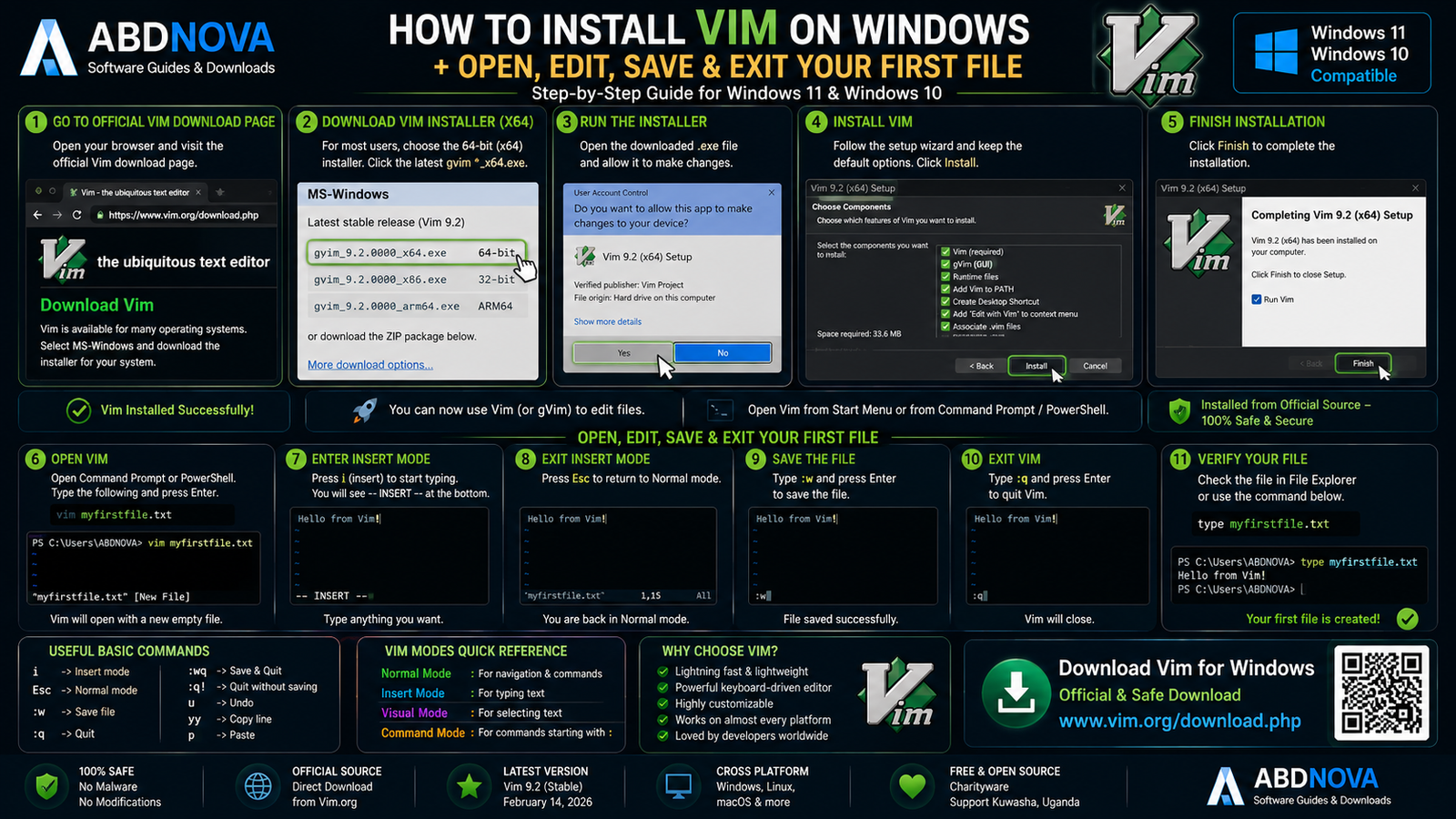
Step 1: Open Vim.org
Go to Vim’s official download page and select the Microsoft Windows section.
Step 2: Choose Your Architecture
For most Intel and AMD PCs, choose the signed x64 installer. Use ARM64 for compatible Windows-on-ARM systems or x86 only when you specifically require 32-bit Vim.
Step 3: Run the Installer
Open the downloaded EXE and continue only after verifying that the installer came from Vim’s official recommended Windows source.
Step 4: Select Installation Options
Depending on the installer, options can include:
- Vim components.
- Desktop shortcuts.
- Context-menu integration.
- Windows PATH.
- Default Vim settings.
Step 5: Finish Installation
Complete setup. You can then open gVim from Windows or launch terminal Vim when its executable is available through PATH.
Check Your Vim Version
Inside Vim:
:versionOr from Command Prompt, PowerShell, or Windows Terminal:
vim --versionThis displays information about the installed Vim build, patches, enabled features, and configuration.
Create Your First Vim File
Open Vim and press:
iThis switches Vim into Insert mode. Type:
Hello from Vim!Press:
EscThen save the file:
:w hello.txtTo quit:
:qThe basic Vim workflow is:
Normal Mode → Insert Mode → Normal Mode → Command
Vim Main Interface & Normal, Insert, Visual and Command Modes

Vim’s modal editing system is the biggest difference between Vim and conventional text editors.
Normal Mode
Normal mode is used primarily for navigation and editing commands.
You can move around, delete text, copy text, paste, change words, search, and run editing commands.
Press:
Escto return to Normal mode.
Insert Mode
Insert mode is used for normal text entry.
From Normal mode:
iType your code or text, then press:
Escwhen finished.
Visual Mode
Visual mode lets you select text.
From Normal mode:
vThen move the cursor to expand the selection.
Command-Line Mode
Press:
:from Normal mode to enter Vim commands.
:w — save
:q — quit
:wq — save and quit
:q! — quit without saving
These commands are enough to start editing real files while you gradually learn more advanced Vim features.
Vim Commands Explained – Navigation, Editing, Search & Replace
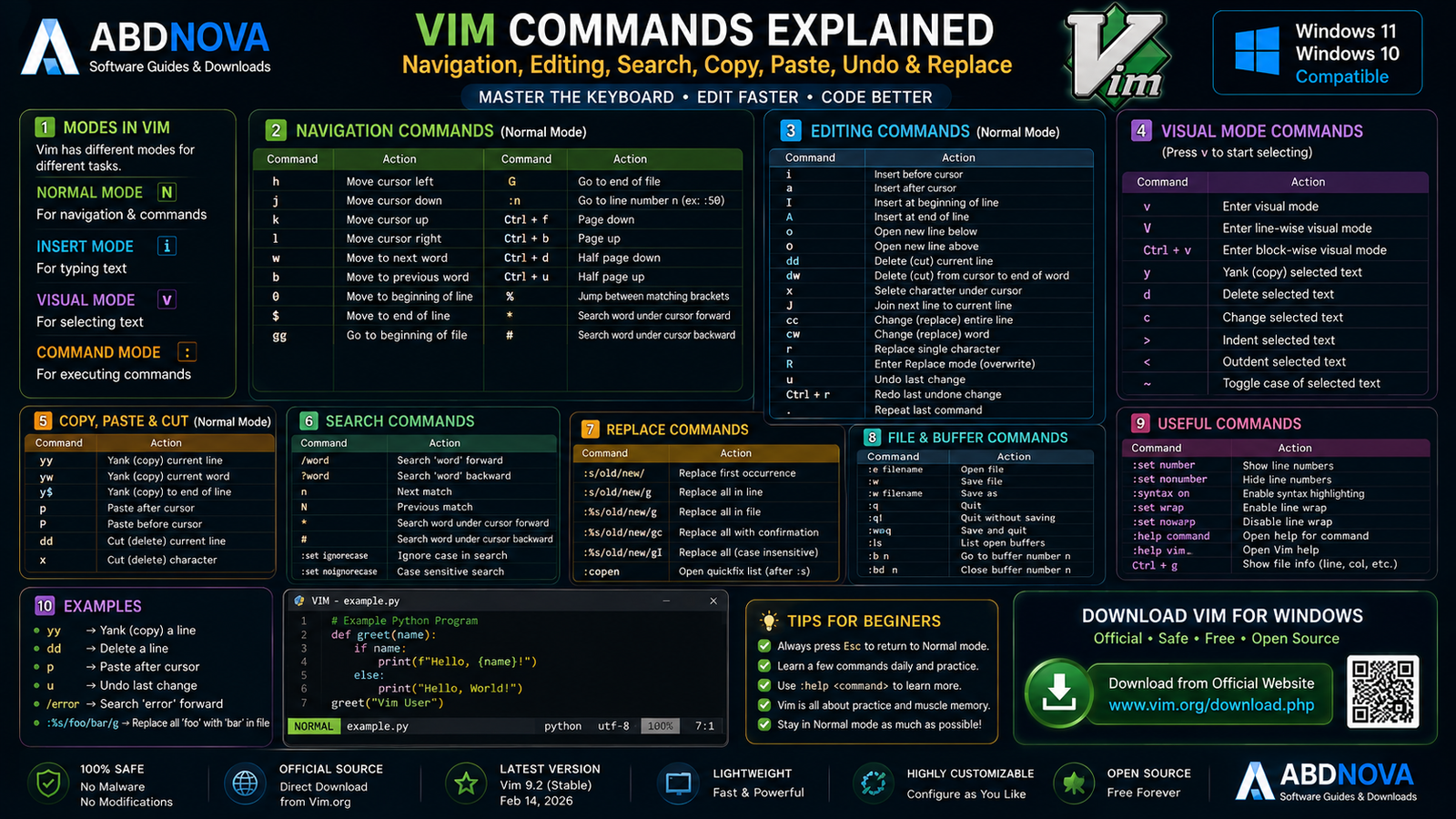
Essential Vim Navigation
| Command | Action |
|---|---|
| h | Move left |
| j | Move down |
| k | Move up |
| l | Move right |
| w | Next word |
| b | Previous word |
| 0 | Beginning of line |
| $ | End of line |
| gg | Beginning of file |
| G | End of file |
Arrow keys also work in modern Vim environments, but learning h j k l can improve keyboard efficiency.
Essential Editing Commands
| Command | Action |
|---|---|
| i | Insert before cursor |
| a | Insert after cursor |
| o | Create new line below |
| dd | Delete current line |
| yy | Copy / yank current line |
| p | Paste |
| u | Undo |
| Ctrl + r | Redo |
| x | Delete character |
Vim commands can often be combined with counts. For example:
5dddeletes five lines.
Search in Vim
Press:
/and enter a search term:
/ABDNOVAThen use:
nfor the next match and:
Nfor the previous match.
Search and Replace
A common replace command is:
:%s/old/new/gTo confirm each replacement:
:%s/old/new/gcSyntax Highlighting
Vim supports syntax highlighting for many programming languages and file formats, making keywords, strings, comments, functions, numbers, operators, and other code elements easier to distinguish.
Vim Splits, Tabs, Macros, Registers, Plugins & Configuration

Split Windows
For a horizontal split:
:splitor:
:spFor a vertical split:
:vsplitor:
:vsSplits are useful when editing related files, source and configuration files, or two sections of the same file.
Vim Tabs
Create a tab:
:tabnewNext tab:
:tabnextPrevious tab:
:tabpreviousTabs and splits can be combined to create complex workspaces without requiring a traditional IDE interface.
Undo & Redo
Vim supports a persistent multi-level undo system rather than only one-step undo.
uundoes a change, while:
Ctrl + rredoes it.
Macros
Macros allow Vim to record a sequence of editing commands and replay them later.
This is especially useful when the same transformation needs to be repeated across many lines or files.
Registers
Vim uses registers to store deleted, copied, and recorded content.
A simple workflow is:
yy
p
The first command yanks a line; the second pastes it.
Plugins
Vim has an extensive plugin ecosystem.
Plugins can add:
- File navigation.
- Git tools.
- Auto-completion.
- Language support.
- Status lines.
- Themes.
- Code navigation.
- Linting.
- Formatting.
Vim Configuration
Common customizations include:
- Line numbers.
- Tabs and spaces.
- Indentation.
- Search behavior.
- Color schemes.
- Key mappings.
- Plugins.
- Interface behavior.
Vim9 Script
Modern Vim includes Vim9 Script for configuring and extending the editor.
Vim 9.2 expanded Vim9 Script with improvements including Enums, generic functions, and tuples.
Most beginners do not need to learn Vim9 Script immediately.
What’s New in Vim 9.2?
Vim 9.2 was officially released on February 14, 2026.
Important improvements include work on:
- Vim9 Script.
- Diff mode.
- Completion.
- Fuzzy matching.
- Register completion.
- Default settings.
- High-DPI behavior.
- XDG Base Directory support.
- Bug and security fixes.
For Windows users, the practical recommendation is simple: use a current Vim 9.2 Windows build rather than an outdated version.
Vim Diff Mode
Vim can compare files directly through Diff mode.
This can be useful for:
- Code changes.
- Configuration files.
- Scripts.
- Documentation.
- Different versions of text files.
Vim 9.2 also introduced additional Diff improvements, including enhancements to matching and character-level comparison.
Vim Terminal & Programming Workflow
Modern Vim can run a terminal inside a Vim window.
This can be useful for:
- Compiling programs.
- Running scripts.
- Git commands.
- Development tools.
- Server administration.
If you prefer running Vim inside a modern Windows command-line environment, see our Windows Terminal Download for Windows guide for PowerShell, Command Prompt, WSL, SSH, tabs, and split panes.
Vim for Server and Remote Work
Vim is widely useful for editing configuration files, scripts, and text on local or remote systems.
If your workflow also involves transferring website or server files through FTP, FTPS, or SFTP, see our FileZilla Download for Windows guide.
Install Vim with WinGet
Vim’s official download page also identifies stable and nightly Windows Package Manager packages.
For a normal stable installation:
winget install vim.vimThe nightly package is separate and intended for users who specifically want newer development builds.
Vim vs gVim vs Neovim vs VS Code

| Feature | Vim | gVim | Neovim | VS Code |
|---|---|---|---|---|
| Main Style | Terminal Editor | Graphical Vim | Modern Vim-Derived Editor | Graphical Code Editor |
| Modal Editing | Yes | Yes | Yes | Not by Default |
| Keyboard Focus | Excellent | Excellent | Excellent | Strong |
| GUI | Terminal Dependent | Yes | Frontend Dependent | Yes |
| Plugins | Extensive | Extensive | Extensive | Extensive |
| Configuration | Extensive | Extensive | Extensive | Extensive |
| Learning Curve | High | High | High | Moderate |
| Best For | Terminal Workflows | Windows GUI Vim Users | Modern Plugin-Heavy Vim Workflows | Broader IDE-Like Development |
Vim and gVim belong to the same Vim ecosystem. Neovim is a separate project derived from Vim with its own development direction.
Vim vs Sublime Text
| Feature | Vim | Sublime Text |
|---|---|---|
| Editing Style | Modal / Keyboard-First | Traditional + Shortcuts |
| Startup Speed | Very Fast | Very Fast |
| GUI | gVim Available | Yes |
| Extensions | Plugins | Packages |
| Terminal Workflow | Excellent | External-Oriented |
| Learning Curve | High | Low–Moderate |
| Customization | Extensive | Extensive |
| License | Free / Open Source | Commercial for Continued Use |
| Best For | Keyboard Power Users | Fast Focused Editing |
Sublime Text feels more familiar to users coming from conventional graphical editors. Vim offers a much more keyboard-focused workflow but requires more learning.
Vim vs Notepad++
Notepad++ is easier for users who want traditional Windows menus and a minimal learning curve.
Vim is more appropriate when you specifically want modal editing, command combinations, macros, advanced text manipulation, terminal workflows, and deep customization.
Is Vim Free?
Yes. Vim is free and open-source software.
It is also historically known as Charityware, with the Vim project encouraging users to support charitable work rather than requiring a commercial license for normal use.
There is no legitimate paid “Vim Pro” edition required to unlock the normal editor.
Is Vim Safe?
Yes, when you obtain Vim through the official project sources.
Vim.org directs Windows users to the project’s Windows installer repository for recent signed Windows packages.
Vim Troubleshooting
vim Is Not Recognized
If Command Prompt, PowerShell, or Windows Terminal reports that Vim is not recognized, the Vim executable folder may not be available through Windows PATH.
If you used the Windows installer, review the PATH integration option or reinstall with appropriate command-line integration enabled.
Vim Opens but I Can’t Type
This is probably not an error.
Vim starts in Normal mode. Press:
ito enter Insert mode.
When finished typing, press:
Escto return to Normal mode.
I Can’t Exit Vim
Press:
EscThen:
:qSave and quit:
:wqDiscard unsaved changes:
:q!My Vim Configuration Broke the Editor
Test Vim without your normal configuration where appropriate.
If a clean environment works normally, review recent configuration and plugin changes and disable questionable plugins one at a time.
A Plugin Doesn’t Work
Check:
- Plugin compatibility.
- Your Vim version.
- Plugin dependencies.
- Configuration.
- Runtime path.
Some plugins require additional language interfaces, external programs, libraries, or other dependencies even when Vim itself works normally.
Windows Warns About the ZIP Archive
For most users, the signed Windows installer is simpler than manually managing a downloaded ZIP archive.
If you intentionally use an official ZIP file and Windows marks it as downloaded from another computer, review the file’s Windows Properties and security information before changing any security setting.
How to Update Vim
Check Vim.org for the current stable release and use a current signed Windows installer or supported package-management method.
WinGet users can manage the stable `vim.vim` package through Windows Package Manager.
When updating a heavily customized Vim installation, keeping a backup of your configuration is sensible.
How to Remove Vim
Installed Version
If Vim was installed through the Windows installer, use Windows installed-app controls or the appropriate Vim uninstaller.
ZIP Version
If you manually extracted Vim from an official ZIP package, close Vim and remove the extracted files when you no longer need them.

Safe Vim Download – Important
Always obtain Vim through the official Vim project download page.
Official source: Vim Official Download.
- Vim Crack.
- Vim Pro Crack.
- Vim Activator.
- Pre-Activated Vim.
- Modified Vim.
- Unofficial repacks.
- Random third-party installers.
Vim is already free and open source, so cracked versions provide no legitimate benefit.
Frequently Asked Questions
What is the latest stable Vim version?
Vim 9.2 is the current stable major version. It was released on February 14, 2026.
Does Vim work on Windows 11?
Yes. Current official Windows packages are available for Windows users.
Does Vim work on Windows 10?
Yes. Vim is available for Windows 10 systems.
Is Vim free?
Yes. Vim is free and open-source software.
Is Vim available in 64-bit?
Yes. Official Windows downloads include an x64 installer and ZIP package.
Does Vim support Windows ARM64?
Yes. Current official Windows downloads include ARM64 installer and ZIP packages.
Is 32-bit Vim available?
Yes. The official Windows download list includes an x86 installer and ZIP package.
What is gVim?
gVim is the graphical version of Vim. It uses the same basic Vim editing model while running inside a graphical Windows application.
Why can’t I type when Vim opens?
Vim normally starts in Normal mode. Press i to enter Insert mode and begin typing.
How do I save a file in Vim?
Press Esc, enter :w, and press Enter.
How do I exit Vim?
Press Esc, type :q, and press Enter.
How do I save and exit Vim?
Use :wq.
Does Vim support plugins?
Yes. Vim has an extensive plugin ecosystem for navigation, Git, completion, language tooling, formatting, linting, themes, and other workflows.
Can Vim compare files?
Yes. Vim includes Diff mode for comparing code, configuration, scripts, documentation, and other text files.
Can I install Vim with WinGet?
Yes. The official Vim download page lists vim.vim as the stable Windows Package Manager package.
Is Vim difficult to learn?
Vim has a steeper learning curve than conventional editors because of modal editing, but basic use only requires a small set of commands such as i, Esc, :w, :q, and :wq.
Is Vim safe?
Yes, when obtained through Vim.org and the official Windows download sources linked by the project.
Final Thoughts
Vim is very different from a conventional Windows text editor, but that difference is also its biggest strength.
Its modal editing system, keyboard commands, powerful search and replace, macros, registers, splits, tabs, persistent undo, plugins, syntax support, terminal integration, and extensive configuration can create an exceptionally efficient editing workflow.
The learning curve is higher than editors such as Notepad++ or Sublime Text, so beginners should start with the essentials: Normal mode, Insert mode, navigation, save, quit, search, and basic editing commands. Advanced features can be learned gradually.
For most Windows 11 and Windows 10 users with Intel or AMD hardware, the x64 Vim 9.2 Windows package is the natural choice. ARM64 and x86 packages are also officially available for compatible systems.
For the safest current build, always use Vim.org and the official Windows source linked by the Vim project.
Ready to download Vim?
Get the current stable Windows version through Vim’s official download page. ABDNOVA recommends official sources only.


