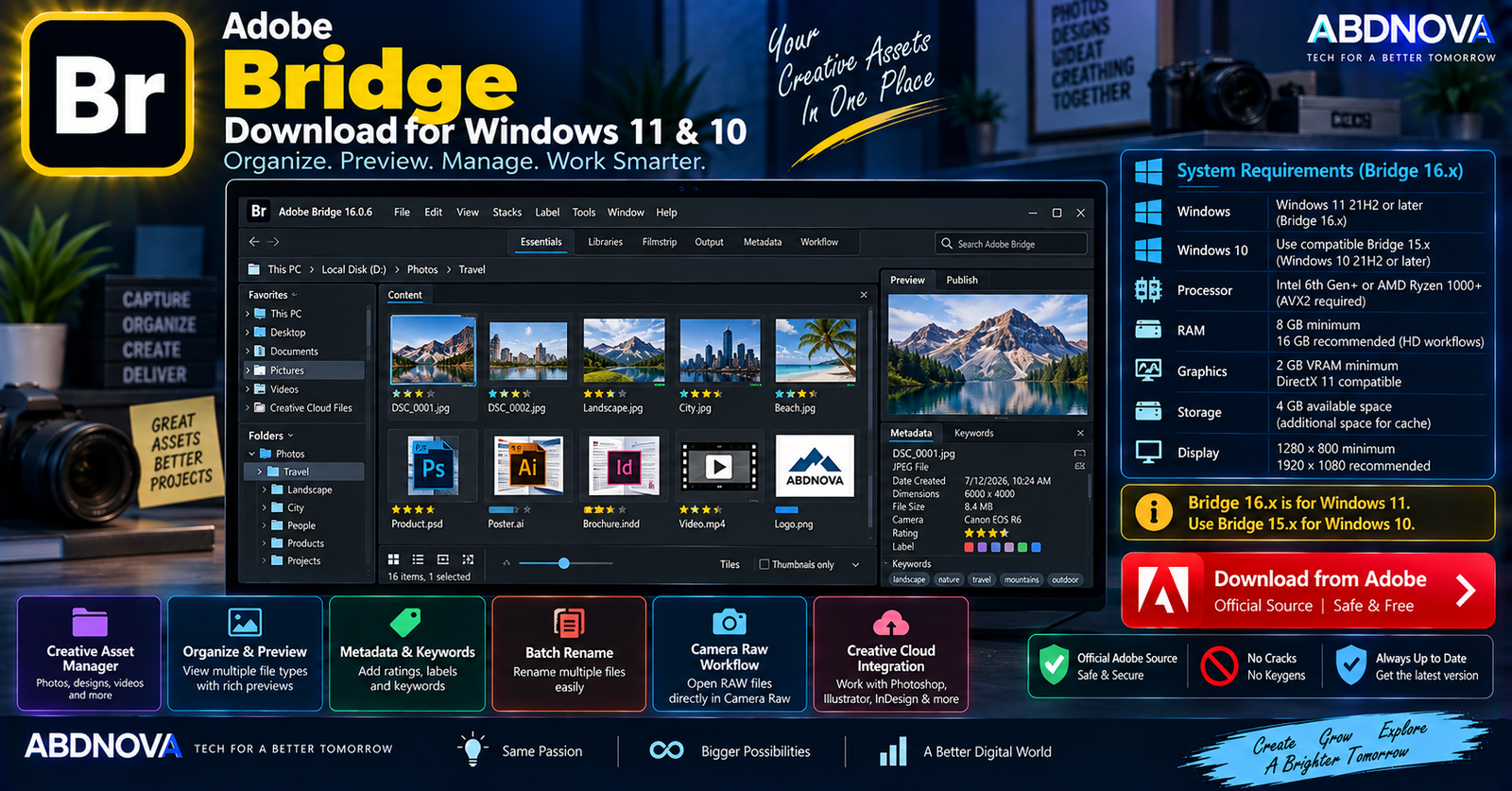

Adobe Bridge Download for Windows 11 & 10
Adobe Bridge Download for Windows gives photographers, designers, video editors, and other creative professionals a free Adobe tool for browsing, previewing, organizing, searching, renaming, tagging, and exporting creative assets.
Unlike catalog-centered photo managers, Bridge can browse your existing folders directly. You can preview creative files, edit metadata, assign ratings and labels, create collections, batch rename files, open RAW images in Adobe Camera Raw, and send assets to other Adobe applications.
Adobe Bridge for Windows at a Glance
| Details | Information |
|---|---|
| Software | Adobe Bridge |
| Developer | Adobe |
| Category | Creative Asset Manager |
| Current Generation | Bridge 16.x |
| Latest Documented Release | Bridge 16.0.6 — July 2026 |
| Current Windows Support | Windows 11 21H2+ |
| Windows 10 | Compatible Bridge 15.x — Windows 10 64-bit 21H2+ |
| Processor | Intel 6th Gen+ / AMD Ryzen 1000+ |
| CPU Requirement | AVX2 required |
| RAM | 8 GB minimum |
| Recommended RAM | 16 GB for HD media and Substance 3D workflows |
| Camera Raw | Integrated workflow |
| Batch Rename / Export | Yes |
| Metadata & Keywords | Yes |
| License | Free |
| Official Source | Adobe |
Adobe Bridge for Windows 11 & 10
Adobe Bridge on Windows 11
Current Bridge 16.x supports Windows 11 version 21H2 or later. It requires a compatible 64-bit Intel or AMD processor with AVX2 support.
Windows 11 users can install the current Bridge release through Adobe Creative Cloud Desktop and use it for:
- Photo and creative-asset organization.
- Direct folder browsing.
- Metadata editing.
- Ratings, labels, and keywords.
- RAW photography workflows.
- Batch renaming and exporting.
- Creative-file previews.
- Adobe application workflows.
Adobe Bridge on Windows 10
Windows 10 is no longer listed as a supported operating system for the current Bridge 16.x generation.
Adobe’s previous Bridge 15.x generation supports Windows 10 64-bit version 21H2 or later. Adobe states that LTSC versions are not supported for Bridge 15.x.
Windows 11 → Current Bridge 16.x
Windows 10 → Compatible Bridge 15.x
Adobe Bridge System Requirements
| Component | Bridge 16.x Requirement |
|---|---|
| Operating System | Windows 11 version 21H2 or later |
| Processor | Intel 6th Generation+ or AMD Ryzen 1000 Series+ |
| Instruction Set | AVX2 support required |
| Recommended Processor | Intel 11th Gen+ with Quick Sync or AMD Ryzen 3000 / Threadripper 2000 Series+ |
| RAM | 8 GB minimum |
| Recommended RAM | 16 GB for HD media and Substance 3D workflows |
More memory can be useful when Bridge is running alongside Photoshop, Illustrator, Premiere, After Effects, or other memory-intensive Creative Cloud applications.
How to Download & Install Adobe Bridge
Adobe provides Bridge as a free download. The safest installation method is through Adobe’s official Bridge page and Creative Cloud Desktop.
- Open Adobe’s official Bridge page.
- Select Download app.
- Install or open Adobe Creative Cloud Desktop.
- Sign in with your Adobe account if required.
- Find Adobe Bridge.
- Select Install.
- Wait for installation to finish.
- Launch Adobe Bridge.
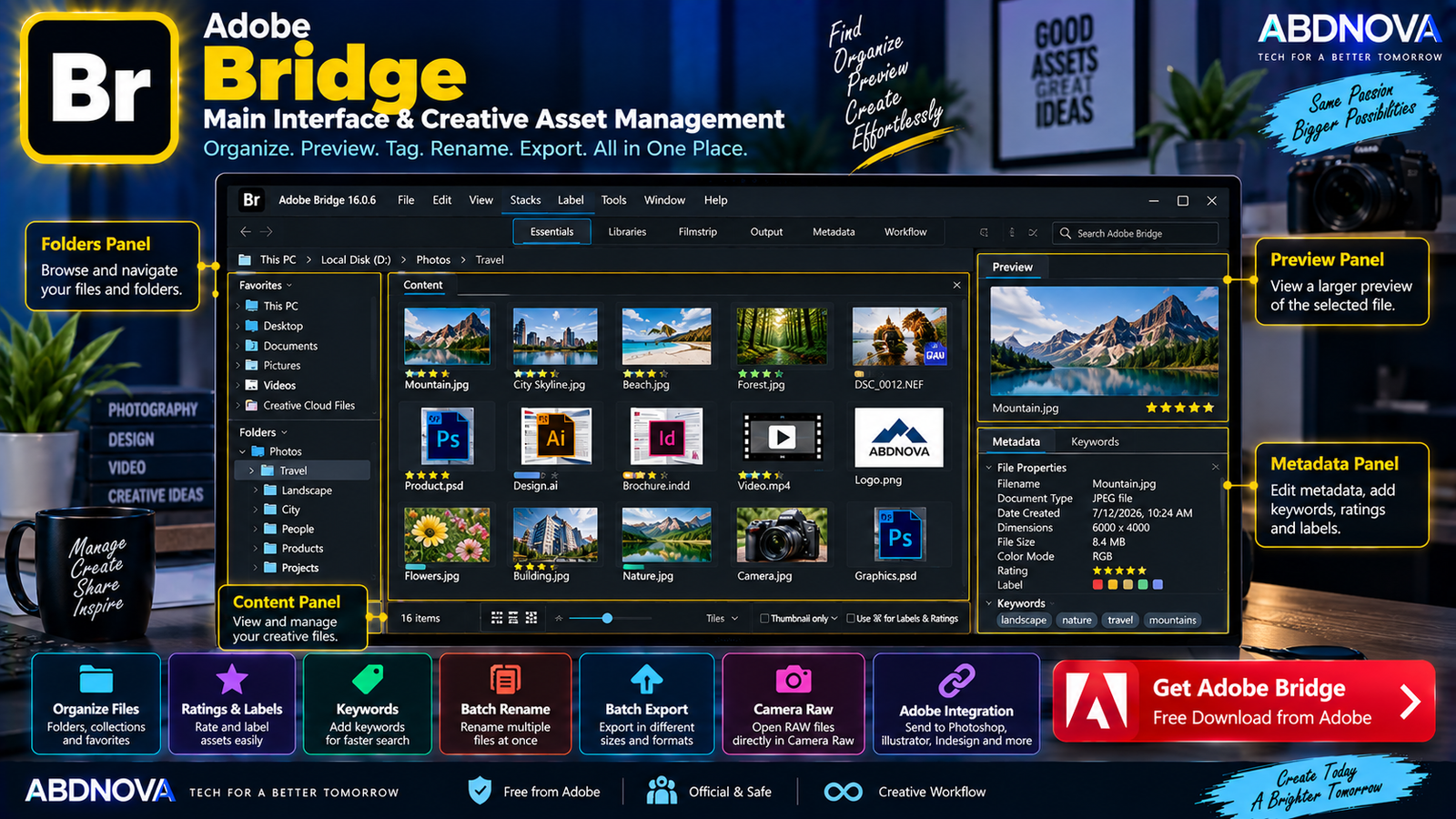
Adobe Bridge Main Interface & Creative Asset Management
Adobe Bridge is built around browsing and organizing creative assets. Its workspace provides panels for navigating folders, viewing files, inspecting larger previews, editing metadata, and managing project assets.
Content Panel
The Content panel displays files from the selected folder. Depending on the file type, Bridge can show thumbnails and rich previews without requiring you to open every asset individually.
Adobe supports previews for creative assets from applications including Photoshop, Illustrator, InDesign, After Effects, and Substance 3D.
Folders & Favorites
The Folders panel lets you navigate existing folders and drives directly. This makes Bridge useful for users who prefer a standard folder-based workflow instead of importing everything into a catalog.
Frequently used locations can be added to Favorites for faster access to folders such as client projects, photography, video assets, downloads, design resources, and finished projects.
Preview Panel
The Preview panel lets you inspect selected files at a larger size. This can save time when comparing similar photographs, illustrations, graphics, or other creative assets.
Metadata, Ratings & Labels
Bridge provides extensive metadata-management tools. Assets can be organized using:
- Star ratings.
- Color labels.
- Keywords.
- Metadata.
For example, a photographer can give the strongest photographs five stars and then filter the folder to display only those images.
Keywords
Keywords make large asset collections easier to search. Images can be tagged with descriptive terms related to subject, client, location, project, website, social media, or other categories.
Filters, Search & Collections
Advanced filters and metadata search help locate assets without manually browsing hundreds or thousands of files.
Collections can group related assets without physically moving every file into the same Windows folder, which is useful when one project contains files stored in several locations.
Batch Rename
Bridge can rename many files together instead of requiring each filename to be changed manually.
This is useful for photoshoots, product images, website assets, event photographs, scanned documents, and project files.
Product-Photo-001.jpg
Product-Photo-002.jpg
Product-Photo-003.jpg
Batch Export
The Export panel can process multiple images with different size and scale options. This is useful for preparing website images, social-media graphics, client previews, smaller JPEG copies, and portfolio images.
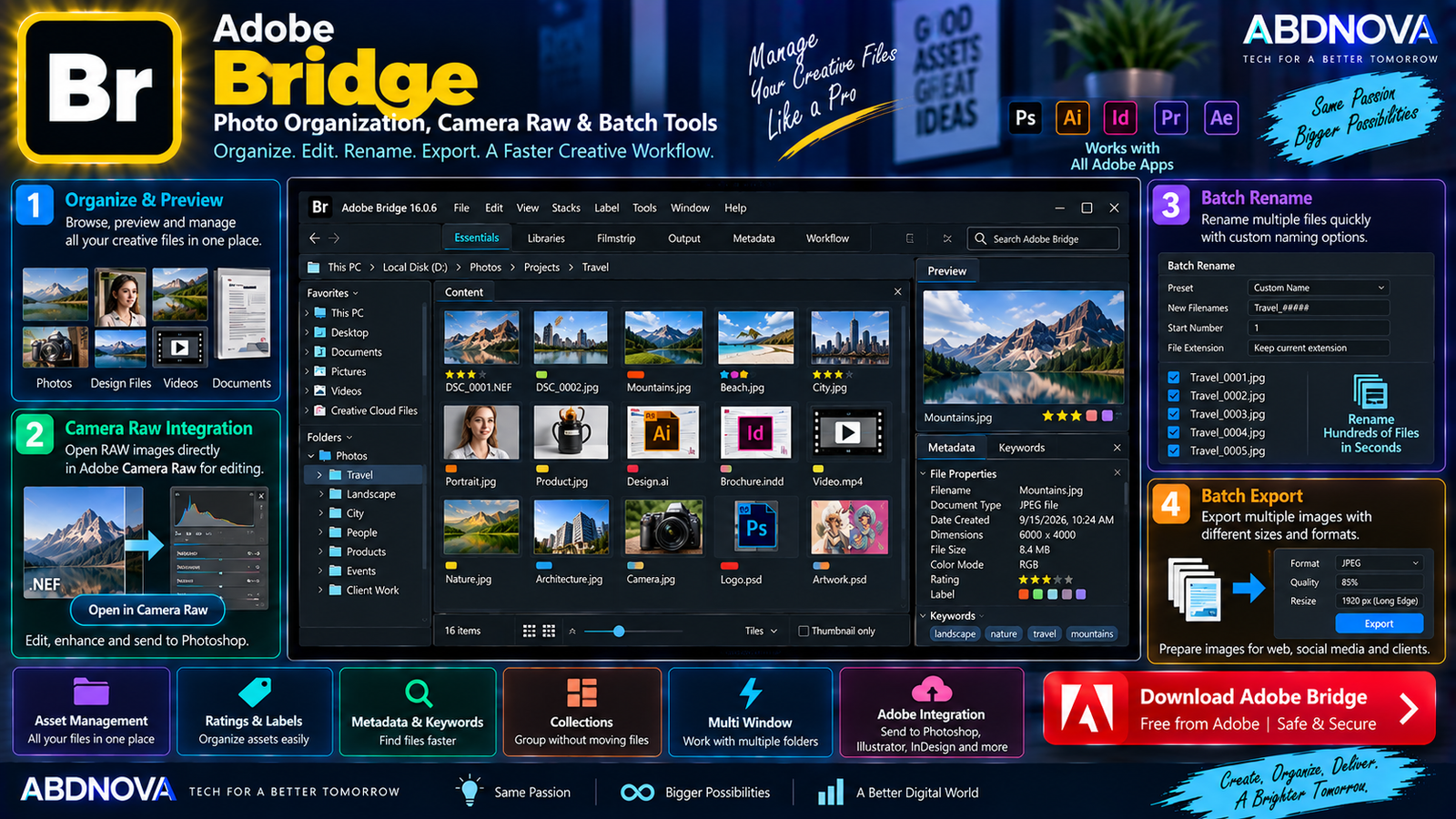
Adobe Bridge Photo Organization, Camera Raw & Batch Tools
Adobe Camera Raw Integration
Bridge works closely with Adobe Camera Raw. Photographers can browse RAW photographs in Bridge and open selected files directly in Camera Raw for image adjustments.
Camera → Bridge → Review & Rate → Camera Raw → Photoshop
This provides a powerful photography workflow without requiring Lightroom Classic’s catalog-centered organization.
Photo Downloader
Adobe Bridge includes Photo Downloader for transferring photographs from cameras and storage devices.
During import, Photo Downloader can also help rename files or convert photographs to DNG, allowing organization to begin as assets are copied to the computer.
Photoshop Integration
Bridge can send photographs directly to Photoshop for detailed image editing. If you also use Photoshop, see our Adobe Photoshop Download for Windows guide for installation, features, and Windows compatibility.
- Bridge: Browse and organize.
- Camera Raw: RAW development.
- Photoshop: Advanced image editing.
Illustrator, InDesign & After Effects Assets
Bridge is not limited to photographs. It can manage and preview creative assets including PSD files, Illustrator artwork, InDesign documents, images, video assets, motion-graphics assets, and supported 3D content.
Multi Window
Multi Window makes it possible to manage several folders simultaneously and work with multiple Content panels. This can make comparing, moving, and organizing assets across folders easier.
Custom Keyboard Shortcuts
The Keyboard Shortcut panel allows frequently used commands to be customized around your preferred asset-management workflow.
Bulk Workflows
Bridge can combine multiple repetitive tasks into broader workflows, helping process groups of files more efficiently when they require similar operations.
Adobe Express Quick Actions
Bridge includes access to Adobe Express Quick Actions for selected common image and video tasks, including operations such as:
- Remove Background.
- Trim Video.
- Convert to SVG.
- Convert to GIF.
HEIC & HEIF Support on Windows
Bridge supports HEIC and HEIF image workflows on Windows, including thumbnails and previews. This is useful when organizing images transferred from smartphones and modern cameras.
Content Credentials
Bridge also supports Content Credentials, which Adobe describes as tamper-evident metadata that can provide information about the creator and creative process.
Creative Cloud Libraries & Adobe Stock
Bridge can work with Creative Cloud Libraries and publish assets to Adobe Stock, making it useful for users working across Adobe’s broader Creative Cloud ecosystem.
Create PDF Contact Sheets
Bridge can create PDF contact sheets containing collections of photographs, illustrations, or InDesign files. Contact sheets can be useful for client reviews, photo selections, asset inventories, portfolios, and project references.
Adobe Bridge vs Lightroom Classic
| Feature | Adobe Bridge | Lightroom Classic |
|---|---|---|
| Main Purpose | Creative asset management | Photo management & editing |
| Catalog Required | No | Yes |
| Direct Folder Browsing | Excellent | Catalog-based workflow |
| RAW Editing | Through Camera Raw | Built-in Develop workflow |
| Metadata | Extensive | Extensive |
| Ratings & Keywords | Yes | Yes |
| Batch Rename | Yes | Yes |
| Photoshop Integration | Yes | Yes |
| Creative File Types | Broad | Primarily photography |
| Price | Free | Paid subscription |
Bridge is designed as a broad creative-file manager, while Lightroom Classic provides a deeper photography-centered catalog and editing workflow.
Adobe Bridge vs Windows File Explorer
Windows File Explorer is sufficient for ordinary file management. Adobe Bridge adds tools designed specifically for creative-production workflows, including:
- Rich creative-file previews.
- Metadata editing.
- Keywords.
- Ratings and color labels.
- Collections.
- Advanced filtering and search.
- Batch rename.
- Batch export.
- Camera Raw integration.
- Adobe application integration.
Bridge is therefore most useful when normal folder browsing is not enough for a large photography, design, or creative-media library.
Is Adobe Bridge Free?
Yes. Adobe currently provides Bridge as a free download.
You do not need to purchase Photoshop simply to download Bridge. However, workflows connected to other Adobe applications or Creative Cloud services can have their own licensing requirements.
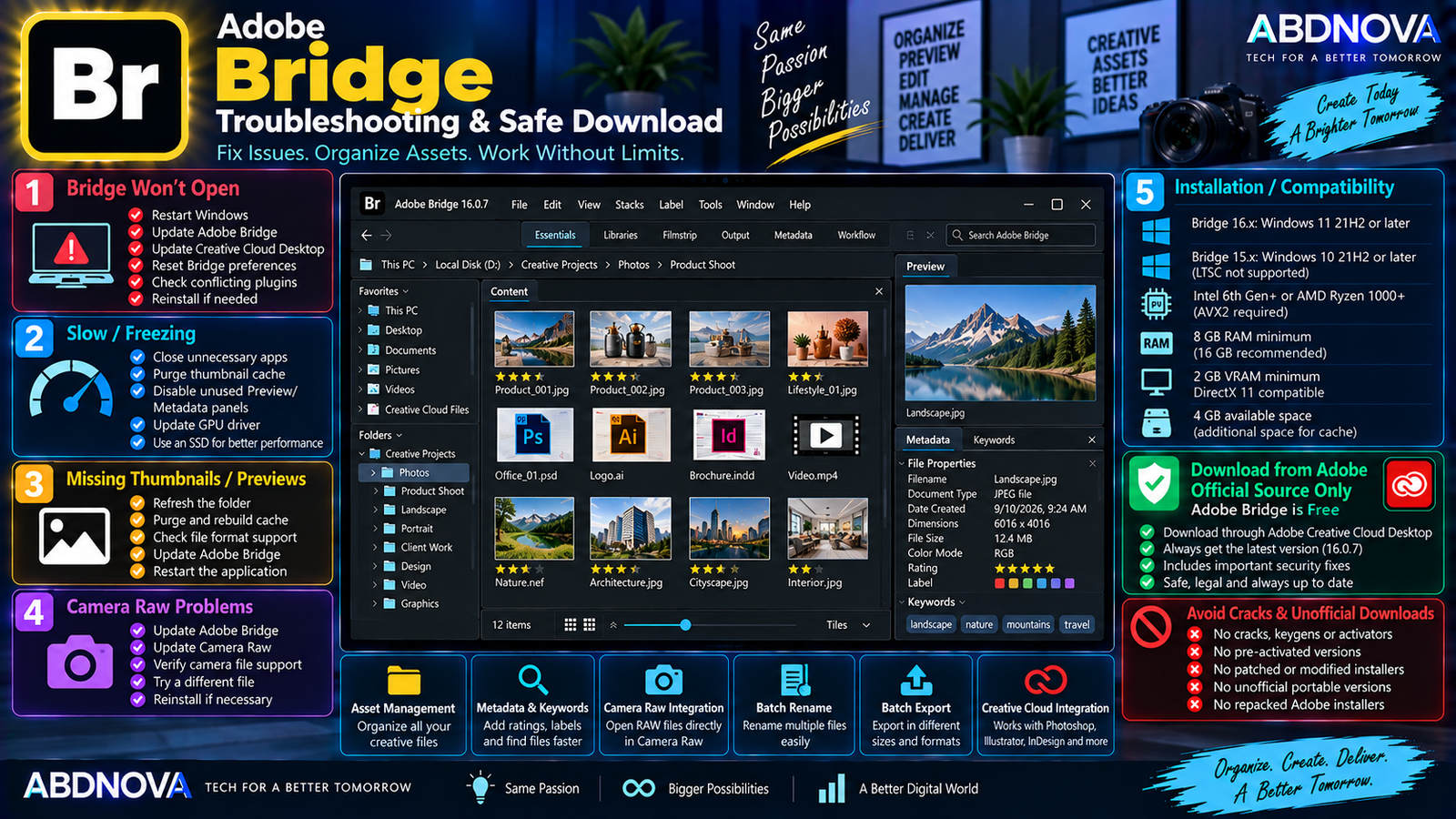
Adobe Bridge Troubleshooting & Safe Download
Adobe Bridge Won’t Open
Try:
- Restarting Windows.
- Updating Bridge.
- Updating Creative Cloud Desktop.
- Updating the graphics driver.
- Resetting Bridge preferences.
- Testing without problematic third-party plugins.
- Reinstalling Bridge if necessary.
Also confirm that the installed Bridge generation supports your Windows version and processor.
Adobe Bridge Is Running Slowly
Bridge may temporarily slow down while processing folders containing many files or generating previews and thumbnails.
Try:
- Closing unnecessary applications.
- Keeping sufficient free storage.
- Using an SSD.
- Allowing thumbnails to finish generating.
- Managing the Bridge cache when appropriate.
- Reducing unnecessary preview generation.
- Updating Bridge.
- Updating the GPU driver.
- Using at least 8 GB RAM.
Thumbnails Are Missing
If thumbnails or previews do not appear correctly:
- Refresh the folder.
- Allow previews to finish generating.
- Check whether the file format is supported.
- Clear or rebuild the relevant cache if necessary.
- Restart Bridge.
- Install available Bridge updates.
Bridge 16.0.6 specifically includes a fix related to HEIC/HEIF thumbnails and previews being lost when special characters were used in filenames.
Camera Raw Won’t Open
If RAW files do not open correctly:
- Update Adobe Bridge.
- Update Adobe Camera Raw.
- Confirm that the camera format is supported.
- Update Photoshop when appropriate.
- Restart the relevant Creative Cloud applications.
Adobe Bridge Installation Fails
Check your Windows version, processor compatibility, AVX2 support, available storage, internet connection, Creative Cloud Desktop installation, and Adobe account.
Remember that current Bridge 16.x requires Windows 11 21H2 or later and a supported AVX2-capable processor.
How to Update Adobe Bridge
Keeping Bridge updated is important for compatibility, bug fixes, and security.
Safe Adobe Bridge Download
Always download Adobe Bridge directly from Adobe or install it through Adobe Creative Cloud Desktop.
- Adobe Bridge cracks.
- Keygens.
- Activators.
- Pre-activated versions.
- Patched Bridge installers.
- Unofficial portable versions.
- Modified Creative Cloud installers.
- Repacked Adobe installers.
There is especially little reason to risk a modified installer because Adobe Bridge itself is available free from Adobe.
Frequently Asked Questions
Is Adobe Bridge free?
Yes. Adobe currently provides Bridge as a free download.
Does Adobe Bridge work on Windows 11?
Yes. Current Bridge 16.x requires Windows 11 version 21H2 or later.
Does Adobe Bridge 16 work on Windows 10?
No. Adobe’s current requirements for Bridge 16.x specify Windows 11 21H2 or later. Compatible Bridge 15.x releases support Windows 10 64-bit version 21H2 or later.
What is the latest Adobe Bridge version?
Adobe’s current release notes list Bridge 16.0.6, released in July 2026, as the latest documented update.
Does Adobe Bridge edit RAW photos?
Bridge can open RAW photographs directly in Adobe Camera Raw, where RAW image adjustments are performed.
Is Adobe Bridge the same as Lightroom?
No. Bridge is a broad creative-asset manager that works directly with folders and many creative file types. Lightroom is more focused on photography, editing, and photo-library workflows.
Can Adobe Bridge batch rename files?
Yes. Batch renaming is one of Bridge’s asset-management tools and can process many files together.
Can Adobe Bridge preview Photoshop and Illustrator files?
Yes. Bridge can preview and manage creative assets including Photoshop and Illustrator files, along with InDesign, After Effects, and Substance 3D assets.
Final Thoughts
Adobe Bridge Download for Windows provides photographers, designers, video editors, and Creative Cloud users with a free workspace for browsing, previewing, organizing, rating, labeling, renaming, searching, and exporting creative assets.
Its direct folder-based workflow, metadata tools, Camera Raw integration, batch processing, rich previews, and connections with other Adobe applications make it significantly more specialized for creative files than a standard Windows file manager.
The main Windows compatibility point is straightforward: current Bridge 16.x requires Windows 11 21H2 or later, while compatible Bridge 15.x releases are the appropriate generation for supported Windows 10 systems.
For the safest installation and future updates, download Bridge directly from Adobe instead of using modified or third-party installers.
Download Adobe Bridge for Windows
Get the official Adobe Bridge application directly from Adobe.