

MusicBee Download for Windows – Music Player & Library Manager
Download MusicBee for Windows 11 and 10 to organize large music libraries, edit tags, manage artwork, create playlists and enjoy high-quality audio playback.
MusicBee Download for Windows gives Windows 11 and Windows 10 users a powerful music player and library manager designed around large local music collections.
MusicBee combines audio playback with library organization, tag editing, auto-tagging, album artwork, playlists, podcasts, web radio, CD ripping, device synchronization and extensive interface customization.
It also offers advanced audio features including WASAPI, ASIO, gapless playback, DSP effects and 10-band or 15-band equalizer options.
MusicBee Download for Windows – Quick Overview
| Information | Details |
|---|---|
| Software | MusicBee |
| Current Stable Version | 3.6.9668 |
| Release Date | June 20, 2026 |
| Type | Music Player & Library Manager |
| License | Free |
| Windows 11 | Supported |
| Windows 10 | Supported |
| Installer Edition | Yes |
| Portable Edition | Yes |
| Windows Store Edition | Yes |
| Library Management | Yes |
| Auto-Tagging | Yes |
| Equalizer | 10-band / 15-band |
| WASAPI | Yes |
| ASIO | Yes |
| Gapless Playback | Yes |
| Podcasts | Yes |
| Web Radio | Yes |
| CD Ripping | Yes |
| Device Sync | Yes |
| Skins & Plugins | Yes |
| Official Source | MusicBee |
What Is MusicBee?
MusicBee is a Windows music player designed to make it easier to manage, find and play music stored on your PC.
MusicBee can help you:
- Play local music.
- Manage large music libraries.
- Edit music tags and metadata.
- Automatically improve incomplete metadata.
- Manage album artwork.
- Create and organize playlists.
- Listen to podcasts.
- Play compatible web radio streams.
- Rip audio CDs.
- Synchronize music with compatible devices.
- Use WASAPI and ASIO audio output.
- Apply equalizer and DSP effects.
- Customize the interface with skins and add-ons.
Unlike general-purpose video players, MusicBee is primarily focused on music collection management and high-quality audio playback.
MusicBee Installer vs Portable vs Windows Store
MusicBee Installer Edition
The regular Installer Edition is the easiest option for most users. It installs MusicBee normally on your Windows system and works like a conventional desktop application.
MusicBee Portable Edition
The Portable Edition can be installed in another folder, partition, external drive or USB storage.
It is useful if you want MusicBee without a conventional system-drive installation.
MusicBee Windows Store Edition
MusicBee also provides a Windows Store edition with automatic updating support.
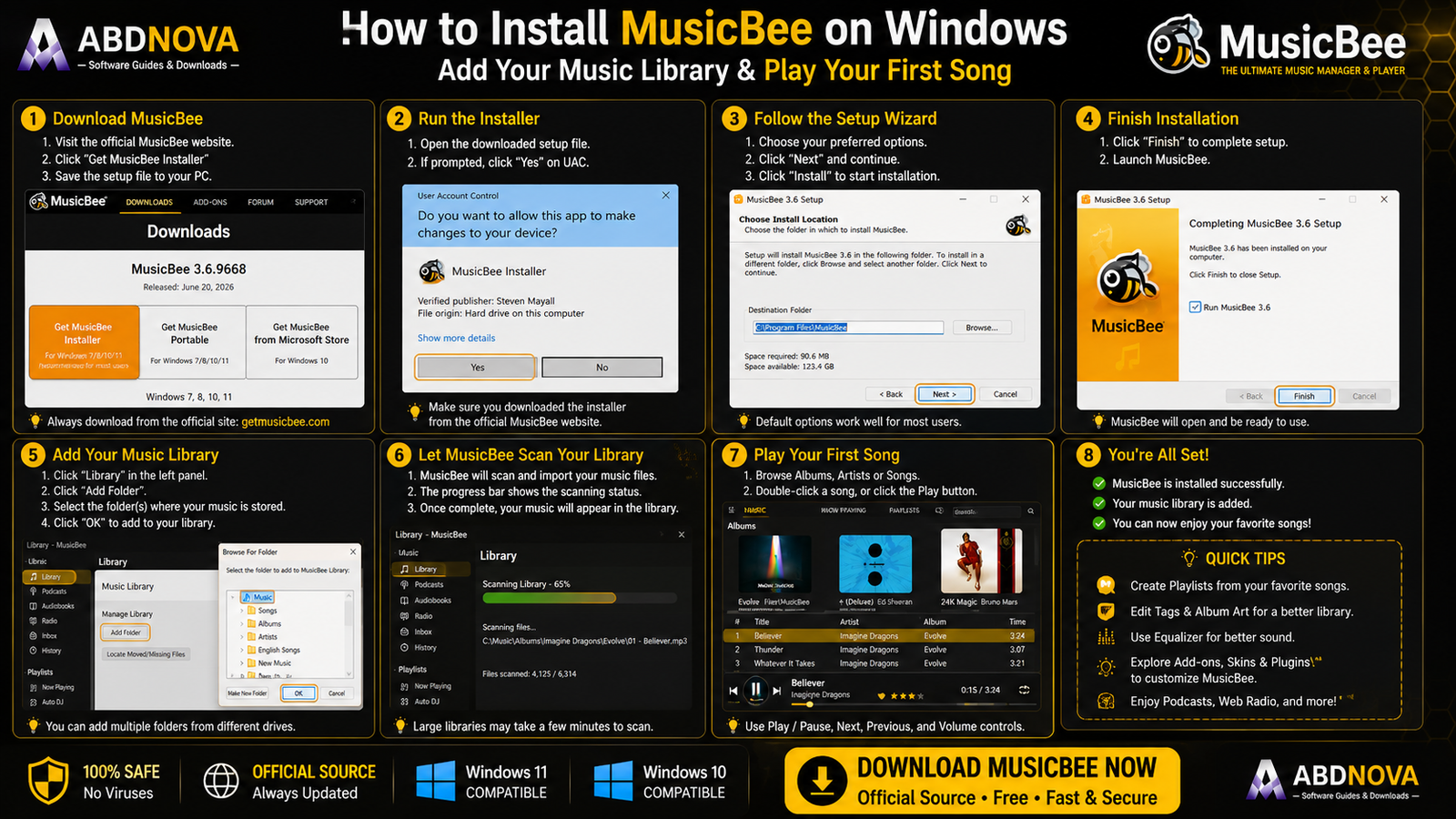
How to Install MusicBee on Windows
- Open the official MusicBee download page.
- Choose MusicBee Installer Edition for a normal installation.
- Download the setup file.
- Open the installer.
- If Windows displays a UAC prompt, verify that the installer came from the official MusicBee site.
- Follow the setup wizard.
- Use the default options unless you have a specific reason to change them.
- Complete installation and launch MusicBee.
- Add the folders containing your music collection.
How to Add Your Music Library
MusicBee becomes much more useful once you add the folders containing your existing music.
Your collection can be stored on the system drive, another partition, an external SSD or HDD, or another accessible storage location.
After scanning the folders, MusicBee can organize tracks using information such as:
- Artist.
- Album.
- Track.
- Genre.
- Year.
- Album artist.
- Composer.
- Rating.
- Artwork.
- Other metadata.
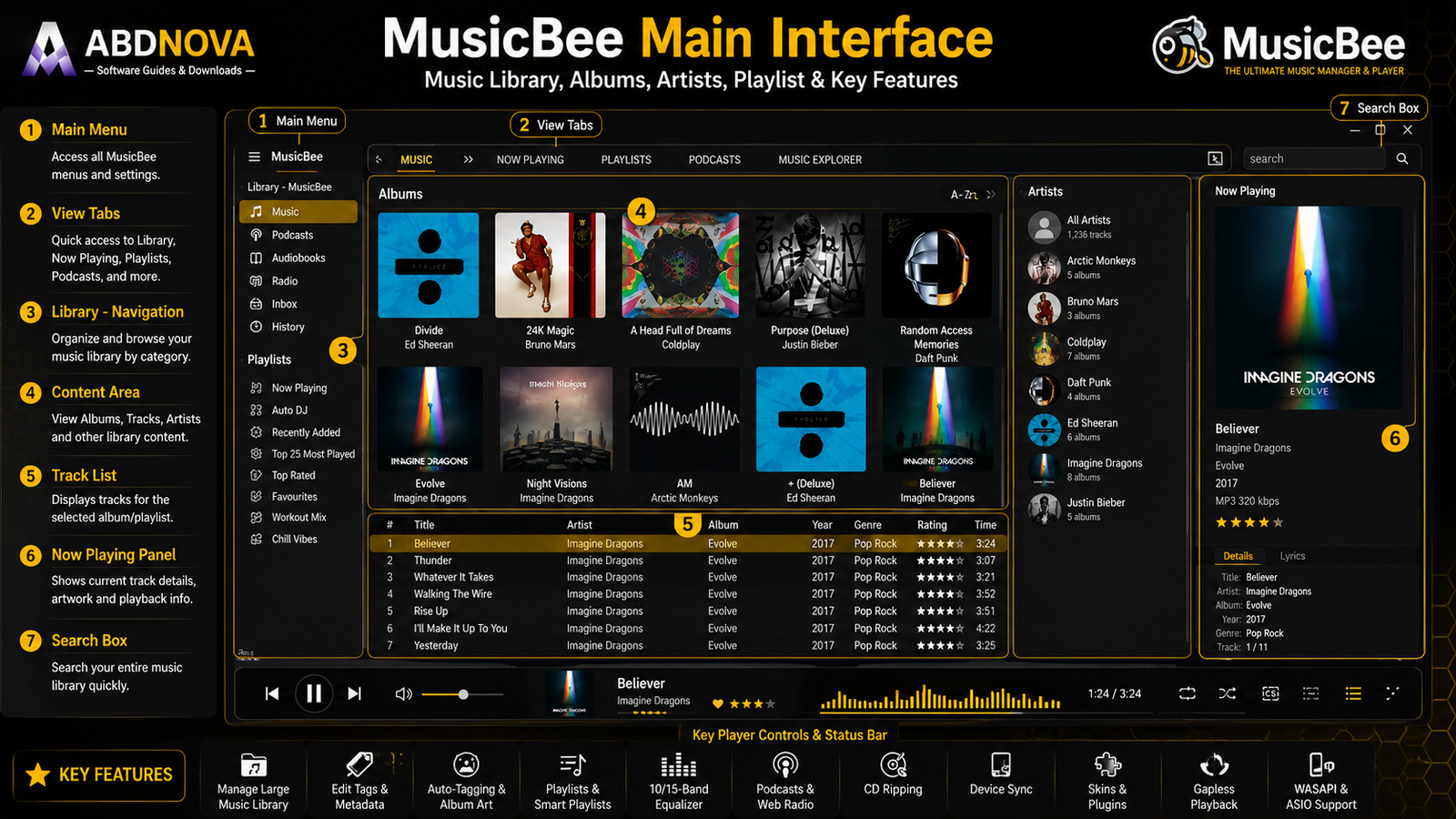
MusicBee Main Interface & Music Library
MusicBee’s interface is designed around your music collection rather than a simple playback window.
Music Library
Browse your collection using artists, albums, genres and other categories.
Track List
View songs from the selected album, playlist or library section.
Now Playing
Displays information about the currently playing track.
Album Artwork
MusicBee can prominently display album covers, helping make large libraries easier to browse visually.
Playlists
Create and manage playlists for different listening situations.
Search
Search large collections without manually navigating through folders.
Player Controls
Common controls include play, pause, previous, next, seek, volume, repeat and shuffle.
MusicBee Library Management, Auto-Tagging & Device Sync
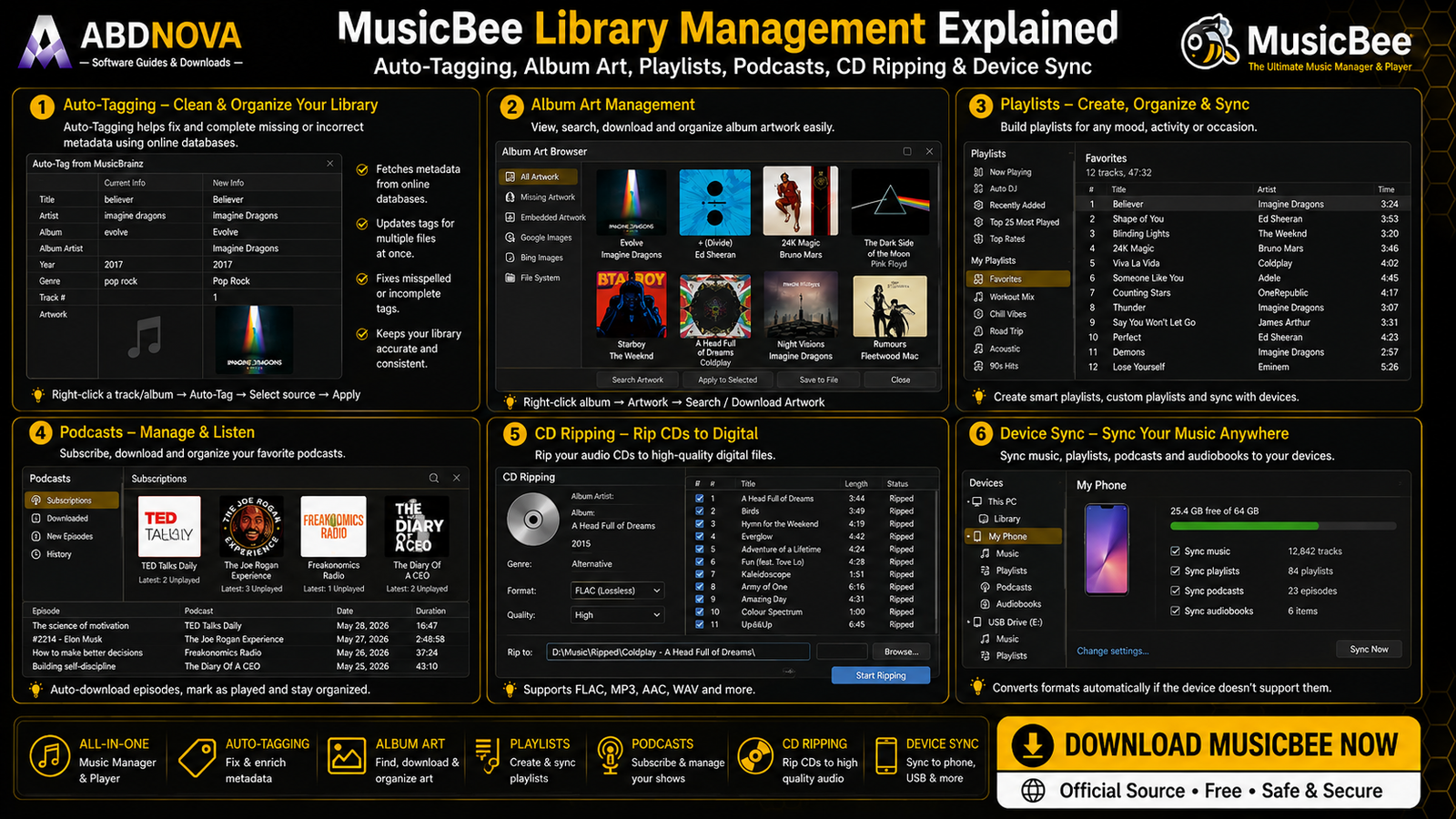
Library management is one of MusicBee’s biggest advantages over simpler audio players.
Instead of treating your collection as unrelated files and folders, MusicBee builds an organized library around metadata.
Music Tag Editing
MusicBee includes extensive tagging tools for metadata such as:
- Title.
- Artist.
- Album.
- Album artist.
- Track number.
- Year.
- Genre.
- Composer.
Auto-Tagging
MusicBee’s auto-tagging tools can help clean up a library containing missing or inconsistent metadata.
Album Artwork
MusicBee can manage album artwork alongside track metadata, making album-based library views easier to navigate.
MusicBee Playlists
You can create playlists for:
- Favorites.
- Workout music.
- Relaxing music.
- Driving.
- Recently added tracks.
- Specific artists.
- Specific genres.
Device Sync
MusicBee can synchronize supported music, playlists, podcasts and audiobooks with compatible devices.
It can also convert formats during synchronization when a target device does not support the original format.
MusicBee Audio Playback – WASAPI, ASIO, Equalizer & Gapless
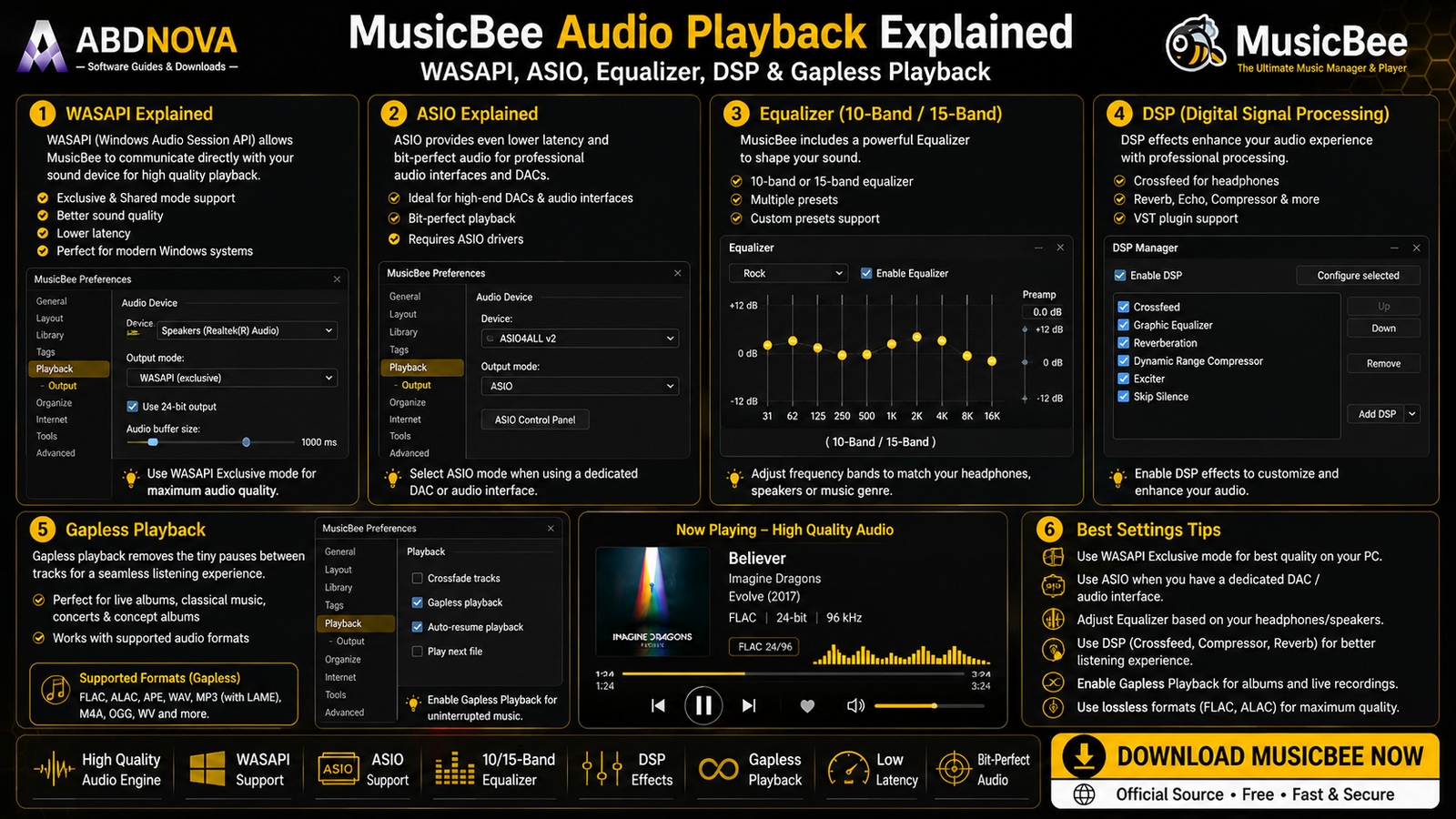
MusicBee is not only a library-management application. It also includes advanced audio-playback options for users who want more control over Windows sound output.
WASAPI Support
MusicBee supports WASAPI, the Windows Audio Session API.
Depending on the selected output mode and hardware setup, WASAPI can provide more direct control over Windows audio playback.
ASIO Support
MusicBee also supports ASIO, which can be useful with compatible DACs, audio interfaces and dedicated ASIO drivers.
Normal laptop or desktop users do not need ASIO simply to enjoy MusicBee.
10-Band & 15-Band Equalizer
MusicBee provides both 10-band and 15-band equalizer options.
You can adjust frequency ranges for different headphones, speakers, music genres and personal listening preferences.
DSP Effects
DSP effects provide additional audio-processing options for users who want to customize playback further.
Gapless Playback
MusicBee supports gapless playback, which is especially useful for albums where one track should transition directly into the next without an unwanted pause.
Examples include:
- Live albums.
- Classical recordings.
- DJ mixes.
- Concept albums.
Podcasts & Web Radio
MusicBee can manage podcasts and play compatible web radio streams, expanding the player beyond local audio files.
CD Ripping
MusicBee includes CD-ripping functionality for users who want to create a digital library from audio CDs they own.
Skins, Plugins & Add-ons
MusicBee supports skins, plugins, visualizers, Theater Mode and other add-ons.
This makes it possible to customize both the appearance and functionality of the player.
MusicBee vs foobar2000 vs AIMP vs Windows Media Player
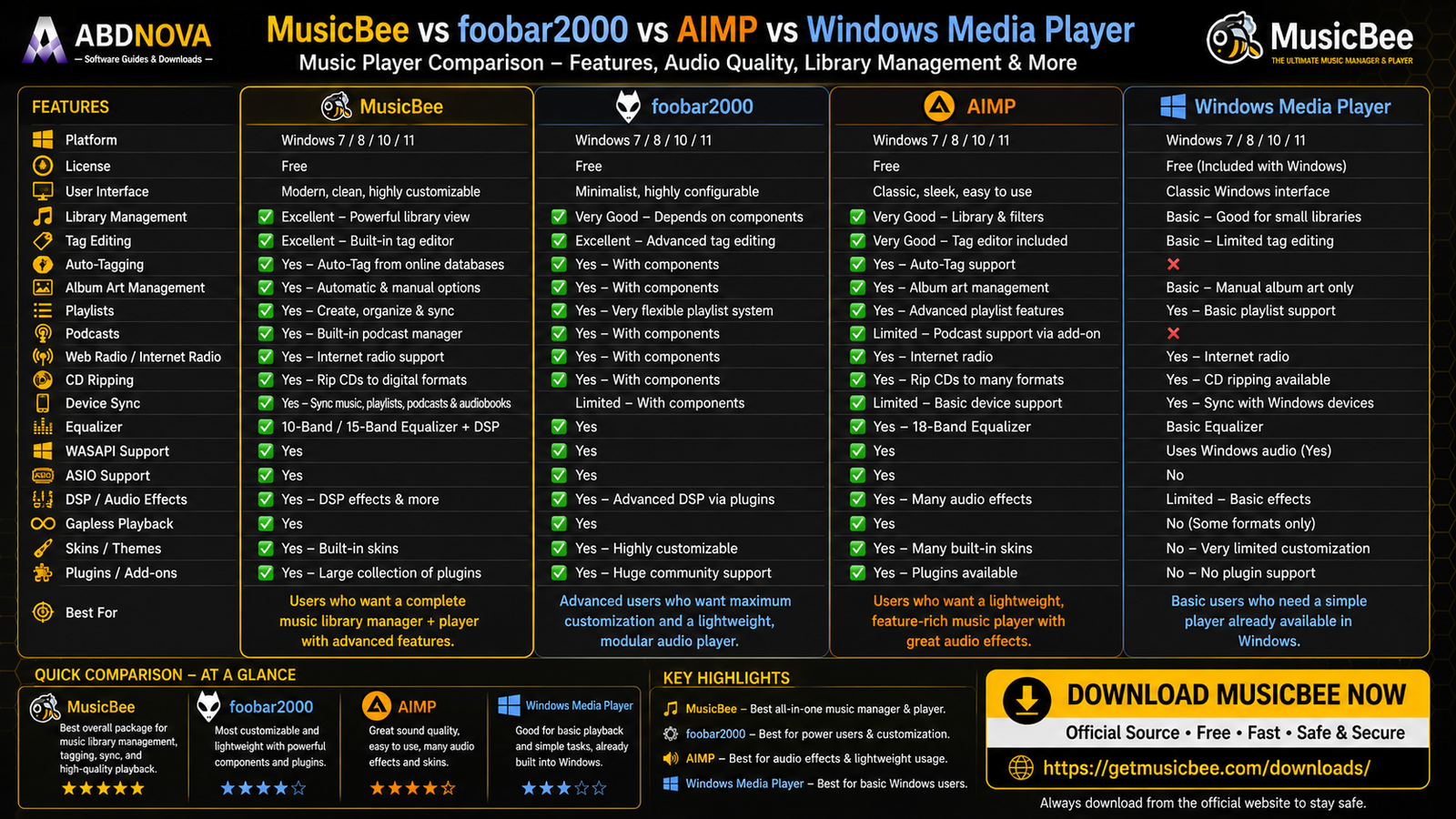
| Feature | MusicBee | foobar2000 | AIMP | Windows Media Player |
|---|---|---|---|---|
| Main Focus | Music library management | Highly configurable audio playback | Dedicated music playback | Basic Windows playback |
| Library Management | Excellent | Strong | Strong | Basic / moderate |
| Tagging | Excellent | Strong | Strong | Basic |
| WASAPI | Yes | Available | Yes | Windows audio |
| ASIO | Yes | Available | Yes | Not main focus |
| Equalizer | 10/15-band | Extensible | 20-band | Basic |
| Podcasts | Yes | Workflow dependent | Yes | Not main focus |
| CD Ripping | Yes | Supported | Different focus | Available |
| Device Sync | Yes | Limited | Limited | Windows-focused |
| Customization | Strong | Excellent | Strong | Limited |
| Best For | Large local music collections | Highly customized playback | Polished music playback | Simple Windows playback |
MusicBee vs foobar2000
Choose MusicBee if your priority is managing a large local music collection with integrated tagging, artwork, playlists and device synchronization.
Choose foobar2000 if you prefer a modular, minimalist and highly configurable audio-player environment. See our foobar2000 Download for Windows guide.
MusicBee vs AIMP
AIMP offers a polished dedicated music-player experience with strong audio controls, equalizer features and customization.
MusicBee puts more emphasis on large-library management, metadata and organization. See our AIMP Download for Windows guide.
MusicBee vs iTunes
MusicBee is primarily designed around advanced local Windows music-library management, while iTunes is more closely tied to Apple’s media ecosystem and traditional Apple library workflows.
If you use Apple media libraries, podcasts, audiobooks or older iTunes workflows, see our iTunes Download for Windows guide.
MusicBee Troubleshooting
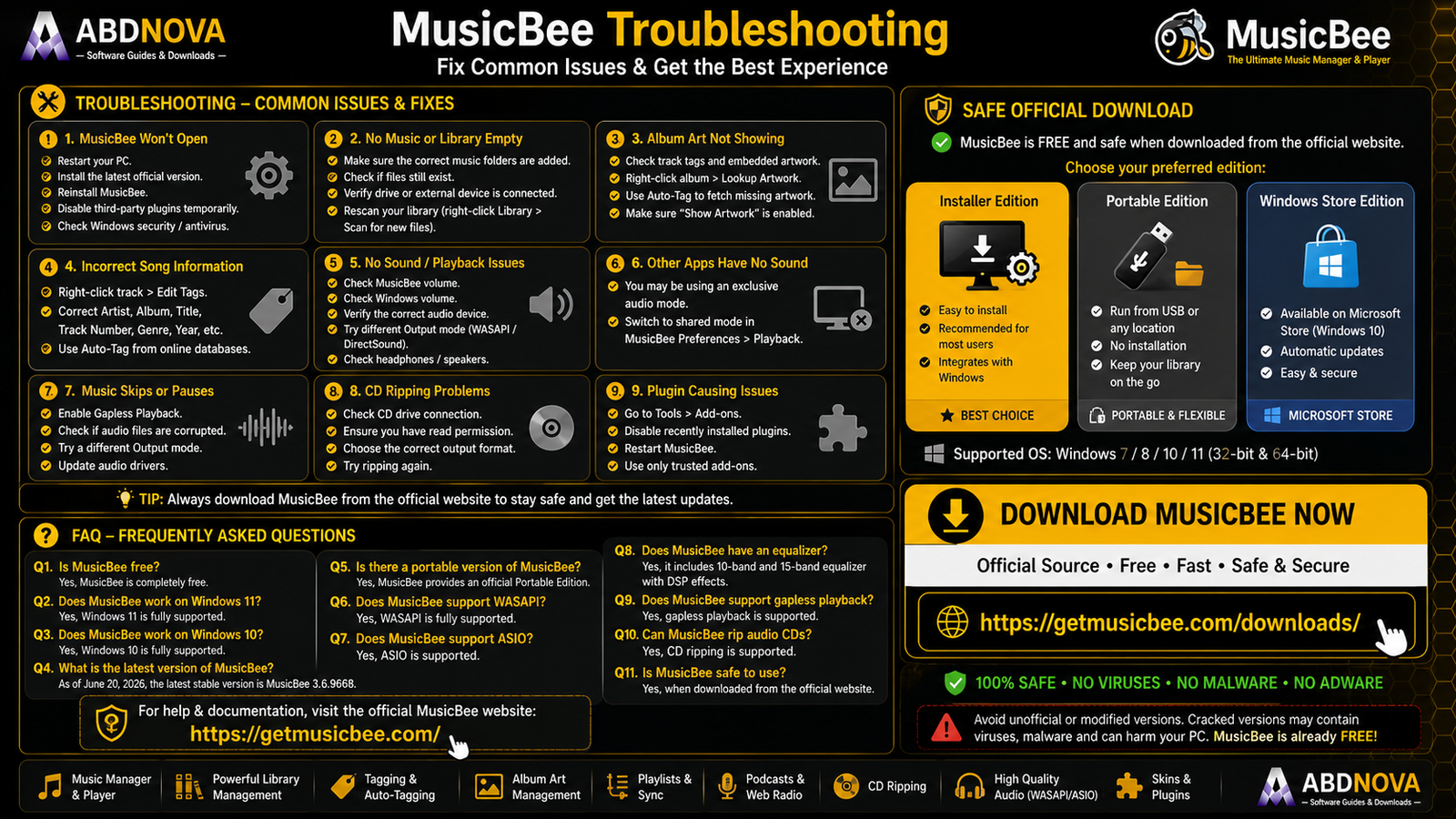
MusicBee Won’t Open
Restart Windows, install the latest official version, reinstall MusicBee, temporarily disable recently added third-party plugins and check Windows security notifications.
Music Files Don’t Appear
Check that the correct music folders have been added to the MusicBee library.
Also confirm that the files still exist, the drive is connected, the folder path has not changed and MusicBee has access to the location. Then rescan the library.
Album Artwork Is Missing
Check the track metadata and artwork settings. You may need to update or manually add the correct album cover.
Music Information Is Incorrect
Use MusicBee’s tagging tools to correct the artist, album, title, track number, genre or year.
No Sound
Check MusicBee volume, Windows volume, the selected output device, headphones or speakers and the configured audio-output mode.
If you recently changed WASAPI or ASIO settings, temporarily return to a simpler default configuration.
Other Apps Have No Sound
If MusicBee is using an exclusive audio mode, it may temporarily take exclusive control of the selected audio device.
A shared output mode can be more convenient when you need sound from several applications at the same time.
Music Skips Between Tracks
For continuous albums, check whether gapless playback is configured appropriately.
A Plugin Causes Problems
Disable the recently added plugin and restart MusicBee. Use trusted MusicBee add-ons rather than unknown third-party downloads.
Safe MusicBee Download for Windows
The safest source for MusicBee Download for Windows is the official MusicBee website.
Use the official MusicBee download page to choose the Installer, Portable or Windows Store edition.
- MusicBee Crack.
- MusicBee Pro Crack.
- MusicBee Premium.
- MusicBee Activated.
- MusicBee Mod.
- Modified MusicBee.
- Unofficial portable repacks.
MusicBee is already free, so there is no legitimate reason to use cracked or modified copies.
Frequently Asked Questions
Does MusicBee work on Windows 11?
Yes. Windows 11 is officially supported by the current MusicBee download.
Does MusicBee work on Windows 10?
Yes. Windows 10 is officially supported.
Is MusicBee free?
Yes. MusicBee is free to download and use.
What is the current MusicBee version?
The current stable MusicBee download is version 3.6.9668, released June 20, 2026.
Is there a portable MusicBee version?
Yes. MusicBee officially provides a Portable Edition for users who prefer another partition, external storage or USB-based setup.
Does MusicBee support WASAPI?
Yes. MusicBee supports WASAPI audio output.
Does MusicBee support ASIO?
Yes. ASIO is supported for compatible audio hardware and drivers.
Does MusicBee have an equalizer?
Yes. MusicBee includes 10-band and 15-band equalizer options along with DSP effects.
Does MusicBee support gapless playback?
Yes. MusicBee supports gapless playback for albums and recordings designed to transition continuously between tracks.
Can MusicBee edit music tags?
Yes. Tagging and auto-tagging are major MusicBee library-management features.
Can MusicBee manage podcasts?
Yes. MusicBee includes podcast support.
Does MusicBee support web radio?
Yes. MusicBee can play compatible web radio streams.
Can MusicBee rip audio CDs?
Yes. MusicBee includes CD-ripping functionality.
Can I customize MusicBee?
Yes. MusicBee supports skins, plugins, visualizers, Theater Mode and other add-ons.
Is MusicBee safe?
Yes, when downloaded from the official MusicBee website.
Final Thoughts
MusicBee Download for Windows is an excellent choice for Windows 11 and Windows 10 users who keep a substantial local music collection and want more than a basic audio player.
Its combination of library management, tagging, auto-tagging, album artwork, playlists, podcasts, web radio, CD ripping, device synchronization, WASAPI, ASIO, equalizer controls, DSP effects, gapless playback, skins and plugins makes MusicBee particularly useful for organizing and enjoying a Windows music library.
For most users, the regular Installer Edition is the easiest choice. Users who need a USB, external-drive or portable setup can choose the official Portable Edition instead.
Ready to download MusicBee?
Get the latest stable Installer, Portable or Windows Store edition directly from the official MusicBee website. ABDNOVA recommends official sources only.


